5
67
Create RAID array
Here we create RAID 0 as an example:
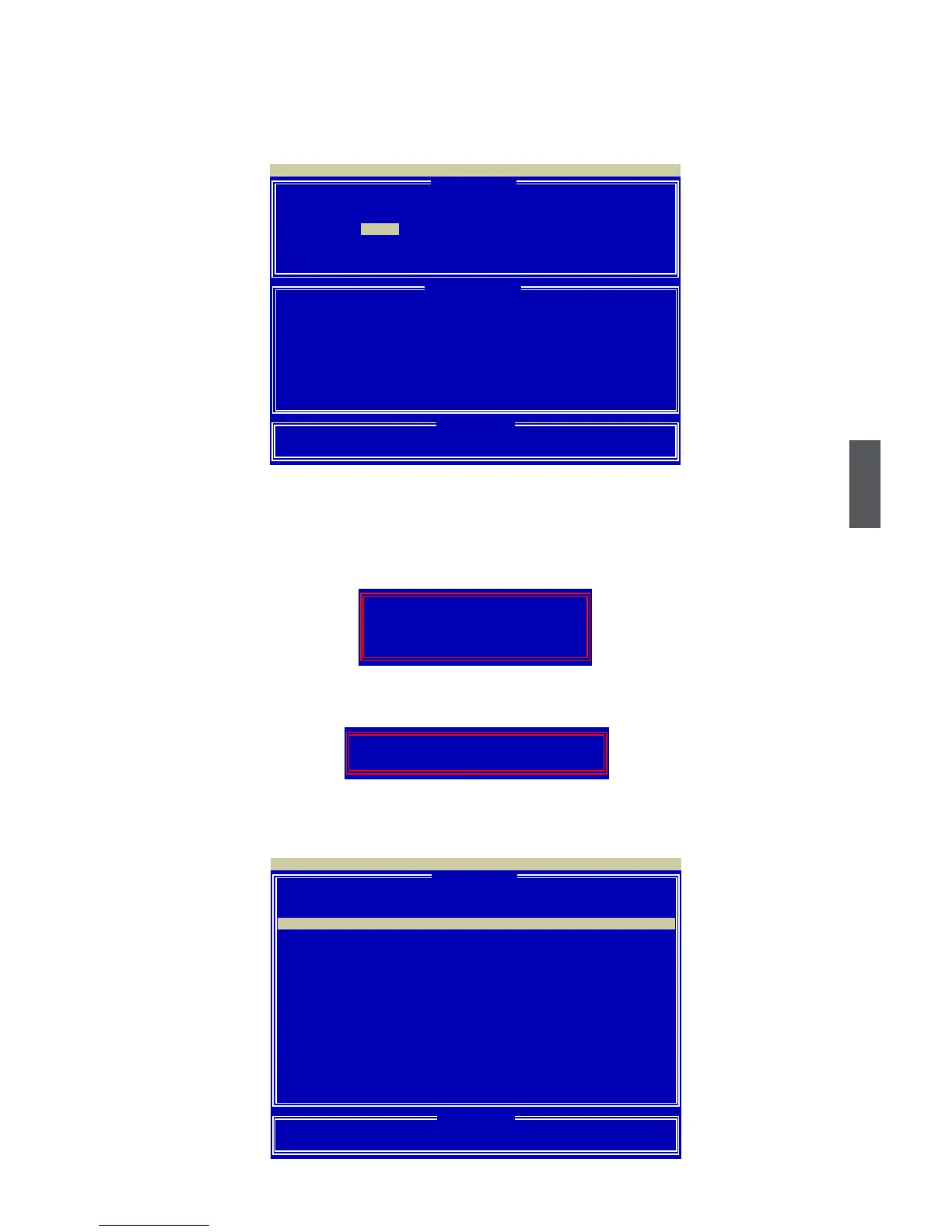
1. Press [2] in the main menu, "Dene LD Menu" appears and the "LD 1" row is highlight, press
[Enter], the scree is shown as below:
2. Press [Space] to select RAID 0.
3. Use [↓] key to highlight the hard disks, change any two of the drives’ "Assignment" status to "Y"
by pressing [Space] or [Y].
4. Press [Ctrl-Y] to save the setting, a message prompts:
5. Press [Ctrl-Y] to clear the RAID array or press any other key to continue, another prompt ap-
pears:
6. Press [Ctrl-Y] to key in the capacity of the RAID array or press any other key to set the array to
its maximum. Then you will see the created array:
[ Dene LD Menu ]
LD No RAID Mode Total Drv
LD 1 RAID 0 2
Stripe Block: 64 KB Fast Init: ON
Gigabyte Boundary: ON Cache Mode: WriteThru
Channel :ID Drive Model Compatibilities Capacity(GB) Assignment
1 :Mas XXXXXXXXXXX SATA XG XX.XX Y
2 :Mas XXXXXXXXXXX SATA XG XX.XX Y
3 :Mas XXXXXXXXXXX SATA XG XX.XX N
4 :Mas XXXXXXXXXXX SATA XG XX.XX N
[↑] Up [↓] Down [ESC] Exit [Space] Change [Crtl-Y] SAVE [PgUp/Dn] Page Change
Option ROM Utility (c) 2008 Advanced Micro Devices, Inc.
[ Keys Available ]
[ Dene LD Menu ]
[ Drives Assignment ]
RAID 0
Fast Initialization Option has been selected
It will erase the MBR data of the disks,
<Press Ctrl-Y Key if you are sure to erase it>
<Press any other key to ignore this option>
Press Ctrl-Y to Modify Array Capacity or press any
other key to use maximum capacity...
[ Dene LD Menu ]
LD No RAID Mode Total Drv Capacity(GB) Status
LD 1 RAID 0
2 163.99 Functional
LD 2 −−−− −−−− −−−−−−−− −−−−
LD 3 −−−− −−−− −−−−−−−− −−−−
LD 4 −−−− −−−− −−−−−−−− −−−−
LD 5 −−−− −−−− −−−−−−−− −−−−
LD 6 −−−− −−−− −−−−−−−− −−−−
LD 7 −−−− −−−− −−−−−−−− −−−−
LD 8 −−−− −−−− −−−−−−−− −−−−
LD 9 −−−− −−−− −−−−−−−− −−−−
LD10 −−−− −−−− −−−−−−−− −−−−
[↑] Up [↓] Down [ESC] Exit [Enter] Select
Option ROM Utility (c) 2008 Advanced Micro Devices, Inc.
[ Keys Available ]
LD 1 RAID 0 2 XX.XX Functional
[ Dene LD Menu ]


 To Next Page
 Loading...