4
1 2 1 2 3 4
RESET POWER
POWER
OPTICAL
ALARM
UNI–D1
UNI–D2
UNI–D 3
UNI–D 4
UNI–V
1
/2
UPDATE
UNI–D1UNI–V 1 UNI –V 2 UNI–D2 UNI–D3 UNI–D4
nbn™ Fibre
Connection Box
Gigabit
WAN
Power
DC
10/100
USB
DSL
Phone 1
Phone 2
4
How everything plugs together
1
Connect your WiFi Modem to the
nbn™ Connection Box
A
2
Plug in the Power Pack Cable
and press the power button
B
3
Connect via Ethernet or WiFi
C
4
Connect to WiFi
D
5
Connect your home phone
E
Connection overview
FOX0959_HFC_Guide_Brand_Update_AW3a.indd 4-5
Connection overview
How everything plugs together
1
Connect your WiFi Modem
to the nbn
™
Connection Box
A
2
Plug in the Power Pack Cable
and press the power button
B
3
Connect your iQ Box
and other devices to WiFi
C
4
Connect your home phone
D
2
B
Ethernet Cable
Power Pack Cable
Power Point
Gigabit
WAN
Power
DC
10/100
USB
DSL
Phone 1
Phone 2
6
1
Connect your WiFi Modem
to the nbn™ Connection Box
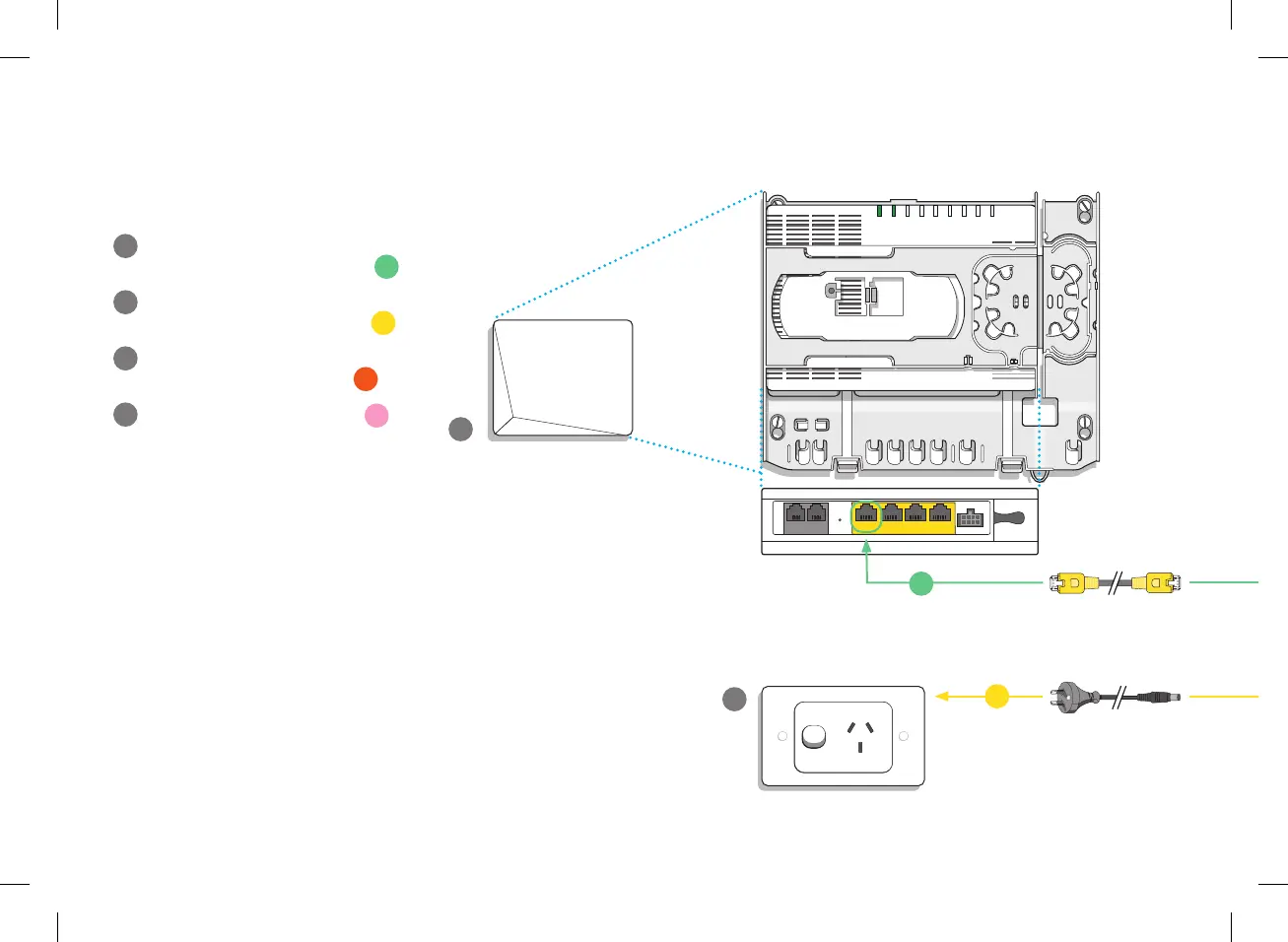
Connect the Red Tipped Ethernet Cable from
the UNI-D1 port on the nbn™ Connection Box
to the WAN port on the modem.
2
Connect the power
Connect one end of the Power Pack Cable to
a nearby power point and the other end to the
DC port located on the back of the modem.
Switch the power point on and then press the
Power Button on the modem.
3
Connect via Ethernet
The modem has four Ethernet ports to connect
to your favourite devices, like your set-top box,
laptop or game console. Just connect the
Yellow Tipped Ethernet Cable from an
Ethernet Port on the modem to the Ethernet
Port on your device. Use the Gigabit Port for
optimum streaming.
How to connect
FOX0959_HFC_Guide_Brand_Update_AW3a.indd 6-7
1
A
Gigabit
WAN
Power
DC
10/100
USB
DSL
Phone 1
Phone 2
Cable Input
Digital Audio Out
Optical HDMI Ethernet
12V DC
5A max
USB
5V DC 500mA
Coaxial
Use this info to connect your WiFi.
Keep it secret. Keep it safe.
2.4GHz WiFi Name (SSID) best for range
5.0GHz WiFi Name (SSID) best for streaming
WiFi password
5
13/06/2017 10:20 AM
Input 1 Input 2
Digita l Audio Out
Optical HDMI
12V DC
5A max
USB
5V DC 500mA
13V/18VDC
350A max
Combined
TV aeri al
CUS0341_FTTC_quick_install_guide_A5_FA.indd 4CUS0341_FTTC_quick_install_guide_A5_FA.indd 4 14/10/20 4:15 pm14/10/20 4:15 pm


 To Next Page