24
ET2707 OBDII/EOBD Code Reader User’s Guide_English
Version_V1.00
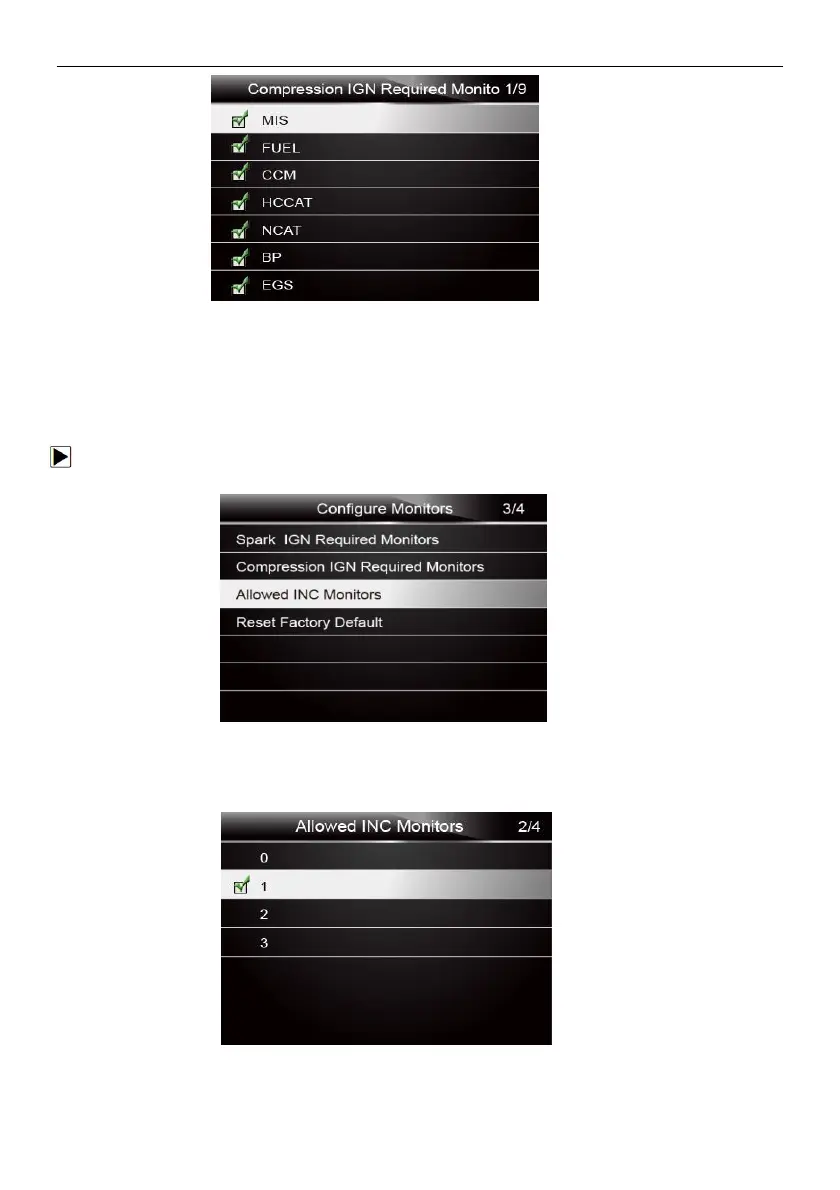
Figure5-9 Sample Spark IGN Required Monitors Selection Screen
5.2.3 Allowed INC Monitors
Emissions tests vary depending on the geographic or regional area in which the vehicle is registered.
ET2707 provides a more flexible way to meet different standards, which allows the user to select 0, 1,
2, 3 INC monitors in test.
To configure allowed INC monitors:
1. Use the UP/DOWN key to highlight Allowed INC Monitors from the menu and press the ENTER
Figure5-10 Sample Configure Monitors Selection Screen
2. The custom INC monitors selection screen displays and scroll with the up and down arrow keys to
select. Press the ENTER key to confirm and BACK key to cancel.
Figure 5-11 Sample Allowed INC Monitors Selection Screen


 To Next Page