WORKING WITH FRANKA RESEARCH 3
120010/1.0/EN Franka Emika GmbH © 136
o Link to Franka World, with indication whether the robot is connected to Franka World (green or
red dot).
o Shut Down Button, to shut down the robot.
o Manuals Button, Clicking on it opens a download page of the Control with the possibility to open
the user manual in all available languages.
Fig. 13.13: Download User Manual
3 Login
Input field for login; after a user logs in, the view of DESK appears.
4 Watchman
Direct access to the Watchman user interface in viewing mode.
5 Download Log
Button for downloading the log files of the Robot.
Desk
Overview
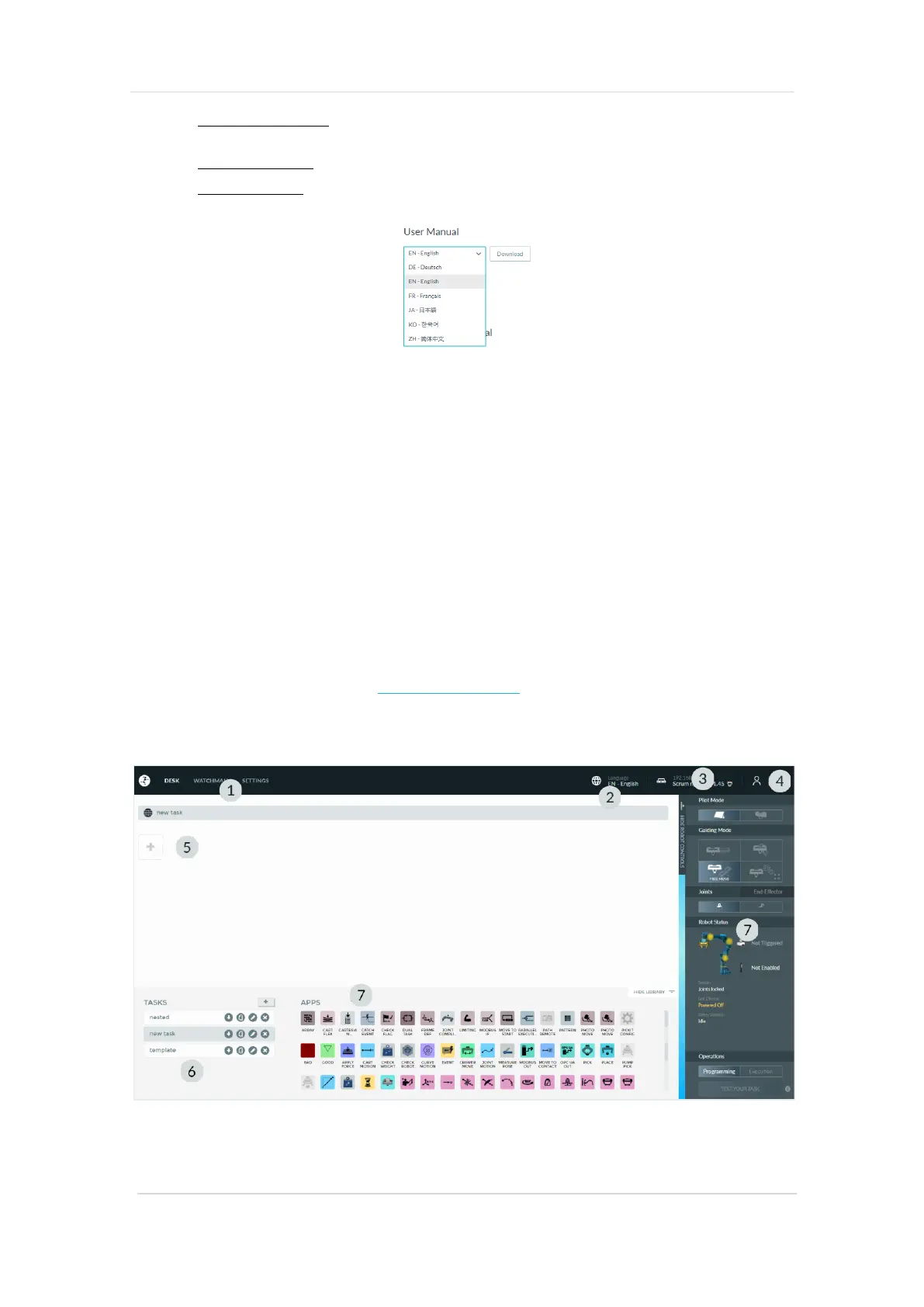
Desk is the user interface in Franka UI for programming, configuring and operating the robot. To open Desk,
enter the following URL in the browser: https://robot.franka.de and log in.
In Desk, you can create Tasks. Tasks are chronological sequences of Apps. Apps, in turn, are the building
blocks of a Task and outline the basic abilities of Franka Research 3, e.g. "Grasp", "Put down" or "Press
button".
Fig. 13.14: Desk



 To Next Page