2
Set Up/Mounting Instructions:
Choose a location to hang the dartboard where there is about 10 feet (3.05m) of open space
in front of the board. The “toe-line” should be 7ft 9 1/4in (2.41m) from the face of the dartboard.
Locate a wall stud and place a mark 76.75in (195cm) from the oor. Insert a screw in the
center of the wall stud at this height and hand the dartboard on this screw
If not mounting into studs, be sure to use drywall anchors or other securing hardware
appropriate to the wall you are using.
If you want to mount the dartboard even more securely to the wall, you can fasten four
screws (not included) through the holes located in the catch ring area (the area outside the
scoring segments). This will secure the board to the wall.
Center of bullseye should be 5ft 8in (1.8m) from the ground.
Plug the A/C adapter into the wall outlet and into the jack at the bottom right of the
dartboard and you’re ready to play. INPUT- AC 120 VOLTS / 60 HZ OUTPUT: DC 9 VOLTS
Unpack your new dartboard carefully, making sure all parts are included. The following
components are included in this set:
t&MFDUSPOJD%BSUCPBSE
t%BSUTVOBTTFNCMFE
t3FQMBDFNFOU5JQT
t1PXFS"EBQUFS
t0XOFST.BOVBM
Unpacking:
Cricket Scoring Display:
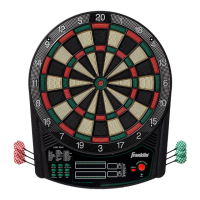
This dartboard utilizes a dedicated cricket scoreboard within the scoring display that keeps
track of each player’s segment status when playing Cricket. When Cricket is selected, individual
characters will be utilized to register marks. There are 3 separate lights within each number (15
through 20 and bulls eye). During play, one of the status lights will turn on (black will appear)
as a segment is hit. If a double or triple of an active number is hit, 2 or 3 lights will turn on
respectively. (Picture for reference only!)


 To Next Page