EasyManua.ls Logo

Franklin PUMPTEC-PLUS - Installation Procedures; Cover Removal; Timer Switch Setting

Franklin PUMPTEC-PLUS
48 pages
Print Icon
To Next Page IconTo Next Page
To Previous Page IconTo Previous Page
Loading...
PUMPTEC-PLUS Pump Protection System
5
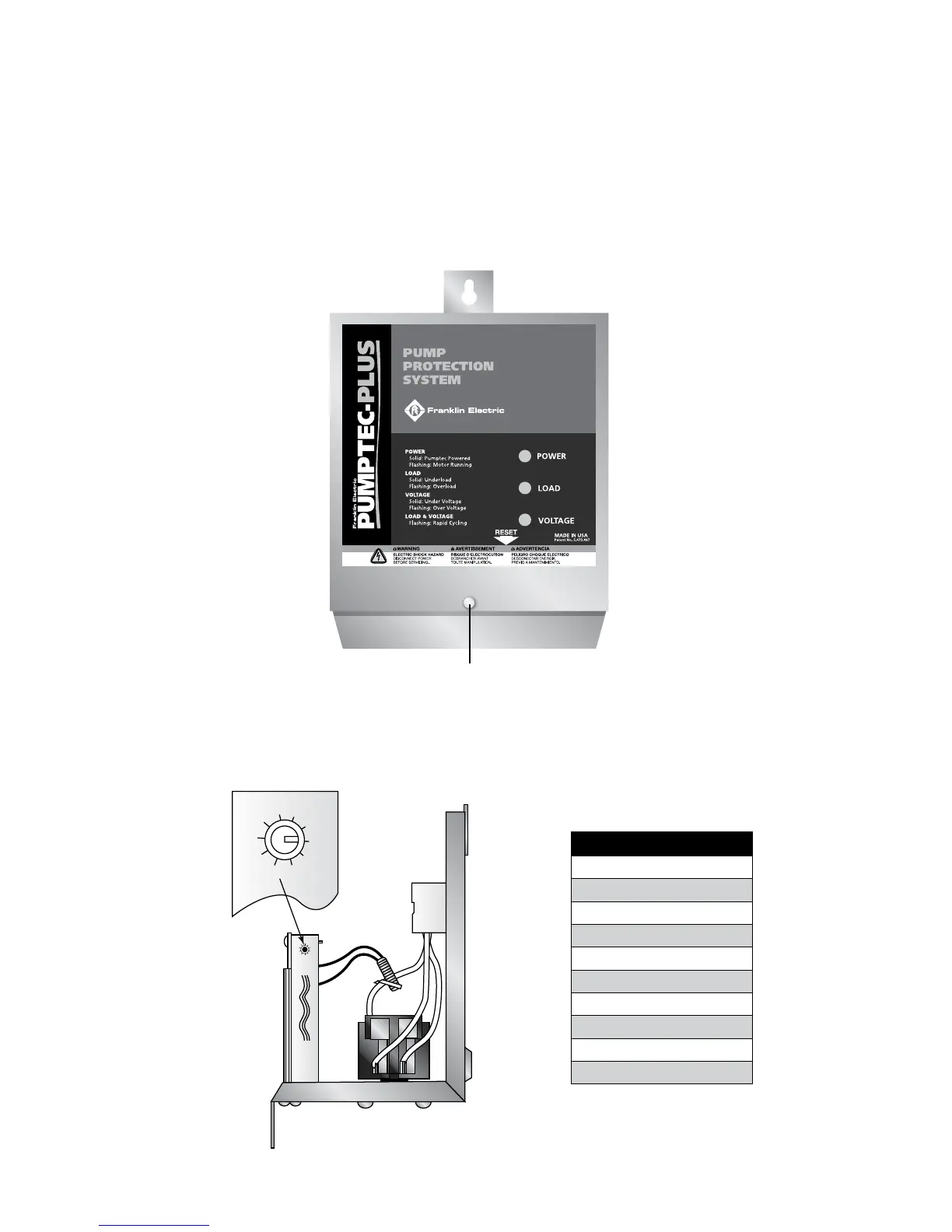
Timer Switch Settings
0) Manual Reset
1) 1 Minute
2) 2 Minutes
3) 4 Minutes
4) 8 Minutes
5) 16 Minutes
6) 32 Minutes
7) 1 Hour 4 Minutes
8) 2 Hours 8 Minutes
9) 4 Hours 16 Minutes
Installation
1. Remove Cover
Remove the Pumptec-Plus cover by removing the cover screw and sliding the cover up. Place
cover in a safe location.
2. Set the Timer Switch
Set the automatic timer switch to the desired reset time. This will determine the time after an
underload trip condition (dry well condition) has occurred until the Pumptec-Plus will try to restart
the motor.
FRONT COVER SCREW
7
8
9
0
1
3
2
4
5
6