INNER INSTALL PROGRAM
Press “PROGRAM” button SPEED window will display P1-P9 to choose the program you like. Setting of
running time, then the TIME window display glittering. Display the advance setting time10:00, press
“SPEED+”, “SPEED-” to set up the exercise time what you need. Press “START” button to start the
inner install program, the inner install program is divided into 10 sect. Each exercise time=the setting
time/10. When the system enter into the next sect, it will make 1 sound “B—“ and the speed will be
changed according to the setting program, then press “SPEED+”, “SPEED-” to change the SPEED,
When the program enter next sect it will come back to the current speed, After finishing one program,
the system will make 6 sound “B—B—“ and display “END” to stop slowly, It will enter into initial
situation after stopped completely in 5 seconds..
PROGRAM EXERCISE CHART
Each program will divide into 10 grade for the exercise time and each time sect has the speed
accordingly.
Program exercise chart for speed range 0.8-12KM/H
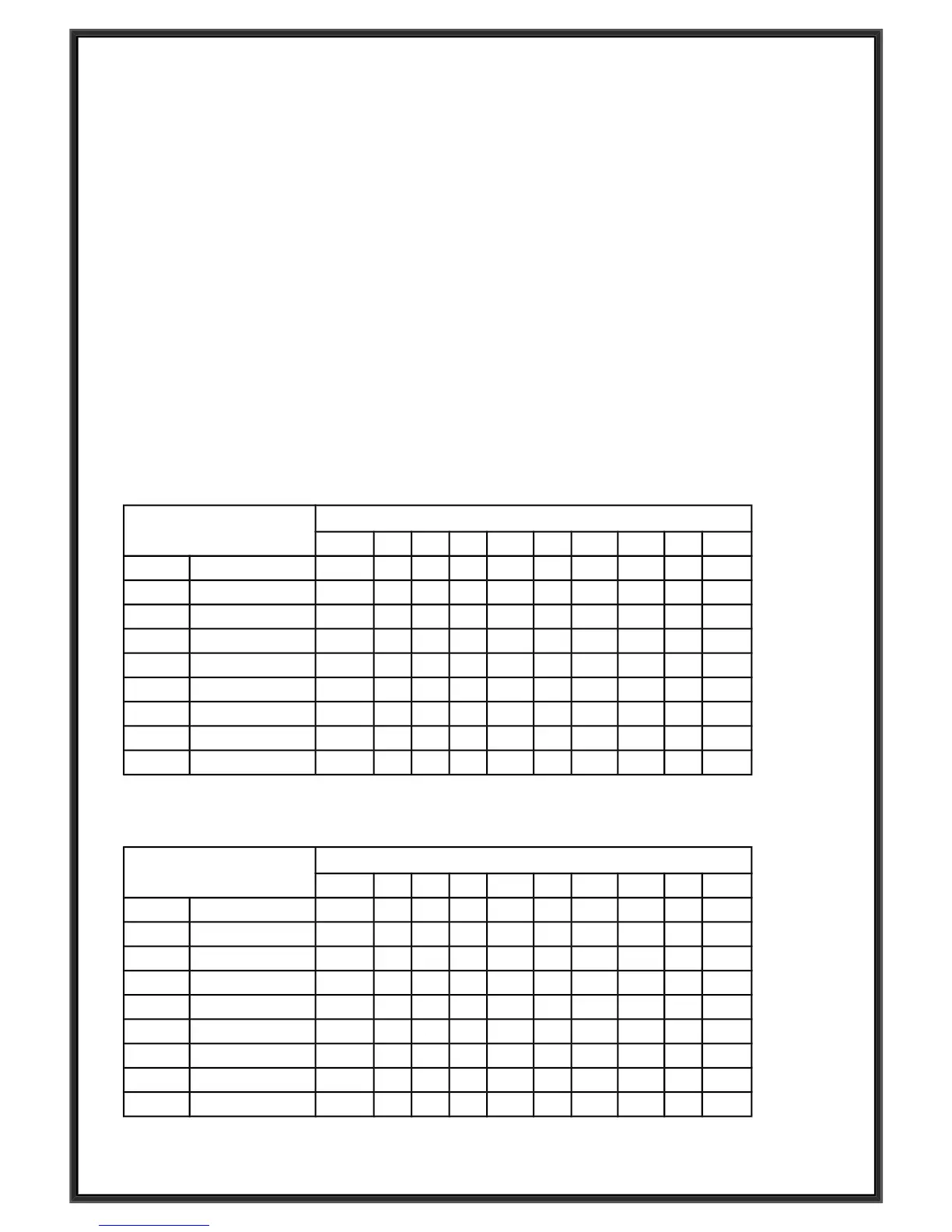
PROGRAM TIME
TIME INTERVAL= setting time/10
1 2 3 4 5 6 7 8 9 10
P1 SPEED 3 3 6 5 5 5 4 4 4 3
P2 SPEED 3 3 4 4 5 5 5 6 6 4
P3 SPEED 3 3 5 6 7 8 6 4 3 3
P4 SPEED 3 6 6 6 8 8 8 3 3 3
P5 SPEED 2 5 6 7 8 8 7 7 3 3
P6 SPEED 2 10 10 8 8 7 6 3 2 2
P7 SPEED 3 4 5 6 7 8 7 6 4 3
P8 SPEED 3 8 6 9 8 8 8 3 10 3
P9 SPEED 2 4 6 8 8 8 7 7 3 3
Program exercise chart for speed range 0.8-6KM/H
PROGRAM TIME
TIME INTERVAL= setting time/10
1 2 3 4 5 6 7 8 9 10
P1 SPEED 3 3 6 5 5 5 4 4 4 3
P2 SPEED 3 3 4 4 5 5 5 6 6 4
P3 SPEED 3 3 5 6 4 5 6 4 3 3
P4 SPEED 3 6 6 6 5 5 4 3 3 3
P5 SPEED 2 5 6 5 6 6 5 4 3 3
P6 SPEED 2 5 5 4 4 3 6 3 2 2
P7 SPEED 3 4 5 6 5 4 5 6 4 3
P8 SPEED 3 5 6 5 4 3 5 3 6 3
P9 SPEED 2 4 6 5 5 4 5 6 3 3


 To Next Page