6
INSTALLING MEMORY
Memory is installed in pairs in the same color sockets, blue rst, then white.
Most systems will already have memory in the blue sockets, and upgrade
memory will be installed in the white sockets.
Touch the metal chassis of the Mini to discharge any static, then open the
plastic package containing a memory module. Avoid touching the gold
edge connector. Line up the notch in the bottom of the memory module
with the key in the socket. The notch is oset to one end. If the notch
does not line up with the key built into the socket, ip the memory module
around end-to-end.
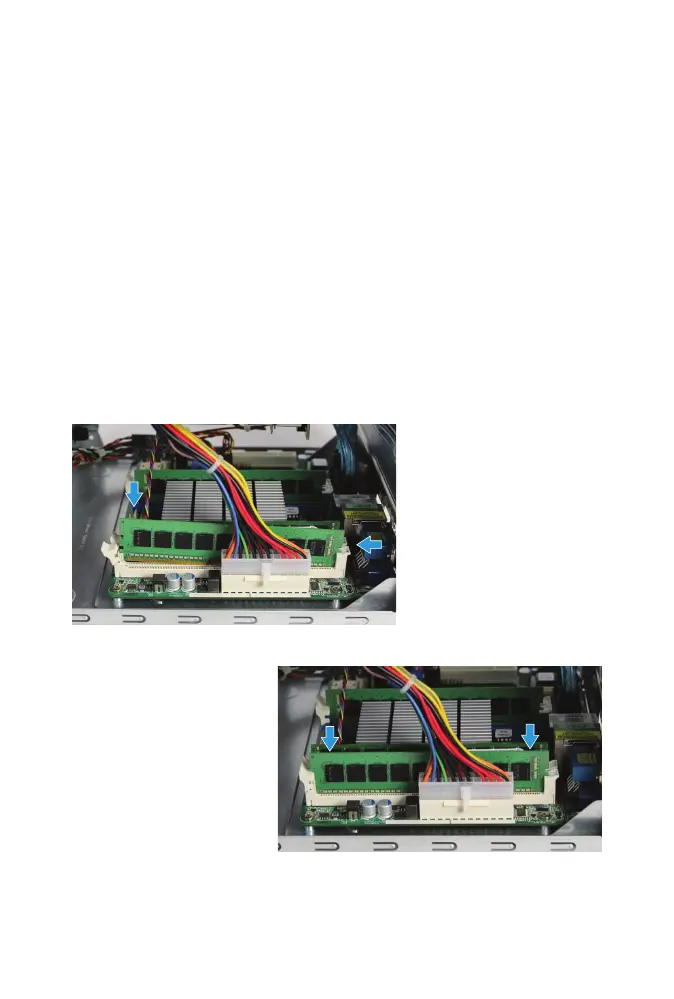
Gently insert the the memory module into the memory slot, putting the
notch on the end of the module under the xed latch.
Gently guide the module
into the slot, pressing
down on both ends of
the module until the
hinged latch swings in,
locking into place.
Repeat for the second
memory module, which
goes in the same color of
slot on the other side of
the chassis.



 To Next Page