7
SOLID STATE DISK (SSD) UPGRADE
The SSD upgrade includes one or two SSD drives and mounting screws.
Each SSD can be mounted in either tray, it makes no dierence to system
operation.
FREENAS MINI SSD MOUNTING
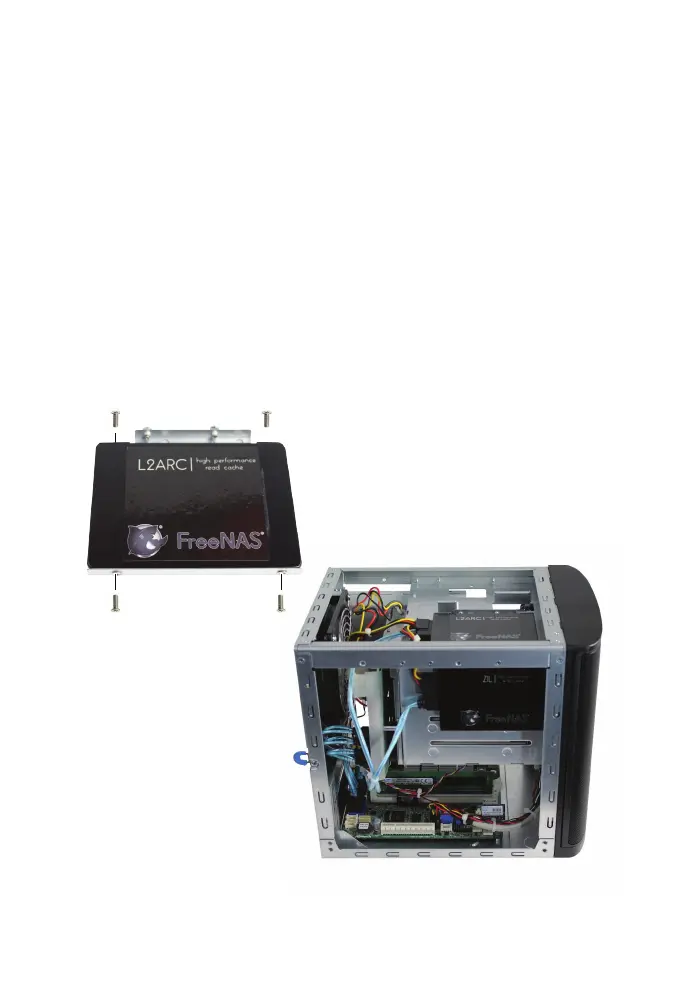
The FreeNAS Mini has two SSD trays, one on the top and one on the side
(see the Parts Location diagram on page 2). Remove the two screws
securing an SSD tray, then slide the tray forward to remove it.
Mount an SSD in the tray with four small screws, one at each corner:
Replace the tray on the
chassis, sliding it back into
place, then attach with the
original screws. Repeat the
process if a second SSD is
being installed.



 To Next Page