05
27
DVDInstallation
02
14
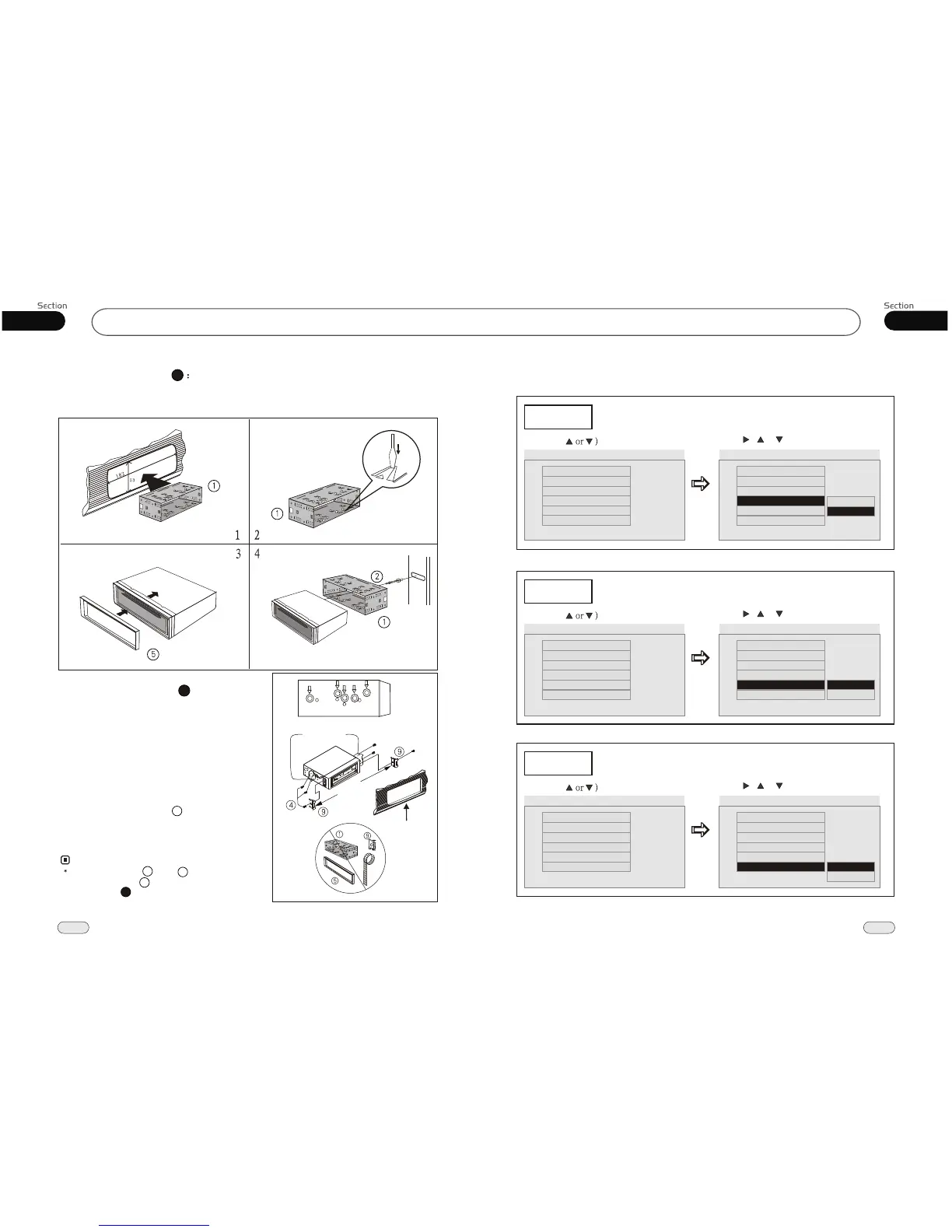
Installation Method DIN Front-Mount
11
Bend these claws
outward for a tight fit,
if necessary.
To support the unit
Fire Wall
Installation Method
2
Installation using the screw holes at
sides of the unit.
the
1. Remove the hooks on both sides.
2. Select a position where the screw holes
of the mounting bracket supplied with
the car and the holes of the main
unit (are fitted), and
screws (see at 2 places
on each side. And then fasten them to
the car.
screw
become aligned
tighten the
4
Outer Trim Frame Hook
Mounting Sleeve are not used
and
for installa-
tion method
5
1
9
2
NOTE:
Bracket supplied
to your car
Bracket supplied
to your car
H
o
o
k
H
o
o
k
Dashboard
or Console
Dashboard
or Console
--General Setup Page--
Captions
Example showing how to set captions on/off:
(Press
(Press , or , then press ENTER)
--General Setup Page--
TV Display
Angle Mark
OSD Lang
Captions
Screen Saver
Wide
On
Eng
Off
On
Go To General Setup Page
--General Setup Page--
TV Display
Angle Mark
OSD Lang
Captions
Wide
On
Eng
Off
Screen Saver On
Closed Captions
Off
On
Logo Type Def
Screen Saver
Example showing how to set Screen Saver on/off:
(Press
(Press , or , then press ENTER)
--General Setup Page--
TV Display
Angle Mark
OSD Lang
Captions
Screen Saver
Wide
On
Eng
Off
On
Go To General Setup Page
--General Setup Page--
TV Display
Angle Mark
OSD Lang
Captions
Screen Saver
Wide
On
Eng
Off
On
Screen Saver
On
Off
Logo Type Def
Logo Type
Example showing how to set Logo Type:
(Press
(Press , or , then press ENTER)
--General Setup Page--
TV Display
Angle Mark
OSD Lang
Captions
Screen Saver
Wide
On
Eng
Off
On
Go To General Setup Page
--General Setup Page--
TV Display
Angle Mark
OSD Lang
Captions
Screen Saver
Wide
On
Eng
Off
On
Logo Type
Default
Captured
Logo Type Def
Logo Type Def
Logo Type Def
Logo Type Def


 To Next Page