02
15
InstallationDVD
26
05
£p £p
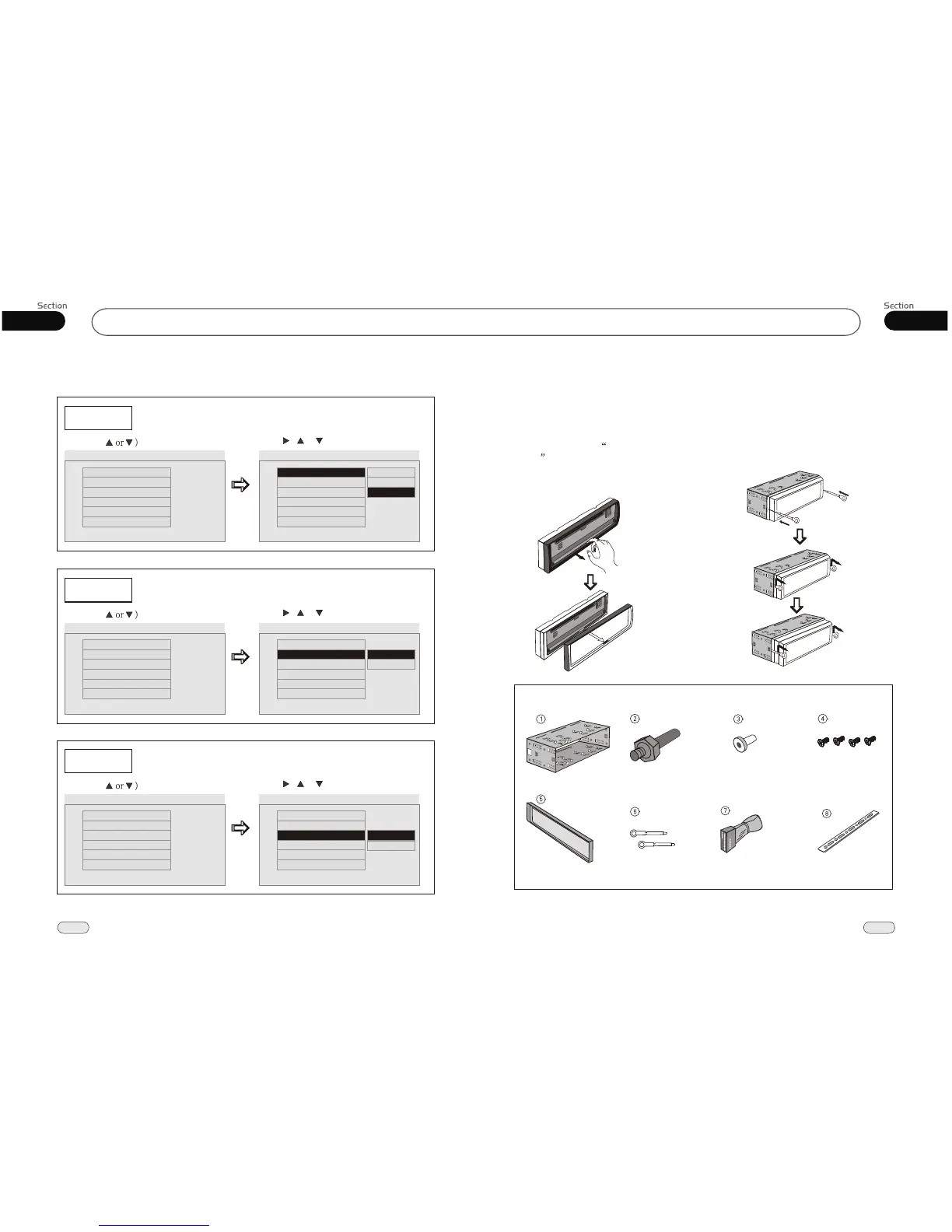
Detach the Unit
1.Take out the Outer Trim Frame after
detaching the front panel.
Detach the front panel before disassembl-
ing the unit. F
efer to the Front
Panel .
or more details regarding
this section, r Detach
2.Insert the keys supplied to the unit at
both sides of the unit (shown as illustrat-
ed) until they click. Pulling the keys
makes it possible to remove the unit from
the dashboard.
Main Parts List
Mounting Sleeve x1 Rear Mounting Bolt x1
4 Screws
M 5 x 5
Harness Rubber x1
Keys x 2
Outer Trim Frame x 1
Connecting Wire x1
Steel Bar x 1
--General Setup Page--
TV Display
Example showing how to set TV Display mode:
(Press
(Press , or , then press ENTER)
--General Setup Page--
TV Display
Angle Mark
OSD Lang
Captions
Screen Saver
Wide
On
Eng
Off
On
Go To General Setup Page
--General Setup Page--
TV Display
Angle Mark
OSD Lang
Captions
Screen Saver
Wide
On
Eng
Off
On
Set TV Display mode
Normal/PS
Normal/LB
Wide
Logo Type Def
Angle Mark
Example showing how to set picture mode:
(Press
(Press , or , then press ENTER)
--General Setup Page--
TV Display
Angle Mark
OSD Lang
Captions
Screen Saver
Wide
On
Eng
Off
On
Go To General Setup Page
--General Setup Page--
TV Display
Angle Mark
OSD Lang
Captions
Screen Saver
Wide
On
Eng
Off
On
Set Angle Mark
On
Off
Logo Type Def
OSD Lang
Example showing how to set language mode:
(Press
(Press , or , then press ENTER)
--General Setup Page--
TV Display
Angle Mark
OSD Lang
Captions
Screen Saver
Wide
On
Eng
Off
On
Go To General Setup Page
--General Setup Page--
TV Display
Angle Mark
OSD Lang
Captions
Screen Saver
Wide
On
Eng
Off
On
Set OSD Language
English
French
Logo Type Def
Logo Type Def
Logo Type Def
Logo Type Def


 To Next Page