01
11
Before You StartDVD
30
05
AM Tuner Section
CD Player Section
522-1620(KHz)
(Europe/Russia)
530-1710 (KHz)
(U.S.A.)
450KHz
28dBuV
VCD Signal System
PAL/NTSC
65dB
60dB(1KHz)
0.1%
General
FM Tuner Section
87.5-108(MHz)
(Europe)
87.5-107.9(MHz)
(U.S.A.)
10.7MHz
10dBuV
60dB
30dB 1KHz
30-15000Hz
Note:
Due to continuous product improvement,
specifications and design are subject to
change without prior notice.
Specifications
Power Requirement
14.4V DC
(11-16V allowable)
Load Impedance
10dB
Bass 100Hz
Treble 10KHz
Tone Controls
Approx.192 x 178 x50
mm
(d/w/h)
Dimensions
Approx.1.75kgWeight
Mounting
Dimensions
Approx.169 X 182X53
mm
(d/w/h)
Tuning Range
IF Range
Usable Sensitivity
(-30dB)
Signal-to-noise Ratio
Stereo Separation
Frequency Response
Frequency Range
IF Range
Usable Sensitivity
(-20dB)
Signal-to-noise Ratio
Separation
Distortion
DVD Player Section
Number of channel
5Hz to 20,000Hz
98dB
73dB
Frequency Response
Dynamic Range
Signal-to-Noise Ratio
2 channels
Less than
measurable limit
Wow and Flutter
65-74(MHz)
Russia)
Max.Power Output
45W X 4
(Optional )
(Optional )
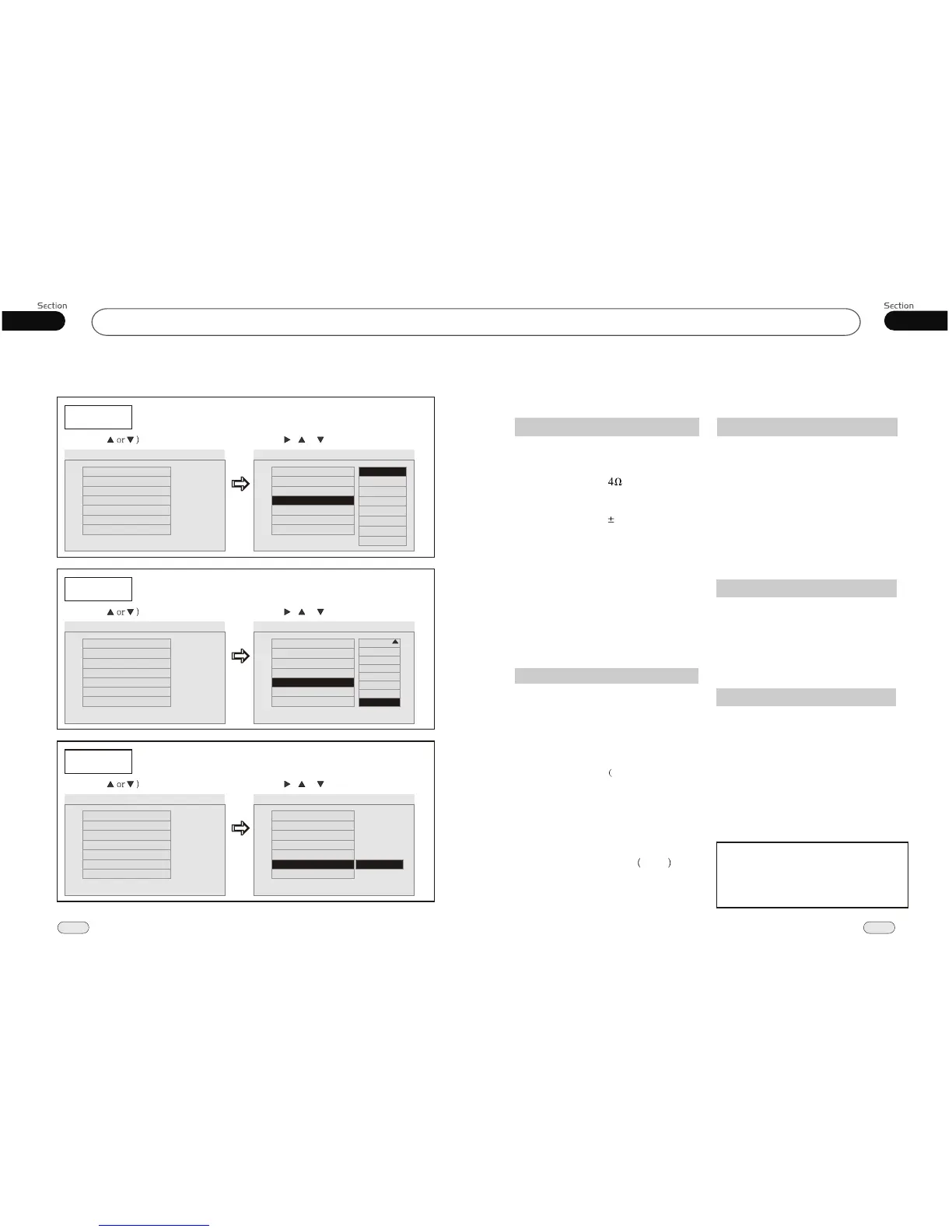
---Preferences page--
Disc Menu
Example showing how to set Disc Menu Language:
(Press , or , then press ENTER)
(Press
--Preference Page--
Go To Preference Page
Preferred Menu Language
TV Type
Audio
Subtitle
Disc Menu
Parental
Password
Default
Auto
Eng
Eng
Eng
--Preference Page--
TV Type
Audio
Subtitle
Disc Menu
Parental
Password
Default
Auto
Eng
Eng
Eng
Parental
Example showing how to set parental control:
(Press , or , then press ENTER)
(Press
--Preference Page--
Go To Preference Page
Set Parental Control
TV Type
Audio
Subtitle
Disc Menu
Parental
Password
Default
Auto
Eng
Eng
Eng
--Preference Page--
TV Type
Audio
Subtitle
Disc Menu
Parental
Password
Default
Auto
Eng
Eng
Eng
Password
Example showing how to set password, and the default pas sword is 8888.
(Press , or , then press ENTER)
(Press
--Preference Page--
Go To Preference Page
Change Password
TV Type
Audio
Subtitle
Disc Menu
Parental
Password
Default
Auto
Eng
Eng
Eng
--Preference Page--
TV Type
Audio
Subtitle
Disc Menu
Parental
Password
Default
Auto
Eng
Eng
Eng
Change
2
3
4
5
6
7
8
Off
G
PG
PG 13
PGR
R
NC 17
Adult
English
French
Spanish
Chinese
Japanese
Russian
Thai
Korean


 To Next Page