02
13
Installation DVD
28
05
A
B
REL
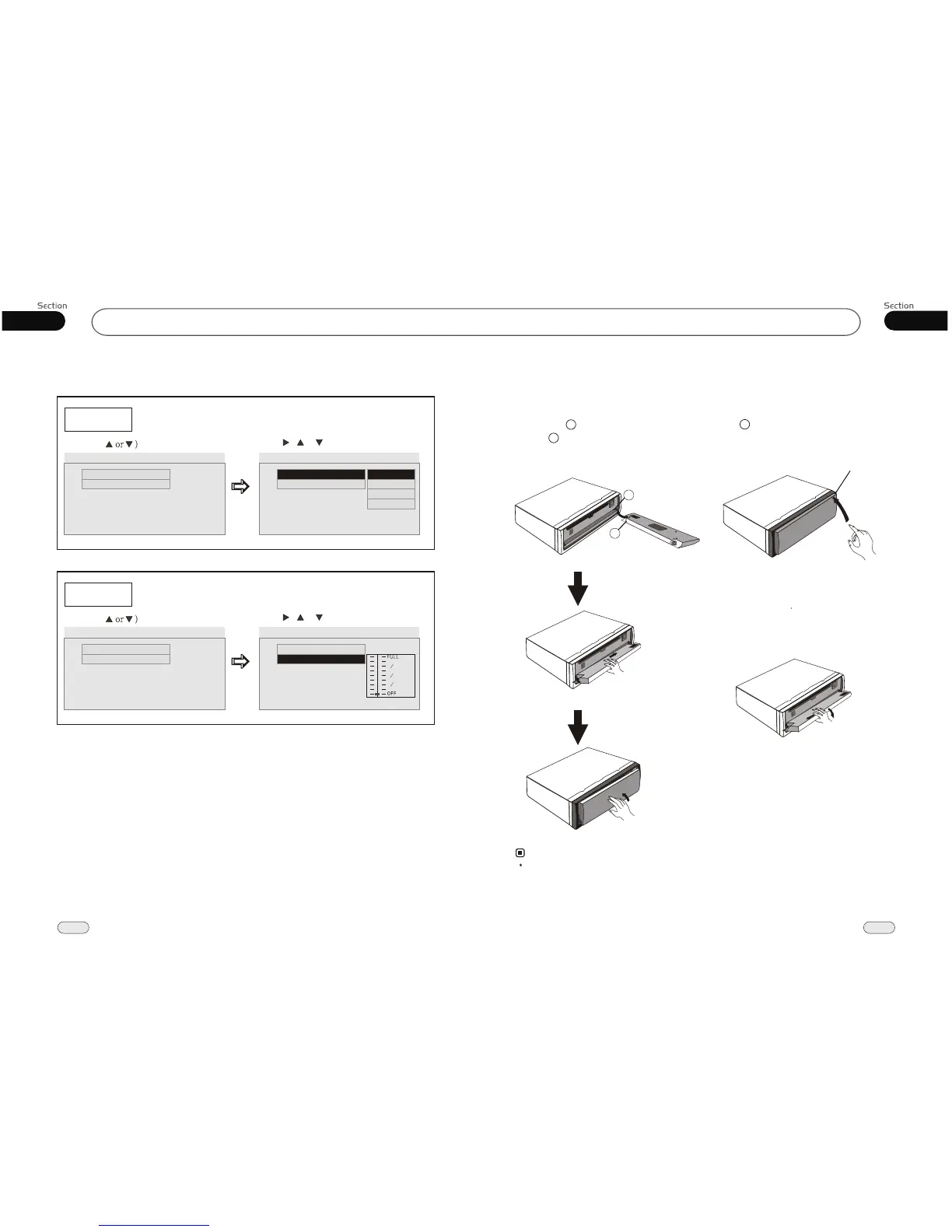
Install the Front Panel
Put notch (Shown as picture)
shaft . And then press into the
right side.
onto
slightly
A
B
Note:
Never put any objects into the panel. front
2
Press button in the upper
corner, and then the front panel will be
folded down.
right
(REL) (REL)
When the front panel was turned down
to a position of 45 , hold and slide the
front panel to left, pull it out . and then
--Dolby Digital Setup--
Dual Mono
Example showing how to set stereo mode:
(Press
(Press , or , then press ENTER)
--Dolby Digital Setup--
Dual Mono
Dynamic
Go To Dolby Digital Setup
Dual Mono
Dynamic
Dual Mono (1+1) Setup
Stereo
L-Mono
--Dolby Digital Setup--
R-Mono
Mix-Mono
Dynamic
Example showing how to set dynamic range compression:
(Press
(Press , or , then press ENTER)
--Dolby Digital Setup--
Dual Mono
Dynamic
Go To Dolby Digital Setup
Dynamic
Set DRC off
--Dolby Digital Setup--
1 4
1 2
3 4
Dual Mono


 To Next Page