HOW TO CLEAN
www.freezimer.com
●1. Cleaning: In standby mode, press and hold the ON/OFF button for more
than 3 seconds, and the machine will start and enter the cleaning mode
(the ON/OFF indicator blinks in red and blue light alternately).
● 2. After the cleaning is over, the machine enters the shutdown standby
mode.
● 3. Dry the exterior with a soft cloth. The outside of the ice machine should
be cleaned regularly.
● 4. Close the drain cap.
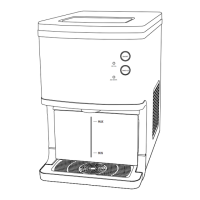
● 5. Warm Tip: Before moving the machine or after you finish using it, please
drain the water from the water tank by using the water drain.
● 6. If the machine has not been used for a long time, please clean it
before use. If it is used frequently, please clean it automatically every half
month.
Note: When the machine is working, long press the power button for more than 3 seconds,
and the machine will enter the shutdown standby mode.
● 4. TAKE ICE: Press the "TAKE ICE" button and hold it in any mode, the indicator light will
flash for 2 seconds and the ice will come out. If the ice cubes are stuck on the rotating rod
while taking out the ice, please stop taking out the ice and press the "TAKE ICE" button again
to collect the ice again.
● 5. ADD WATER: When the machine detects that there is no water supply for more than
60 seconds, the machine will enter the water shortage mode, the add water light will turn
on, and the compressor will stop working at the same time. When the machines completely
stops running, touch the ON/OFF button once to exit and secure the machine into standby
mode.
● 6.ICE FULL: After an hour, ice or other objects block the infrared rays, and the ice full
indicator lights up, and the machine enters ice full protection mode. While under the ice full
protection mode, touch the ON/OFF button once to exit the protection mode and enter the
standby mode.
10


 To Next Page