USING YOUR ICE MAKER MACHINE
www.freezimer.com
1. Press the "ON/OFF" button after the ice maker is powered on, it will start
running. You can also use the mobile APP to control the ice maker
remotely.
Tip: You can use potable water directly or use tap water with the included
water purification system.
2. Pull out the water tank, pour water into the water tank with or without
water purification system, making sure that it does not exceed the
maximum water level.
3. When the ice maker is on, check the water level regularly. If the water
pump fails to pump water, the ice maker will automatically stop and the
"ADD WATER" indicator will turn on. Press the "ON/OFF" button to stop,
add water to the level mark, then press the "ON/OFF" button again to
power on.
Tip: Be sure to turn off the machine before adding water.
4. When the ice storage bucket is full, the ice maker will automatically stop
working and the "ICE FULL" indicator will light up. To restart ice making,
remove the ice cubes and press the "ON/OFF" button.
5. Change the water in the tank every twenty-four hours to ensure a safe
level of hygiene. If the unit is not going to be used for a few days, drain
the water tank under the ice storage bucket and any water in the water
tank in the ice maker (through the drain on the back of the machine),
then refill and run again.
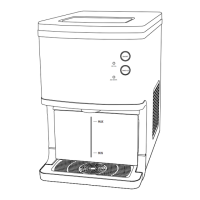
6. The minimum water level is 1.3 inches and the maximum water level is
4.5 inches. When the water level is low, the "ADD WATER" indicator will
light up. Please add water, be sure to turn off the machine before adding
water.
12


 To Next Page