Sideguard Assist is only an aid. It may failto
detect some objects and is not asubstitute for
attentive driving.Alwaysensure that there is
sufficient distance to the sidefor otherroad
users,pedestrians and obstacles.
Make sure that the areaonthe co-driver's side
besidethe vehicleisfree before making aturn.
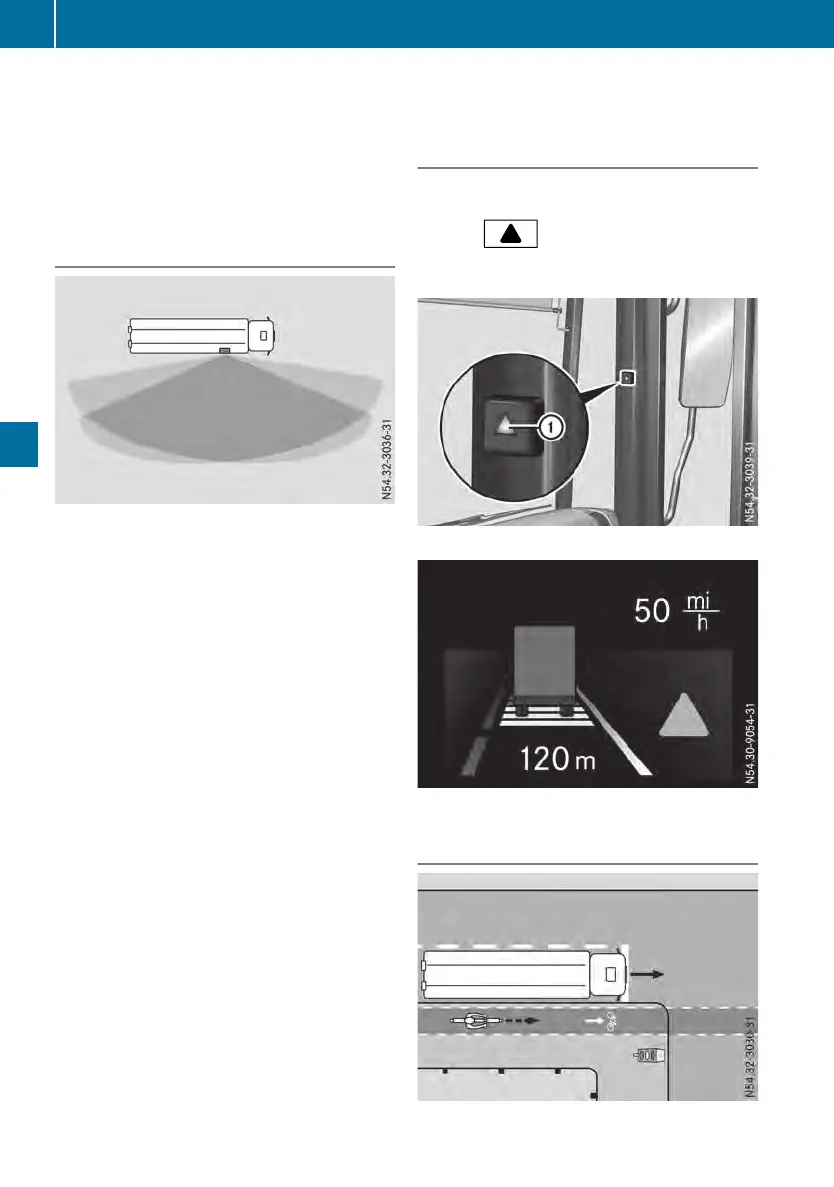
Monitoring range of the sensors
Monitoring rangeofthe sensors
Between the vehicleand the monitoring range
there is an angle of approximately 6°. Objects
within this rangeare not detected.
Due to the nature of the system:
R
warningsmay be issuedinerrorwhendriv-
ing close to crashbarriers or similar solid
boundaries
R
warningsmay be interrupted when youare
driving alongsideparticularly long vehicles,
such as trucks,for aprolonged time
Depending on the situation, Sideguard Assist
may:
R
issue awarning prematurely
R
not issue awarning
Make sure that the radar sensor coverisfree
from dirt, ice or slush. The radar sensors must
not be painted or covered,e.g. by stickers or
films.
If Sideguard Assist is malfunctioning,the on-
board computerdisplaysayellowevent win-
dow.
Objects in the monitoring rangeare then not
indicated.
Have the function of the radar sensors
checkedataqualified specialist workshopfol-
lowing:
R
asevere impact
R
damagetothe sidetrim
Sideguard Assist may otherwise not work
properly.
Indicator and warninglamp
Sideguard Assist is active when youswitch on
the ignition.
The gray indicator lamp is litinthe
AssistanceAssistance menu window of the on-board
computer.
:
Warning lamp in the A-pillar
Example:assistance menu window
Warning whenturningright
138
Drivingsystems
Driving mode












 To Next Page