X
Set the driving level (Y page 142).
X
Using the u or t button, scrolltoâ
operation and maintenance.
The menu window shows the vehicleaxles
and the axleload.
Setting the axleloadindicator
You can adjust the axleloadindicator if there
is anotable difference between the axleload
indicator and the weighbridge results.
X
Park the vehicleonalevel surface.
X
Applythe parking brake.
X
Set the driving level (Y page 142).
X
Drive the vehicleonto the single axleweigh-
bridge.
X
Using the u or t button, scrolltoâ
operation and maintenance.
The menu window shows the axleloads and
the overallaxleload.
X
Press the 9 button.
The input window shows the axleloads.
X
Select the desiredaxlewiththe r or
s button.
X
Using the u or t button, correct the
axleloadaccording to the value shown by
the single axleloadmeasuring device.
Levelcontrol menuwindow
Important safety notes
G
WARNING
Whenyou drive with the chassisloweredor
raised,the vehicle's braking and driving
characteristics can be significantlyimpaired.
You could also exceedthe permissible vehi-
cle height if the chassisisraised.There is a
riskofanaccident.
Adjust the vehiclelevel before pulling away.
Raise/lowerthe chassisframe to pick up/set
downdemountable bodies.
If youcontinueajourney afterhaving changed
the chassisheight, lower/raise the chassis
frame to driving level.
Whenthe ¸ yellow indicator lamp in the
instrument cluster lights up,the chassisisnot
at driving level or the level control is malfunc-
tioning. Observe the additionalinformation in
the event window.
Adjusting the levelcontrol
The LevelcontrolLevelcontrol menu window is available
on vehicles with airsuspension. You can oper-
ate the level control when the vehicleissta-
tionary or when the vehicleisinmotion up to
approximately 18 mph (30 km/h).
Depending on your vehicle's equipment, you
control the function of the level control system
using:
R
the control panel on the driver'sseat
(Y page 140)
R
the on-board computer
X
Using the u or t button, scrolltoâ
operation and maintenance.
X
Use the r or s button to scrolltothe
LevelcontrolLevelcontrol menu window.
X
Press the 9 button.
The on-board computerdisplaysthe input
window.
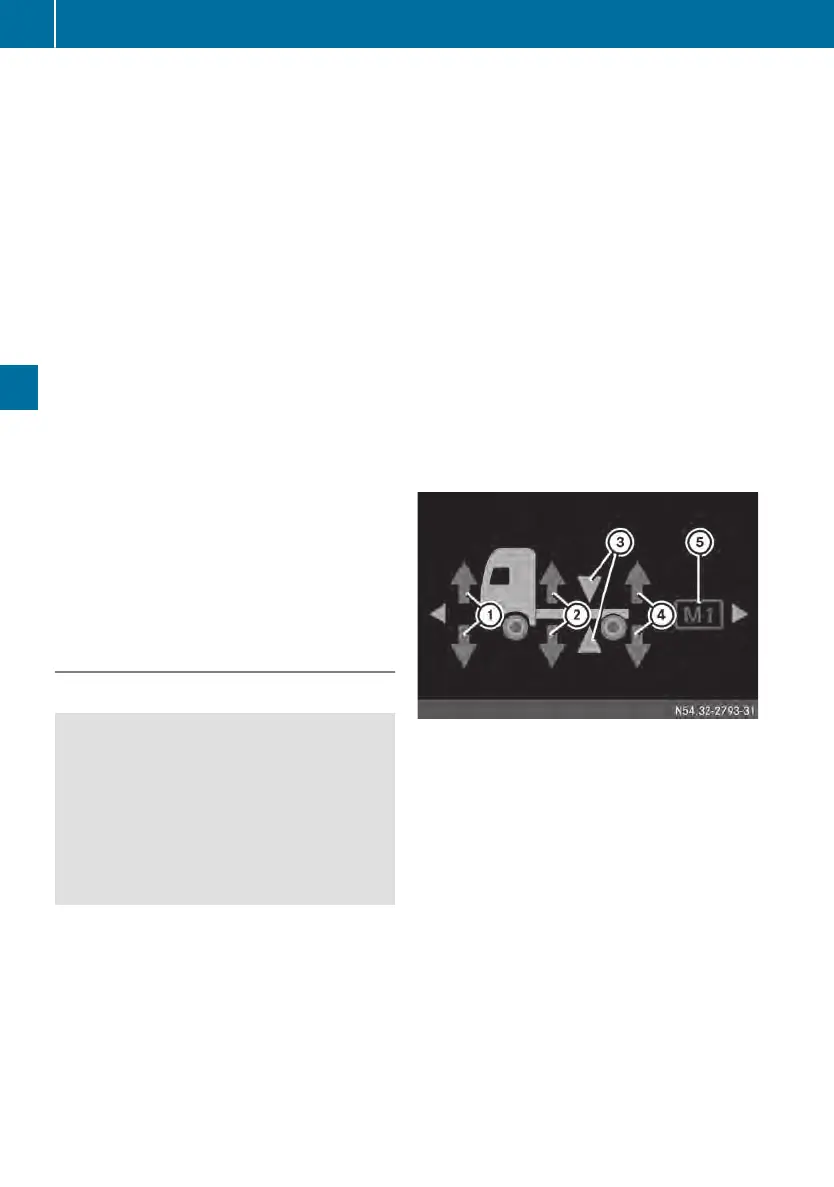
Levelcontrol input window (example: vehiclewith
2axles)
:
Preselection: to raise/lower the front axle
;
Preselection: to raise/lower the entire
vehicle
=
Preselection: to set the driving level
?
Preselection: to raise/lower the rearaxle
A
Memory position M1 or M2 for chassis
height
X
To raise/lowerthe chassis: using the
u or t button, select front axle :,
entirevehicle ; or rearaxle ?.
X
Press the r button to lowerthe chassis
or the s button to raise it. The ¸ indi-
catorlampinthe instrument cluster lights
up.
X
To interrupt/endthe raisingorlowering
operation: press the 9 button.
78
On-board computer
On-board computer and displays












 To Next Page