5
OK
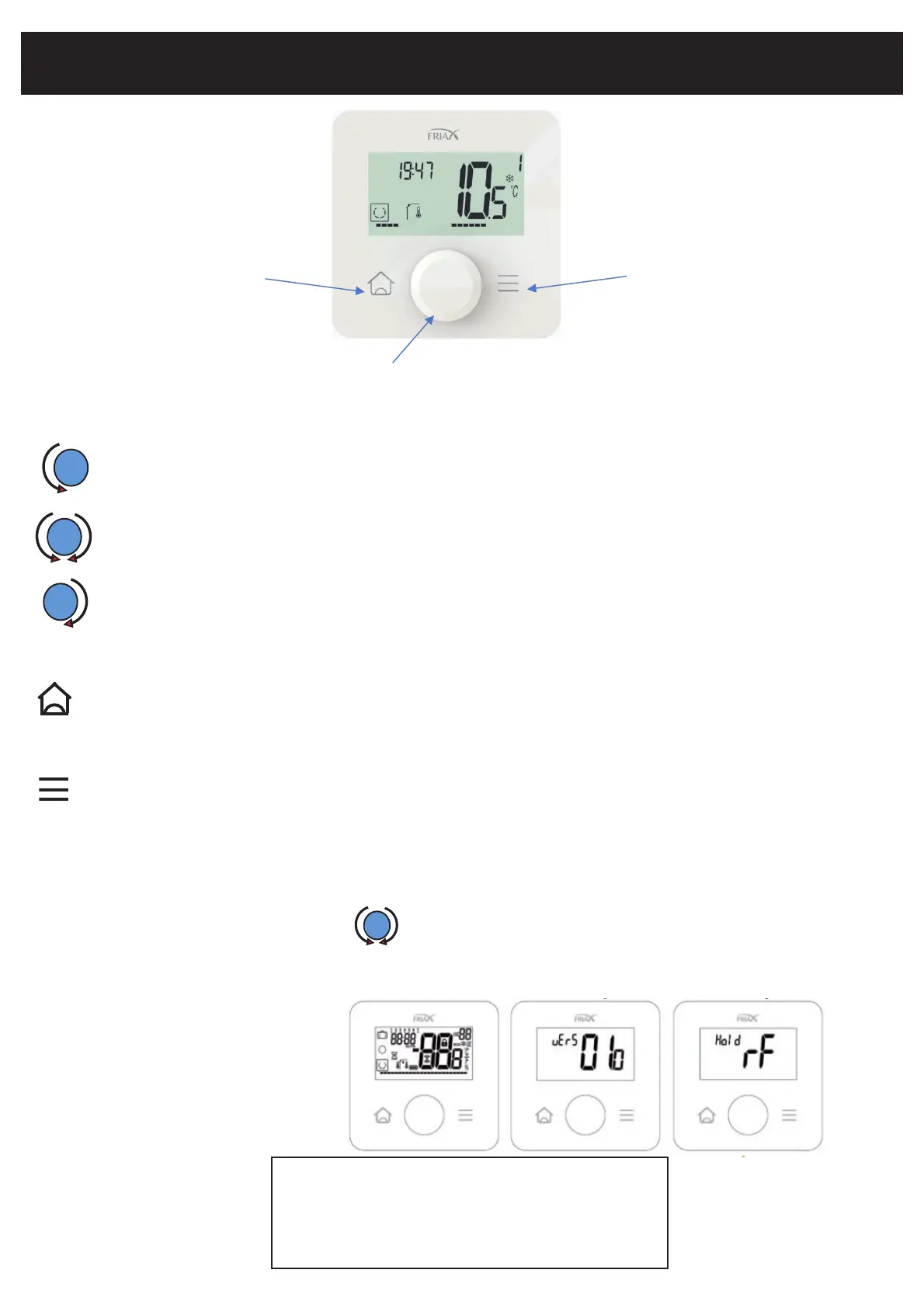
button Home button Return
Push Button and Rotator
Description:
Left rotation OR Minus OR access previous menu when navigating menus.
Brief press: Product wake-up / Validation /.
Right rotation OR More OR access next menu when navigating menus.
Description of the 2 capacitive keys:
button Return:
Short press on main screen allows switching between display setpoint/read value.
Pressing and holding for 2 seconds in all menus returns you to the main screen.
Short press on main screen toggles temperature/humidity display.
Short press in other menus allows you to return to the (previous) menu.
-1- Radio communication is established to allow the remote control values to be refreshed
When:
-After turning off the backlight, press.
-After 3 minutes, the display refreshes in backlight off mode.
Display and button
button Home :
IMPORTANT NOTES:
Remote start
Startup timeline
Remains in Hold RF display if :
- Product not yet associated
- Impossibility of communication with Split card
1.All logos 2.Software version 3. Waiting for recovery
OK



 To Next Page