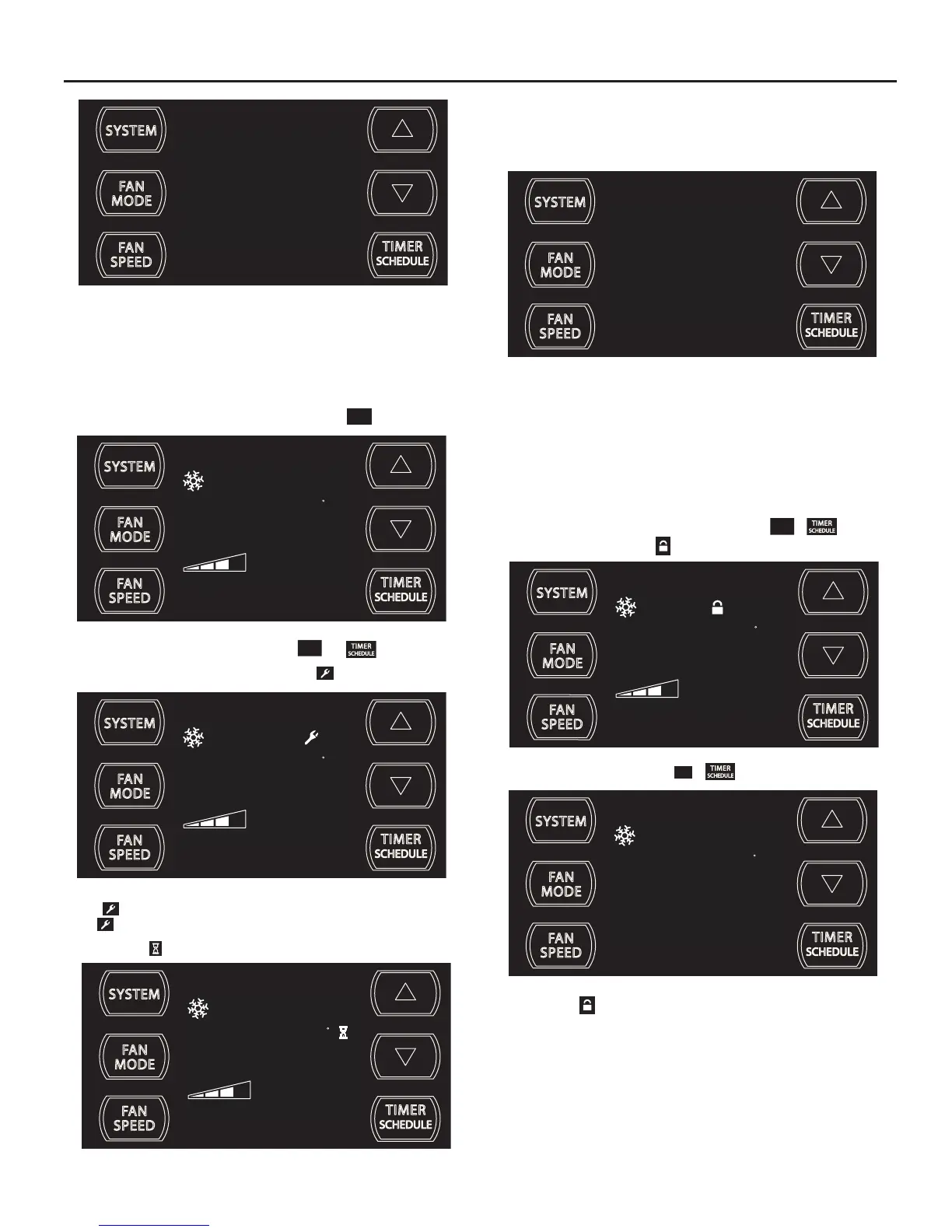
Alerts
:KHQWKH¿OWHUQHHGVWREHFOHDQHGRUUHSODFHGWKH
CHECK
FILTER
icon displays.
SET POINT
F
AUTO FAN
79
FILTER
FRR118
The alert can be dismissed by pressing the
FAN
MODE
and for 3 seconds.
When maintenance is required, a service icon
appears on screen.
SET POINT
F
AUTO FAN
79
FRR119
This ZLOOUHPDLQRQWKHGLVSOD\XQWLOWKHIDXOWKDVEHHQFRUUHFWHG1RWH
the
LFRQZLOOÀDVKLIWKHIDXOWLVRIDPRUHVHYHULW\QDWXUH
The wait icon
illuminates when the compressor lockout is active.
SET POINT
F
AUTO FAN
79
FRR120
This means there is a compressor demand but the system is not ready
IRUWKHFRPSUHVVRUWRRSHUDWH)RUH[DPSOHDVKRUWSRZHURXWDJHWKH
compressor will not restart until the internal pressures of the compressor
are at the proper level.
3
FRR194
7KHLQGLFDWHVD',0VHWWLQJRIIXOOEULJKWQHVV3UHVVWKH7,0(5
6(7 5HIHU WR )LJXUH EXWWRQ ZLWKLQ VHFRQGVWR VDYHWKH VHWWLQJ
%XWWRQLQDFWLYLW\IRUPRUHWKDQVHFRQGVFDXVHVWKHGLVSOD\WRWLPHRXW
and return to the normal operating display.
F
FRR179
,IWKHURRPIUHH]HSURWHFWLRQLVDFWLYHWKHGLVSOD\LQGLFDWHVWKLVE\VKRZLQJ
)´2QFHWKHFRQGLWLRQLVVDWLV¿HGWKH³)´GLVSOD\LVUHPRYHG3UHVV7,0(5
6(7)LJXUHEXWWRQRYHUULGHVWKHIUHH]HSURWHFWLRQDOHUWIRUPLQXWHV
This alert appears when the room is too cold for the air conditioner to
RSHUDWHSURSHUO\$QRWKHUFDXVHRIDOHUWRFFXUVZKHQWRPXFKLFHEXLOGV
up on the unit's condenser.
Lock Control Panel
To lock the front panel controls, press and hold the
FAN
SPEED
+ buttons
for 3 seconds. The lock icon
illuminates to indicate the locked status.
SET POINT
F
AUTO FAN
79
FRR116
To unlock, presses and hold the
FAN
SPEED
+ buttons for 3 seconds.
SET POINT
F
AUTO FAN
79
FRR117
The lock icon disappears to indicate unlocked status.



 To Next Page