FRR080
30°
45°
60°
30°
45°
60°
25ft
25ft
8ft
4ft
25ft
16ft
6ft
30°
30°
45°
60°
45°
60°
25ft
25ft
25ft
8ft
25ft
25ft
7.5ft
SIDE VIEW
TOP VIEW
Figure 9
Remote Control Operation
Remote Control5HIHUWR)LJXUHVDQGGXULQJRSHUDWLRQGHVFULSWLRQ
Getting Started,QVWDOOWZR$ $$EDWWHULHVLQWKHEDWWHU\FRPSDU WPHQW
located on the back of the unit.
Operation - The remote control should be within 25 feet of the air
FRQGLWLRQHUIRURSHUDWLRQ5HIHUWR)LJXUHIRUHIIHFWLYHQHVV3UHVVWKH
power button to turn the remote on. The remote will automatically power
off after 15 seconds if the buttons are not being pressed. The remote must
be on to control the unit.
POWER Button - Turns remote and unit on and off.
SYSTEM Button$OORZVWKHXVHUWRVHTXHQWLDOO\VHOHFW&RRO
,
+($7
DQG)$121/< operation. When the button is pressed, the
display indicates which mode has been selected via a display message.
1RWHWKDWZKHQWKHKHDWLQJIXQFWLRQLVQRWDYDLODEOHWKHV\VWHP ZLOO
DXWRPDWLFDOO\VNLSWKH+($7PRGH
FAN MODE Button - Selects between automatic (
AUTO FAN
) or
CONTINUOUS
operation. In the
AUTO FAN
mode, the fan only turns on and off when the
compressor operates or the heat function is enabled.
NOTE:
AUTO FAN
LVQRWDYDLODEOHLQWKH)$121/<0RGHWKHGLVSOD\
indicates
CONTINUOUS
. In the
CONTINUOUS
mode, fan speed is
determined by your selection on the
FAN
SPEED
button.
FAN SPEED Button - Used to sequentially select new fan speed, plus
$872RSHUDWLRQ:KHQWKH
FAN
SPEED
button is pressed, the fan speed icon
(triangle) changes to indicate the new speed level. Fan speed automatically
varies depending on the set temperature on the control panel and the actual
URRPWHPSHUDWXUH)RUH[DPSOHLIWKHUHLVDELJGLIIHUHQFHEHWZHHQ\RXU
set temperature and the actual room temperature, the system fan speed
LQFUHDVHVWR+,*+,WUHPDLQVDWWKLVVSHHGXQWLOWKHURRPWHPSHUDWXUH
matches the set temperature.
SCHEDULE Button – The
SCHEDULE
button turns the schedule function
on and off. Press the Schedule button once to turn on the Schedule
5HVLGHQWLDO&RPPHUFLDO7LPHURU&XVWRPL]HGWKDWKDVDOUHDG\EHHQ
selected on your unit. Pressing the
SCHEDULE
button a second time turns
the schedule function off.
UP and DOWN Arrows - Pressing either the
(UP) or '2:1
button changes the desired room temperature. The factory preset lower
and upper limits are 60)&DQG)&7KHVHEXWWRQVDUHDOVR
used to navigate between function options when using the User Menu or
Maintenance Mode.
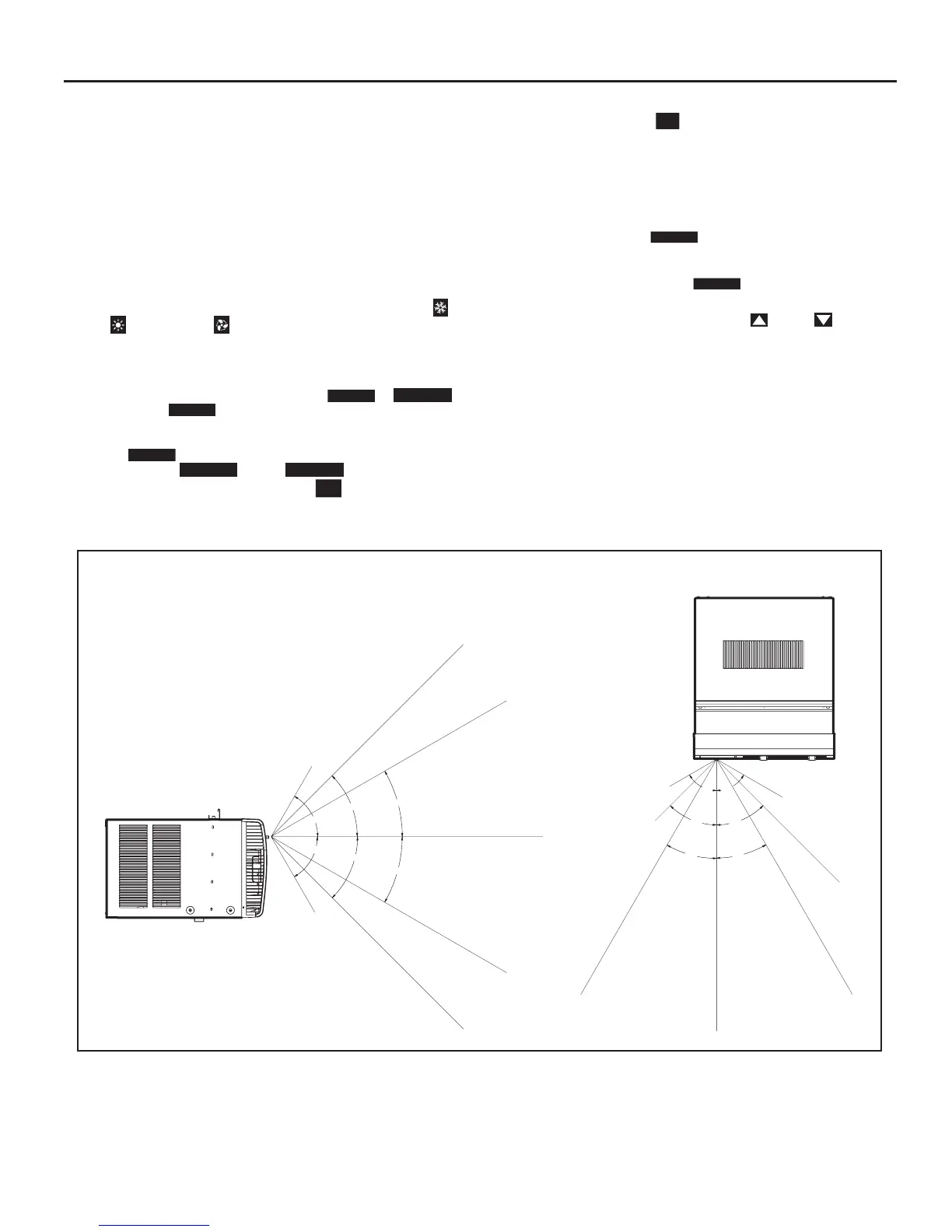
Remote Effectiveness
Hand Held Remote - Has an operating range of up to 25 ft. The infrared
remote control signal must have a clear path to transmit the command to
the air conditioning unit. The remote signal has some ability to "bounce"
off of walls and furniture similar to a television remote control. The diagram
below shows the typical operating range of the control in a standard room
with 8 ft high ceilings.



 To Next Page