EasyManua.ls Logo

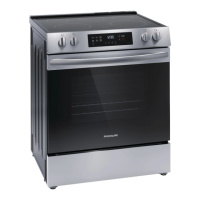
Frigidaire FCFE3062AS - User Manual

Frigidaire FCFE3062AS
2 pages
Print Icon
To Next Page IconTo Next Page
Loading...
Get started
with your
electric
range
Set up your oven
Remove all packaging material and tape and make sure your oven racks are in place prior to
operating the range. Check out your Use & Care Manual for tips to help care for your range.
Set your clock
It’s easy! Press
. Press the Up or Down arrow until “CLoC” appears in the display. Press
START. Press and hold the Up or Down arrow until the correct time appears in the display,
then press START.
Before cooking for the first time
Set your oven to Bake at 350°F/ 177°C for about 30 minutes. As the range gets settled in
your home, it’s normal to experience some noises and smoke.
BEFORE YOU START
YOU’RE IN CONTROL
Your oven controls
Using your oven starts with pressing
the keys on your oven control.
A22474804 Rev A (2205)
Press BAKE.
350° will appear in the display.
Use the UP and DOWN arrow keys to
change to desired cooking temperature.
Press START.
To cancel BAKE at any time, press OFF.
1
2
3
4
OFF
START
Bake Broil
Cook
Time
Keep
Warm
Delay
Start
Steam
Clean
On-Off
GET STARTED
OVEN MODE HIGHLIGHTS
Cooking is more convenient with Cook Time.
Choose the amount of time you want your
oven to cook, then the oven will turn o.
Meals stay warm and ready to serve in the
oven with Keep Warm.
Do not use aluminum foil or any other materials to
line the oven bottom, walls, racks or any part of the
oven.
Do not add bleach, ammonia, oven cleaner, or any
other abrasive household cleaners to the water used
for Steam Clean.
All oven racks should be removed before a steam
clean operation.
For more cooking and rack position tips, refer to
your Use & Care Manual.
REMEMBER
Question and Answer IconNeed help?

Do you have a question about the Frigidaire FCFE3062AS and is the answer not in the manual?

Summary

Get Started with Your Electric Range

Before You Start

Initial setup steps including oven preparation, setting the clock, and first-time cooking.

Youre In Control

Overview of oven controls and a step-by-step guide for starting basic cooking functions.

Oven Modes and Functions

Oven Mode Descriptions

Detailed explanations of various oven cooking modes like Bake, Broil, Steam Clean, and Keep Warm.

Control Panel Features

Explanation of control panel elements including Clock, Timer, Start, Off, and special function keys.

Quick Care and FAQs

Quick Care Tips

Recommendations for maintaining the cooktop and oven, including cleaning and protection methods.

Frequently Asked Questions

Answers to common user queries regarding oven noises, operational differences, and smoke during broiling.

Owner Support and Registration

Lets Make It Official

Information on registering the new Frigidaire range to become part of the owner community.

Owner Support Contact

Contact details for owner support, including website and phone numbers for assistance.

Summary

Get Started with Your Electric Range

Before You Start

Initial setup steps including oven preparation, setting the clock, and first-time cooking.

Youre In Control

Overview of oven controls and a step-by-step guide for starting basic cooking functions.

Oven Modes and Functions

Oven Mode Descriptions

Detailed explanations of various oven cooking modes like Bake, Broil, Steam Clean, and Keep Warm.

Control Panel Features

Explanation of control panel elements including Clock, Timer, Start, Off, and special function keys.

Quick Care and FAQs

Quick Care Tips

Recommendations for maintaining the cooktop and oven, including cleaning and protection methods.

Frequently Asked Questions

Answers to common user queries regarding oven noises, operational differences, and smoke during broiling.

Owner Support and Registration

Lets Make It Official

Information on registering the new Frigidaire range to become part of the owner community.

Owner Support Contact

Contact details for owner support, including website and phone numbers for assistance.

Overview

This document serves as a quick start guide and owner's manual for a Frigidaire electric range, providing essential information for setup, operation, and maintenance.

Function Description

The Frigidaire electric range is designed for various cooking tasks, offering multiple oven modes and cooktop features. The primary function is to provide controlled heat for baking, broiling, and keeping food warm.

Oven Modes:

  • BAKE: This mode is ideal for foods that require gentle, rising heat, such as cakes, cookies, and casseroles. It provides even heat distribution throughout the oven cavity.
  • BROIL: Designed for direct, high-heat cooking, broil is perfect for grilling meats, toasting, or browning the tops of dishes.
  • STEAM CLEAN: A time-saving, chemical-free method for assisting in the routine cleaning of small and light soils within the oven. This feature uses steam to loosen grime, making it easier to wipe away.
  • DELAY START: Allows users to set a delayed starting time for oven cooking or cleaning functions. This is convenient for scheduling cooking to finish at a specific time.
  • COOK TIME: This feature enables users to set a specific duration for cooking. Once the set time elapses, the oven automatically turns off, preventing overcooking.
  • KEEP WARM: Used to maintain cooked foods at a serving temperature without further cooking. This ensures meals stay hot and ready until serving.

Cooktop Features:

  • WARM ZONE: Located on the cooktop, this zone uses radiant heat to keep cooked foods warm. It's useful for holding dishes at serving temperature while other parts of the meal are being prepared.

Control Functions:

  • OVEN LIGHT: Controls the interior oven light, allowing users to view food without opening the oven door.
  • CLOCK: Used to set and display the time of day.
  • GEAR (Settings): Provides access to user preferences for various control functions, allowing for customization of the range's operation.
  • TIMER ON-OFF: Used to set or cancel a minute timer, useful for tracking cooking durations independently of the main oven functions.
  • UP and DOWN keys: These arrow keys are essential for adjusting temperature, time, and navigating menu options.
  • START: Initiates cooking functions and sets the clock.
  • OFF: Cancels all active cooking functions, turning off the oven or cooktop elements.

Usage Features

The range is designed for intuitive use, with clear instructions for common operations.

Getting Started:

  1. Unpacking: Before first use, all packaging material and tape must be removed, and oven racks should be in place.
  2. Setting the Clock: Press the "Clock" button, then use the Up or Down arrows until "CLoC" appears. Press "START," then press and hold the Up or Down arrows to set the correct time, and press "START" again.
  3. First-Time Use: It is recommended to set the oven to Bake at 350°F/ 177°C for approximately 30 minutes before cooking for the first time. This helps the range settle and burn off any manufacturing residues, which may cause some noises and smoke.

Basic Oven Operation (Bake Mode Example):

  1. Press the "BAKE" button. The display will show "350°" as the default temperature.
  2. Use the "UP" and "DOWN" arrow keys to adjust the temperature to the desired cooking temperature.
  3. Press "START" to begin the baking cycle.
  4. To cancel baking at any time, press "OFF."

Using Cook Time:

  • Select the desired cooking mode (e.g., Bake).
  • Press "COOK TIME."
  • Use the Up and Down arrows to set the desired cooking duration.
  • Press "START." The oven will cook for the set time and then automatically turn off.

Using Keep Warm:

  • After cooking, press "KEEP WARM."
  • The oven will maintain a warm temperature to keep food ready for serving.

Using the Warm Zone on the Cooktop:

  • To turn on, press the "Warm Zone" key twice.
  • To turn off, press the "Warm Zone" key once.

Troubleshooting Common Issues:

  • Noises during cooking: Temperature changes cause parts to expand and contract, and controls click. Fans run to heat and cool the oven. These are normal operational sounds.
  • Oven not performing like an old one: New ranges may require adjustments to cooking times and temperatures. Users are advised to consult the Use & Care Guide for instructions on how to adjust temperature or contact owner support.
  • Smoke during broiling: Broiling is direct heat cooking and will naturally produce some smoke. If smoke is excessive, food should be placed further from the heating element to prevent burning.

Maintenance Features

The Frigidaire electric range incorporates features and recommendations to ensure its longevity and cleanliness.

Quick Care Tips:

  • Cooktop Protection: Before cooking for the first time, apply a ceramic cooktop cleaning cream to protect the cooktop surface from scratches.
  • General Cleaning: For everyday spills and grime, clean with warm water and mild soap. For more stubborn messes, Frigidaire ReadyClean™ Oven and Microwave Cleaner is recommended.
  • Steam Clean: This feature is designed for routine cleaning of light soils. Before starting a Steam Clean cycle, all oven racks and accessories should be removed. This chemical-free method uses steam to loosen dirt, making it easier to wipe clean. Refer to the Use & Care Guide for more detailed steam clean tips.

Important Reminders:

  • No Aluminum Foil: Do not use aluminum foil or any other materials to line the oven bottom, walls, racks, or any part of the oven. This can interfere with heat distribution and damage the oven.
  • Steam Clean Additives: Do not add bleach, ammonia, oven cleaner, or any other abrasive household cleaners to the water used for Steam Clean. Only water should be used.
  • Rack Removal for Steam Clean: All oven racks must be removed before initiating a Steam Clean operation to ensure proper cleaning and prevent damage.
  • Manual Reference: For more comprehensive cooking tips, rack position guidelines, and troubleshooting advice, users should refer to the detailed Use & Care Manual.

Owner Support: Frigidaire provides owner support for questions, help, and service needs. Contact information for frigidaire.com and frigidaire.ca, including phone numbers, is provided in the manual. Users are also encouraged to register their new range by looking for the Photoregister™ icon on their registration card.

Frigidaire FCFE3062AS Specifications

General IconGeneral
Oven Capacity5.3 cu. ft.
Cooktop SurfaceSmooth Glass
Number of Burners5
Self-CleaningYes
ColorStainless Steel
Fuel TypeElectric
Width29.875 inches
BrandFrigidaire
ModelFCFE3062AS
Burners5
Burner TypeRadiant
Convection OvenNo
TypeFreestanding

Related product manuals