Operating I nstructions
Operating I nstructions
( continued)
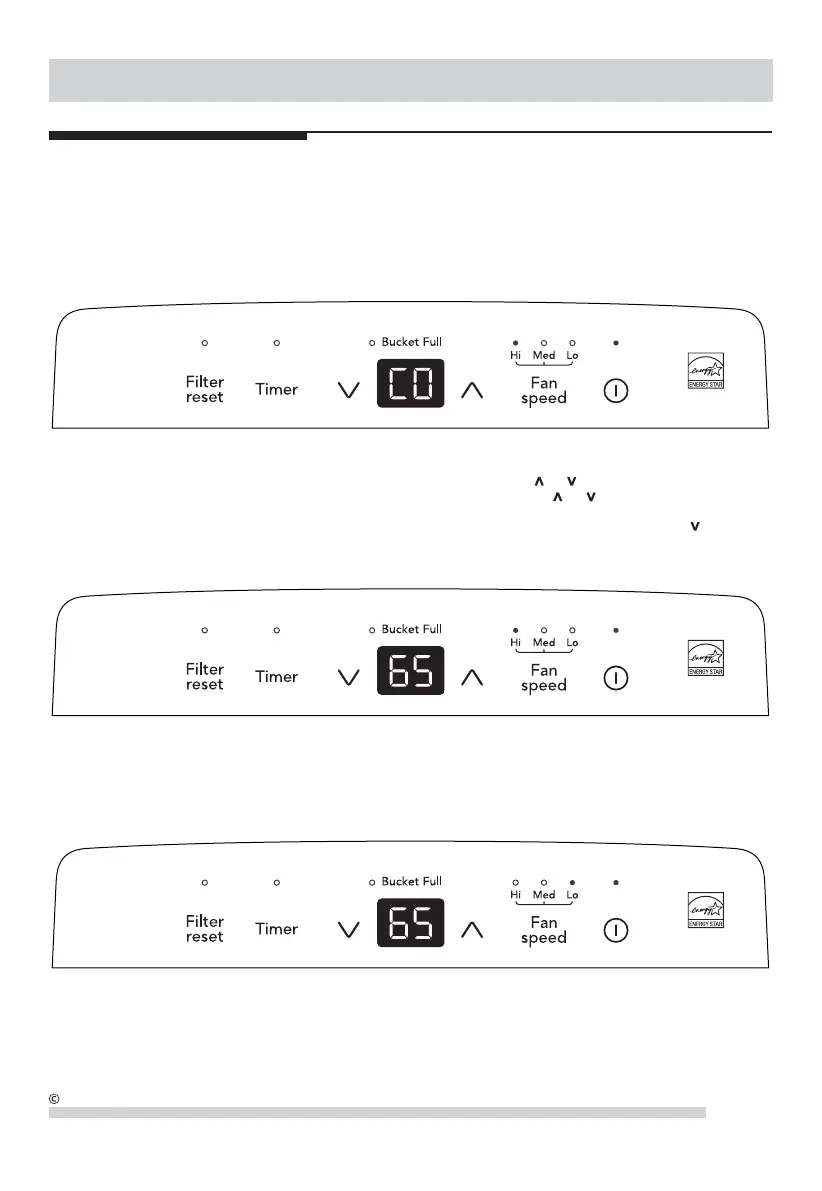
4. You can also use the FAN SPEED button to change the fan speed to Hi, Med or Lo. The indicator light will show the
setting you have selected. A higher fan speed will result in quicker moisture removal.
3. After a few days when the Relative Humidity has declined, press the HUMI DI TY or buttons to choose a value
between 35% to 85% , so the room is kept at a comfort able humidity. Pressing the or buttons will change the
humidity selection in 5% increments. 5 seconds after you have set the desired humidity, the readout will display the
actual room humidity. I f at any time you want to return to the CONTINUOUS Mode, pressing the HUMIDI TY button
will lower the Relative Humidity through 5% decrements until the display reads CO.
2. To turn the unit on, press the ON/ OFF button. The unit will run in the factory setting of CONTINUOUS and high fan
speed. I n the CONTINUOUS mode, the unit will only display CO and not the room humidity. I t is recommended you
leave the unit running in the CONTINUOUS setting for the first three or four days until the sweating and dampness
odors have stopped.
5
2019 Electrolux Home Products, Inc. All rights reserved.


 To Next Page