
 Need help?
Do you have a question about the Frigidaire FFRA051WAE and is the answer not in the manual?
General precautions to prevent accidents and ensure safe operation of the air conditioner.
Critical warnings about severe injury or death from misuse or hazards.
Describes symbols displayed on the unit for user guidance.
Instructions for recording model/serial numbers and registering the product.
Guidance on removing packaging from the air conditioner unit.
Describes expected sounds during normal operation and their causes.
Step-by-step guide to operating the room air conditioner.
Explanation of how to use the temperature selector for desired room comfort.
Details on selecting the appropriate cool mode for cooling effect and airflow.
Instructions for selecting fan speeds for air circulation without cooling.
Information on how air directional louvers control airflow direction.
Guidance on cleaning the air conditioner, including air filter and cabinet.
Tips and methods to conserve energy when using the air conditioner.
Troubleshooting guide for common issues and their solutions.
Details the warranty period, what is covered, and common exclusions.
Legal disclaimers regarding implied warranties and liability limitations.
This document outlines the use, care, and maintenance of your Frigidaire Room Air Conditioner, ensuring safe and efficient operation. It covers essential safety precautions, operational instructions, and troubleshooting tips to help you maximize the lifespan and performance of your appliance.
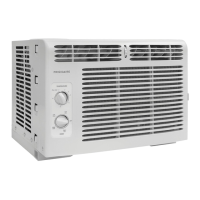
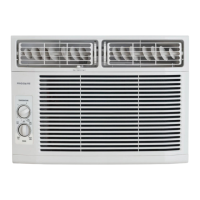
The Frigidaire Room Air Conditioner is designed to provide cooling and air circulation within a room. It operates by drawing in warm room air, cooling it through a refrigeration cycle, and then discharging the cooled air back into the room. The unit features a temperature selector to set the desired room temperature and a mode control to switch between cooling and fan-only operation. When in "COOL MODE," the thermostat automatically starts and stops the compressor to maintain the set temperature. The fan mode allows for air circulation without engaging the compressor, useful for ventilating the room. Air directional louvers are included to control the direction of airflow, allowing you to customize the distribution of cooled air. The power supply cord is equipped with a current detection device to enhance safety by sensing damage to the cord and preventing potential fire hazards.
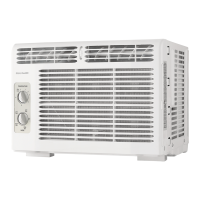
To begin operating the air conditioner, you should first set the temperature selector to the highest (coldest) setting and the mode control to the highest COOL setting. Once the room has cooled, you can adjust the temperature selector to a more comfortable setting. The temperature selector allows you to rotate the switch clockwise for higher cool settings, which provide lower room temperatures, or counter-clockwise for lower cool settings, resulting in higher room temperatures. The mode knob enables you to select between "high cool" for maximum cooling effect and airflow, "low cool" for minimum cooling effect and airflow, or various fan speeds for air circulation only. It is important to note that when selecting a fan speed, the compressor will not run. If your unit has a vent handle, it should be kept closed for maximum efficiency during cooling.
A crucial safety feature is the current device on the power supply cord. To test this device, plug in the air conditioner, press the TEST button on the plug head (you will hear a click as the RESET button pops out), and then press the RESET button again (you will hear another click as it engages). A light on the plug head indicates that the power supply cord is now supplying electricity to the unit. This device should not be used to turn the unit on or off, and the RESET button must always be pushed in for correct operation. If the power supply cord fails to reset, it must be replaced by the product manufacturer.
The air directional louvers, specifically the auger type, can be adjusted by rotating the auger wheel to obtain the desired left/right airflow direction. This allows for targeted cooling and improved comfort. It is essential to wait at least three minutes when turning the unit off and then on again, or when changing between cool and fan modes. This delay prevents the compressor from overheating and potential circuit breaker tripping, which could be harmful to the unit.
Regular maintenance is crucial for keeping your air conditioner looking new and operating efficiently. Before performing any cleaning, always unplug the unit to prevent electric shock or fire hazards.
The air filter should be checked and cleaned at least once a month, or more frequently if necessary. Trapped particles in the filter can accumulate and cause frost to form on the cooling coils, reducing efficiency. To clean the filter, slide it out from the right side of the unit. Wash the filter with liquid dishwashing detergent and warm water, rinsing it thoroughly. Gently shake off excess water and ensure the filter is completely dry before replacing it. Alternatively, you can vacuum the filter clean.
For cabinet cleaning, dust the cabinet and front with an oil-free cloth or wash it with a cloth dampened in a solution of warm water and mild liquid dishwashing detergent. Rinse thoroughly and wipe dry. Avoid using harsh cleaners, wax, or polish on the cabinet front, as these can cause damage. When wiping around the controls, wring excess water from the cloth to prevent moisture from entering and damaging the air conditioner. After cleaning, plug the air conditioner back in.
If you plan to store the air conditioner during the winter months, carefully remove it from the window according to the installation instructions. Cover it with plastic or return it to its original carton to protect it from dust and damage.
The manual also provides a troubleshooting guide for common issues such as the unit not operating, air not feeling cold enough, ice forming on the cooling coil, or unusual noises. For instance, if the unit does not operate, check if the wall plug is disconnected, the current device is tripped, or the house fuse is blown. If air does not feel cold enough, adjust the temperature selector to a higher COOL position. If ice forms on the cooling coil, the outdoor temperature might be too low, or the air filter may be dirty; setting the selector to FAN or cleaning the filter can resolve this. Normal sounds like rushing air, high-pitched chatter from the compressor, vibration, gurgling/hissing from refrigerant, and pinging/swishing from water droplets are common and not indicative of a malfunction. However, if water drips inside the room, it may indicate improper installation, requiring the air conditioner to be tilted slightly to the outside for proper drainage.
Following these maintenance steps and troubleshooting tips will help ensure your Frigidaire Room Air Conditioner continues to provide effective and reliable cooling for years to come.
 General
| Type | window |
|---|---|
| Color | white |
| Operating Area Size | 150 square feet |
| Cooling Capacity | 5000 british thermal units |
| Cooling Settings | 2 |
| Heater | no |
| Moisture Removal | 1 pints per day |
| Fan Speeds | 2 |
| Fan Airflow Rate | 136 cubic feet per minute |
| Noise Level | 56.5 decibels adjusted |
| Remote Control | no |
| Timer | no |
| Sleeping Mode | no |
| Control Type | button |
| Display Type | none |
| Annual Energy Consumption | 11 kilowatt hours |
| Energy Efficiency | 10 |
| Current | 4.9 amperes |
| Depth | 15.25 inches |
| Height | 12 inches |
| Width | 16 inches |
| Net Weight | 43 pounds |


 To Next Page