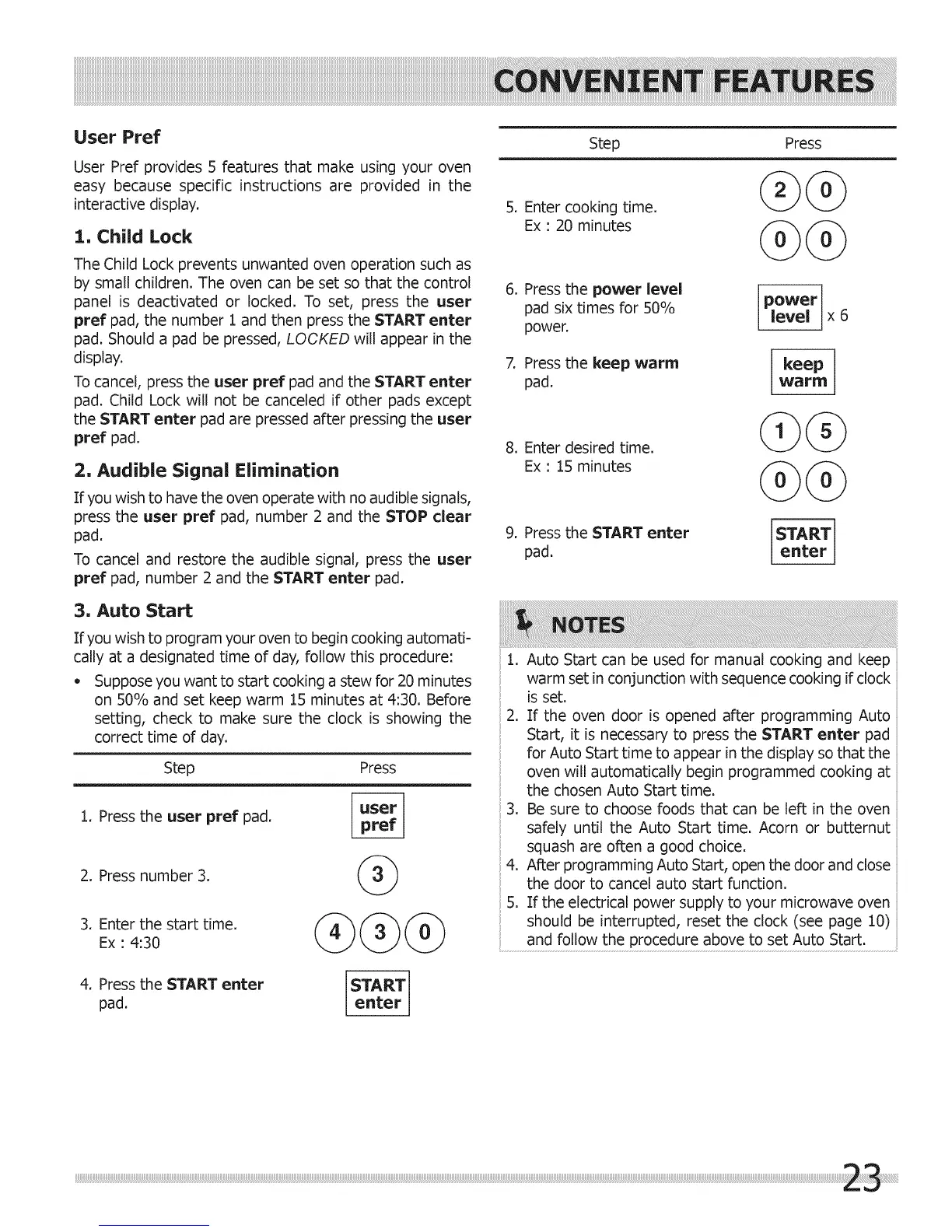
User Pref
User Pref provides 5 features that make using your oven
easy because specific instructions are provided in the
interactive display.
1. Child Lock
The Child Lock prevents unwanted oven operation such as
by small children. The oven can be set so that the control
panel is deactivated or locked. To set, press the user
pref pad, the number 1 and then press the START enter
pad. Should a pad be pressed, LOOKED will appear in the
display.
To cancel, press the user pref pad and the START enter
pad. Child Lock will not be canceled if other pads except
the START enter pad are pressed after pressing the user
pref pad.
2, Audible Signal Elimination
If you wish to have the oven operate with no audible signals,
press the user pref pad, number 2 and the STOP clear
pad.
To cancel and restore the audible signal, press the user
pref pad, number 2 and the START enter pad.
Step Press
5. Enter cooking time.
Ex : 20 minutes
@@
6. Press the power level
pad six times for 50%
power.
7, Press the keep warm
pad.
8. Enter desired time.
Ex : 15 minutes
9. Press the START enter
pad.
power
level x 6
keep
w_lrilrl
@@
START
enter
3, Auto Start
If you wish to program your oven to begin cooking automati-
cally at a designated time of day, follow this procedure:
o Suppose you want to start cooking a stew for 20 minutes
on 50% and set keep warm 15 minutes at 4:30. Before
setting, check to make sure the clock is showing the
correct time of day.
Step Press
1. Press the user pref pad.
2. Press number 3.
3. Enter the start time.
Ex : 4:30
1. Auto Start can be used for manual cooking and keep
warm set in conjunction with sequence cooking if clock
is set.
2. If the oven door is opened after programming Auto
Start, it is necessary to press the START enter pad
for Auto Start time to appear in the display so that the
oven will automatically begin programmed cooking at
the chosen Auto Start time.
3. Be sure to choose foods that can be left in the oven
safely until the Auto Start time. Acorn or butternut
squash are often a good choice.
4. After programming Auto Start, open the door and close
the door to cancel auto start function.
5. If the electrical power supply to your microwave oven
should be interrupted, reset the clock (see page 10)
and follow the procedure above to set Auto Start.
4. Press the START enter START
pad. enter



 To Next Page