38
10/2021
5(&25'
&$3785(
5(&25'
&$3785(
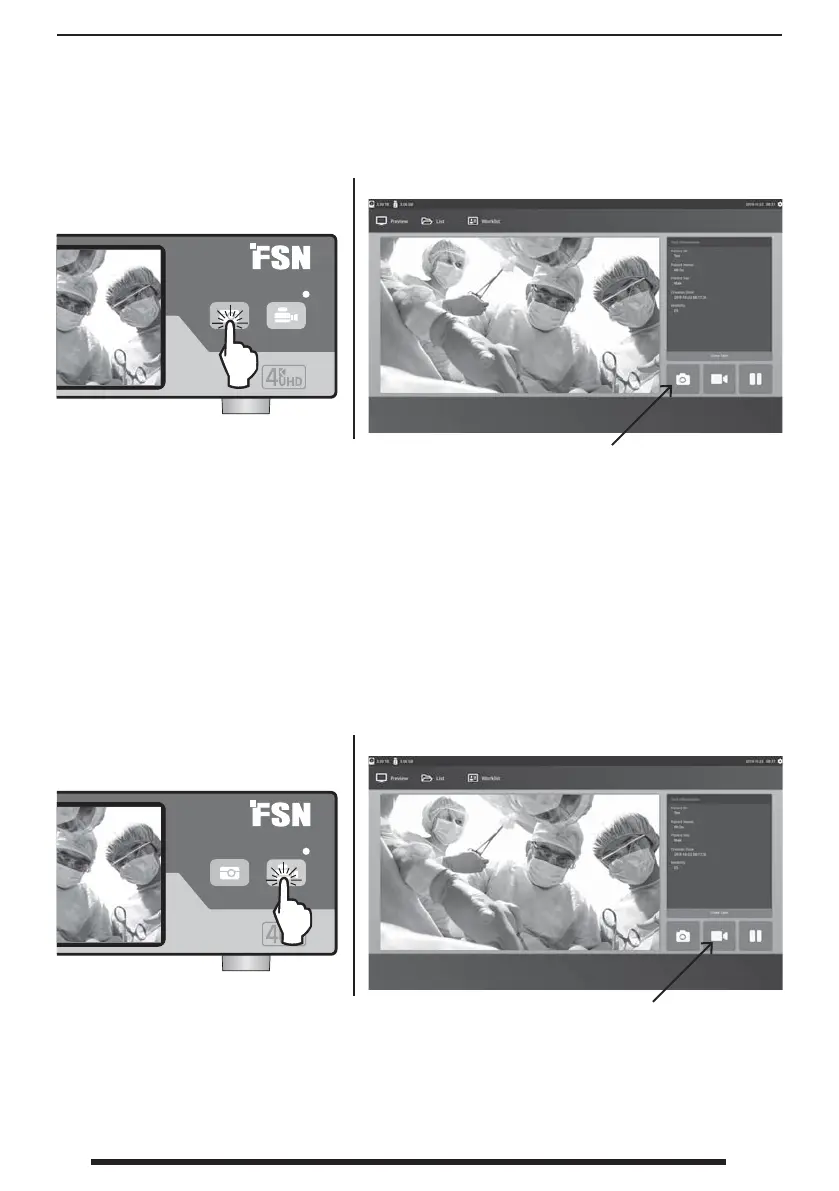
Capturing Still Images IPS740 series
Recording Video IPS740 series
Connect an input source signal. Make sure a task has been created and the input source signal is
being shown in the preview window of the front panel LCD or the external monitor.
Connect an input source signal. Make sure a task has been created and the input source signal is
being shown in the preview window of the front panel LCD or the external monitor.
Front Panel LCD
Front Panel LCD
External Monitor
External Monitor
Select the camera icon to capture an image. A beep sound signals that the capture was
performed. A preview of the capture is displayed for 1.5 seconds.
If a foot pedal is connected to the pedal capture input on the back of the recorder, pressing the
pedal will capture a still image. Captured still images are stored within the task for future use.
Select the video recorder icon to record video. A beep sound and red dot symbol signals that the
recording process is underway. Select the video recorder icon again to stop recording.
If a foot pedal is connected to the pedal record input on the back of the recorder, pressing the
pedal will start and stop the video recording process. Recorded video les are stored within the
task for future use.


 To Next Page