39
10/2021
Task Actions IPS740 series
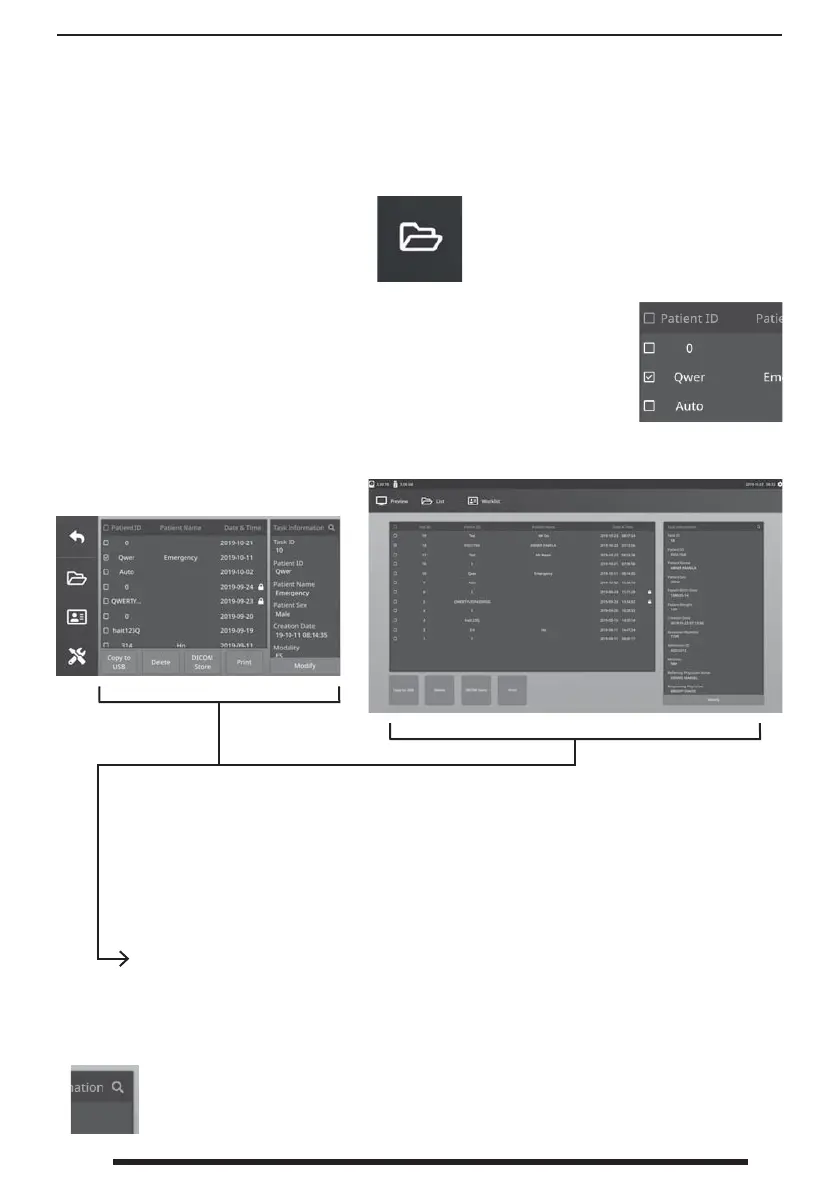
Select the FILE icon to manage tasks, including: search, modify, copy, delete, DICOM store, and
print. After a task has been closed, additional content can no longer be added to the task.
From the list of stored tasks, select a task by clicking the box to the left of
the Patient ID column. This opens several actions that can be applied to the
task, including: Copy to USB, Delete, DICOM Store, Print, and Modify. Use
the upper right magnifying glass icon to search tasks for speci c content.
Front Panel LCD
External Monitor
Task Actions
• Copy to USB - Copies the selected task to a USB memory stick. All USB memory
sticks plugged in the system will be shown as options.
• Delete - Deletes the selected task.
• DICOM Store - Sends the selected task to the PACS server.
• Print - Prints the selected task. The printing layout, 1x1 Landscape for example, is
shown on the title bar of the dialog window.
• Modify - Allows changes to a task’s patient information.
The magnifying glass icon in the top-right corner will search tasks for speci c
content. By leaving all criteria blank, all the tasks are listed in search results.


 To Next Page