40
10/2021
File Actions IPS740 series
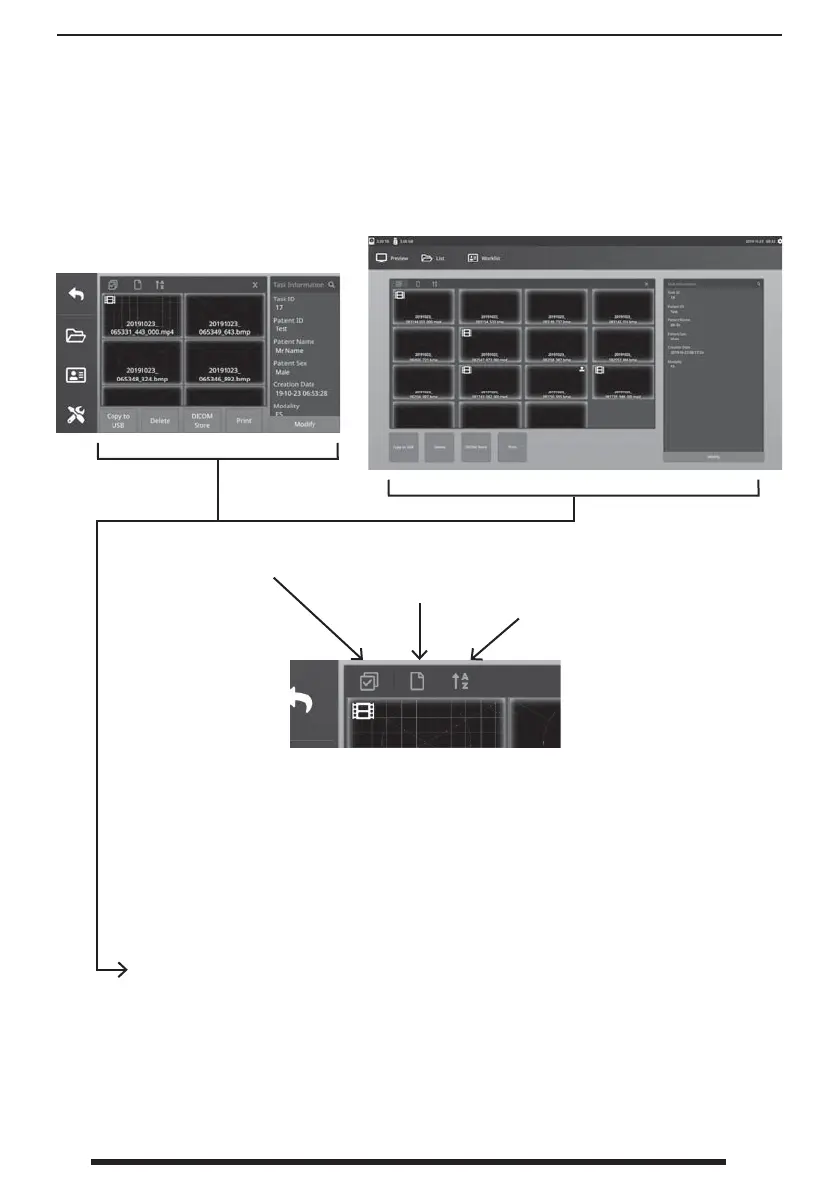
Double-click a task and all the les contained in the task are displayed in the left window.
Selects all les in
the task.
Sorts all les in
the task by type.
Sorts all les in the
task in acending or
decending order.
Front Panel LCD
External Monitor
File Actions (after selecting les to be manipulated)
• Copy to USB - Copies the selected les to a USB memory stick. All USB memory
sticks plugged in the system will be shown as options.
• Delete - Deletes the selected les.
• DICOM Store - Sends the selected les to the PACS server.
• Print - Prints the selected les. The printing layout, 1x1 Landscape for example, is
shown on the title bar of the dialog window.
• Modify - Allows changes to a le’s patient information.
The magnifying glass icon in the top-right corner will search for speci c content.


 To Next Page