User Manual Fugoo GO Bluetooth Speaker Model FSNA3 page 7 1/27/2017
Audio playback
Adjusting the volume
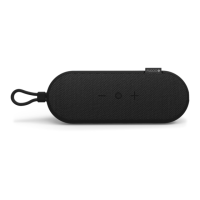
• Click the + (Volume up) or – (Volume down) buttons to raise or lower the volume
• On any audio device that supports the AVRCP protocol, adjusting the audio volume
on the audio source device will also change the volume on your speaker.
Playback
• Play / pause: Press O (Action Button) to toggle playing and pausing your audio.
• Next track: Press O and + to skip to the next track of the recording you're listening to.
• Previous track: Press O and – to skip to the previous track of the recording you're
listening to.
Customization / other functions
Normal and Loud modes
• There are two loudness modes for your Fugoo GO Bluetooth Speaker. Normal mode
is the default, and is designed for best overall sound with most types of music.
Outdoor mode boosts the maximum loudness level, and is ideal for playing music
outdoors, and in large rooms. Both modes employ dynamic real-time equalization to
boost the loudness of songs that have been recorded at lower volume levels.
• To switch from one mode to the other, start with the speaker powered on, then press
and hold the Action (O) button for three seconds. The speaker will turn play a beep
tone:
§ 1 Beep indicates normal mode
§ 2 Beeps indicates outdoor mode
Voice prompts level
• There are three voice prompt levels: Normal, Low and Off. Normal is the default
volume level – the level for voice prompts you will hear when you first turn on your
Fugoo Bluetooth Speaker. The Low level is about 20% lower than the Normal level.
• To change the voice prompt level from Normal to Low, start with the speaker off,
then press and hold the – (volume down) and + (volume up) buttons, then also
press the (Power) button for one second. The speaker will turn on, and announce
that voice prompts have been set to Low.
• Follow the same steps as above to change the voice prompt level from Low to Off.
• Follow the same steps again to change the voice prompt level from Off to Normal.


 To Next Page