C3: Making Single Sided / Double Sided Copies …
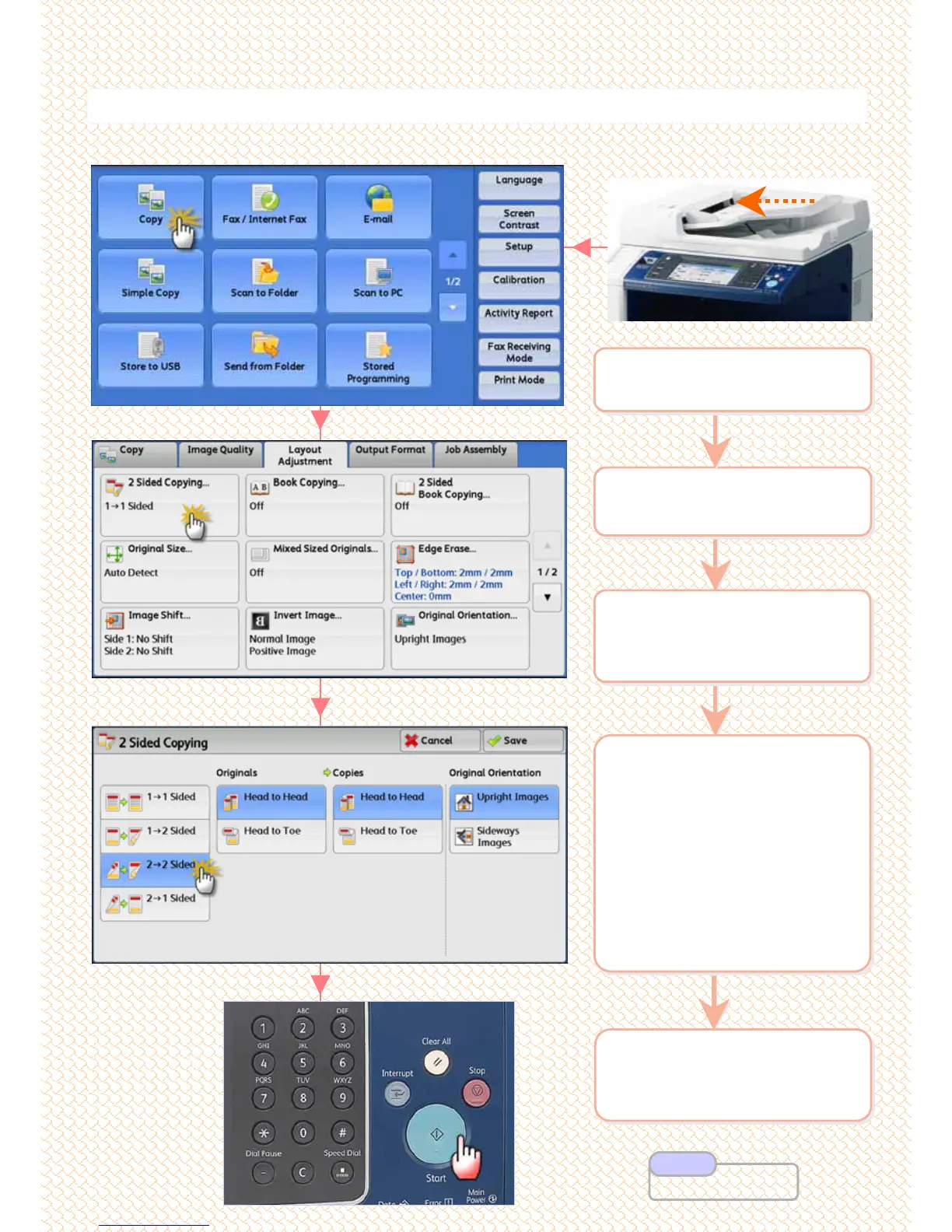
Make copies as single sided / double sided
Make copies as single sided / double sided
2 On the [Services Home]
select [Copy]
2 On the [Services Home]
select [Copy]
1 Load documents onto the
Document Feeder face up
1 Load documents onto the
Document Feeder face up
5 Enter number of copies
using numeric keypad &
Press <Start> button
5 Enter number of copies
using numeric keypad &
Press <Start> button
3 Select [Layout
Adjustment] > Press
[2-Sided Copying]
3 Select [Layout
Adjustment] > Press
[2-Sided Copying]
4 Select an option
1 Î 1 Sided copy 1-sided
document onto 1 side of paper
1 Î 2 Sided copy 1-sided
document onto 2 sides of paper
2 Î 2 Sided copy 2-sided
document onto 2 sides of paper
2 Î 1Sided copy 2-sided
document onto 1 side of paper
Press [Save]
4 Select an option
1 Î 1 Sided copy 1-sided
document onto 1 side of paper
1 Î 2 Sided copy 1-sided
document onto 2 sides of paper
2 Î 2 Sided copy 2-sided
document onto 2 sides of paper
2 Î 1Sided copy 2-sided
document onto 1 side of paper
Press [Save]
10
10
User Guide P.95
Note



 To Next Page
 Loading...



