EasyManua.ls Logo

FujiFilm FINEPIX F40fd - User Manual

FujiFilm FINEPIX F40fd
180 pages
Print Icon
To Next Page IconTo Next Page
Loading...
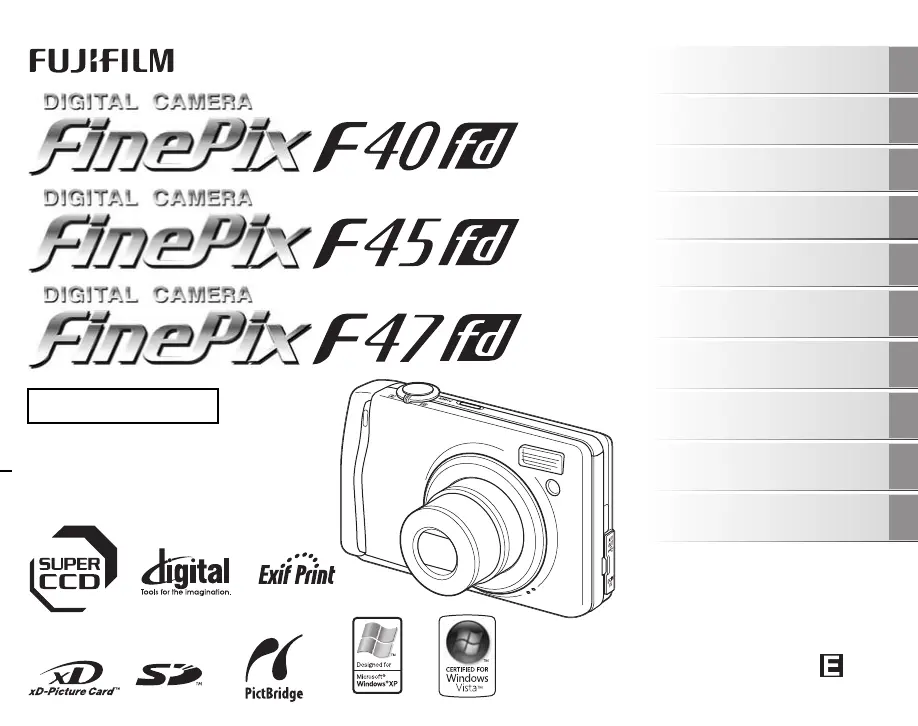
OWNER’S MANUAL
This manual will show you how to use
your FUJIFILM DIGITAL CAMERA
FinePix F40fd / FinePix F45fd / FinePix
F47fd correctly.
Please follow the instructions carefully.
BL00599-201(1)
Getting Ready
Using the Camera
Advanced Features
Photography
Settings
Camera Connection
Software
Installation
Playback
•Movie
Appendices
Troubleshooting

Table of Contents

Questions and Answers

  • H
    hernandezcaitlinSep 13, 2025
    Why can't I erase a frame on my FujiFilm Digital Camera?
    • J
      John StantonSep 13, 2025
      If you cannot erase a frame on your FujiFilm Digital Camera, it might be because the frame is protected. Unprotect the frame using the camera on which the protection was initially applied.
  • V
    vjacksonAug 25, 2025
    What to do if my FujiFilm Digital Camera is not turning on?
    • S
      Shelley ColonAug 25, 2025
      If your FujiFilm Digital Camera isn't turning on when you press the power button, there are several potential causes: * The battery may be completely drained, so load a fully charged battery. * The battery might be inserted incorrectly; ensure it's loaded in the correct direction. * The battery cover might not be securely closed; make sure it's properly closed. * If you're using an AC power adapter, it might not be correctly connected; ensure it's properly connected to both the camera and the power source.
  • B
    Beverly MonroeAug 25, 2025
    Why is my FujiFilm FINEPIX F40fd not taking pictures?
    • A
      Alyssa McfarlandAug 26, 2025
      If your FujiFilm Digital Camera isn't taking pictures when you press the shutter button, consider these possible causes: * The memory card or internal memory might be full. Either insert a new memory card or delete unnecessary photos. * The memory card or internal memory might not be formatted. Format the memory card or internal memory on the camera. * The memory card contact area might be dirty. Wipe the contact area with a soft, dry cloth. * The memory card might be damaged. Insert a new memory card. * The battery might be dead. Load a fully charged battery. * The auto power off function may have turned the camera off. Turn the camera back on.
  • M
    Michael DurhamSep 23, 2025
    Why isn't CONT. working on my FujiFilm FINEPIX F40fd?
    • W
      Wendy ZavalaSep 23, 2025
      To ensure the CONT. function in the frame number setting works on your FujiFilm Digital Camera, always turn the camera off when replacing the battery or memory card. Opening the battery cover without turning the camera off may cause the frame number memory to not function.
  • R
    ramireztonySep 14, 2025
    Why is my FujiFilm Digital Camera not charging?
    • C
      collinschristineSep 14, 2025
      If your FujiFilm Digital Camera isn't charging, consider these potential causes: * The battery might be loaded backward; ensure it's in the correct direction. * The battery charger and connection cord might not be properly connected; ensure they are correctly connected. * The battery terminals could be soiled; remove the battery briefly and wipe the terminals with a clean, dry cloth before reloading. * The battery may no longer be rechargeable; try loading a new battery.
  • K
    Katherine JeffersonSep 23, 2025
    Why is there no image or sound on the TV from my FujiFilm Digital Camera?
    • T
      Tim DavisSep 23, 2025
      If your FujiFilm Digital Camera is not displaying images or sound on the TV, ensure that: * The camera is correctly connected to the TV. Connect the camera and TV correctly. * If playing a movie, ensure the A/V cable was not connected during playback. Stop movie playback mode, then connect the camera and TV. * The TV input is set to “VIDEO,” not “TV”. Set the TV input to “VIDEO.” * The video output setting is correct (NTSC or PAL). Change the setting to NTSC or PAL. * The TV volume is not turned down. Adjust the volume.
  • R
    Robert Thompson MDSep 6, 2025
    How do I get my PC to recognize my FujiFilm FINEPIX F40fd Digital Camera?
    • J
      Jason SantiagoSep 6, 2025
      If your PC isn't recognizing your FujiFilm Digital Camera, make sure the USB cable is correctly connected to both the PC and the camera. Set up the camera properly before connecting the USB cable.
  • J
    jwrightSep 7, 2025
    Why are my photos and videos not being saved on my FujiFilm Digital Camera?
    • J
      Jeremy ChapmanSep 7, 2025
      If your FujiFilm Digital Camera isn't recording images or movies, it might be because the AC power adapter was connected or disconnected while the camera was on. Only connect or disconnect the AC power adapter when the camera is off to prevent damage to the memory card or malfunctions during PC connection.
  • M
    Michele WeaverSep 23, 2025
    How to unprotect frames on my FujiFilm FINEPIX F40fd?
    • E
      Eric ColemanSep 23, 2025
      To unprotect frames on your FujiFilm Digital Camera, use the camera on which the protection was initially applied.
  • P
    Patricia SmithAug 31, 2025
    What to do if my FujiFilm Digital Camera power cuts out during operation?
    • J
      Jeff GarciaAug 31, 2025
      If your FujiFilm Digital Camera suddenly loses power during use, the cause may be: * The battery has run out, so load a fully charged battery. * The camera and AC power adapter are not connected correctly, so connect the camera and AC power adapter correctly.

Summary

Warning

FCC Statement and Canadian Compliance

Regulatory compliance information for the device in the US and Canada.

IMPORTANT

End User License Agreement

Terms and conditions for using the camera software provided on CD-ROM.

EC Declaration of Conformity

Product Compliance Standards

Declaration that the product conforms to specified safety and EMC standards.

Disposal of Electric and Electronic Equipment

Environmental Disposal Guidelines

Instructions for proper disposal of electrical and electronic equipment.

Preface

Important Usage Notes

Guidance on test shots, copyright, handling the camera, and liquid crystal safety.

About this Manual

Understanding Manual Illustrations

Explanation of icons, symbols, and how illustrations represent camera operations.

Accessories Included

List of Included Items

Inventory of items provided with the digital camera package.

Camera Parts and Features

Overview of Camera Controls

Identification and brief description of all physical buttons, dials, and ports on the camera.

Getting Ready

Battery and Memory Card Handling

Instructions for charging the battery and loading memory cards into the camera.

Initial Camera Setup

Setting language, date, time, and auto power off functions for first-time use.

Using the Camera

Taking Pictures

Basic operations for taking photos, including composition, focus, and exposure.

Viewing and Managing Images

How to playback, zoom, select, and erase images and movies.

Advanced Features - Photography

Shooting Modes Explained

Guide to selecting and using various shooting modes like AUTO, Scene Position, and Manual.

Flash and Self-Timer Usage

Detailed explanation of flash modes, self-timer, and their application.

Settings

F-MODE and SHOOTING Menus

Using menus to adjust image quality, sensitivity, exposure, and focus settings.

SET-UP Menu Configuration

Guide to configuring camera settings like display, sound, date/time, and system options.

Advanced Features - Movie

Recording Movies

Instructions for recording video with sound, including changing movie size.

Playing Back Movies

How to play back recorded movie files and adjust volume.

Camera Connection

Connecting to External Devices

Instructions for connecting the camera to a TV, printer, or PC via USB.

Software Installation

Software Installation and Usage

Steps for installing and using the FinePixViewer software on Windows and Mac.

Appendices

Specifications

Technical details and capabilities of the camera.

Safety Notes

Crucial safety instructions and warnings to prevent injury or damage.

Troubleshooting

Common Problems and Solutions

A guide to diagnosing and resolving issues related to camera operation and components.

FujiFilm FINEPIX F40fd Specifications

General IconGeneral
Megapixel8.3 MP
Sensor typeCCD
Image sensor size1/1.6 \
Digital zoom6.9 x
Optical zoom3 x
Focal length range8 - 24 mm
InterfaceUSB 2.0
Digital SLRNo
Video capabilityYes
Camera shutter speed3 - 1/2000 s
Focal length (35mm film equivalent)36 - 108 mm
Focus adjustmentAuto
Normal focusing range0.45 - ∞ m
Macro focusing range (tele)0.3 - 0.8 m
Macro focusing range (wide)0.07 - 0.8 m
Auto Mode focusing range (tele)0.6 - ∞ m
Flash modesauto, Red-eye reduction, Slow synchronization, suppressed
Flash range (tele)0.6 - 3.5 m
Flash range (wide)0.6 - 6.5 m
Internal memory25 MB
Compatible memory cardssd, xd
Maximum memory card size2 GB
Motion JPEG frame rate30 fps
Video formats supportedAVI
Maximum video resolution640 x 480 pixels
Display diagonal2.5 \
Display resolution (numeric)230000 pixels
USB version2.0
Product colorBlue
Battery typeNP-70
Scene modesbeach, Close-up (macro), Fireworks, Museum, Night, party (indoor), Portrait, Sports, Sunset, Underwater, Landscape (scenery)
Image editingrotating, trimming
White balanceauto, custom modes, daylight, Fluorescent, Incandescent, manual, Shade
Camera playbacksingle image, slide show
Light meteringSpot
Light exposure modesaperture priority AE, shutter priority AE
Weight and Dimensions IconWeight and Dimensions
Depth23.3 mm
Width95.7 mm
Height59 mm
Weight155 g

Related product manuals