6
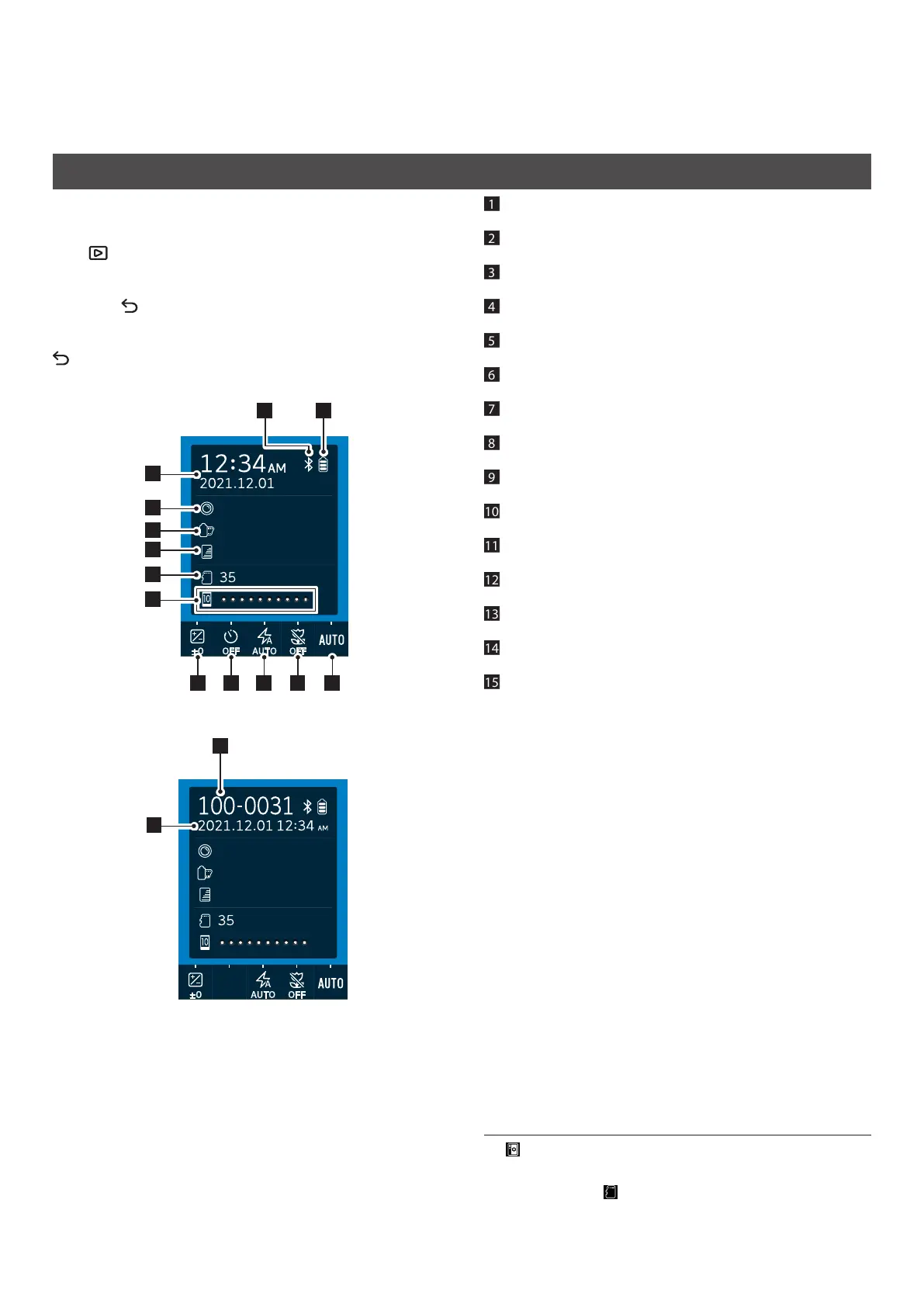
LCD Screen display
When the camera is turned on, the shooting screen appears on the
LCD Screen.
• To switch from the shooting screen to the playback screen, press
the (Playback) button.
• To switch from the playback screen to the shooting screen, press
the Shutter button fully.
If you press (Back) while the shooting screen or playback screen
is displayed, the following information will appear on the LCD
Screen. To return to the shooting screen or playback screen, press
(Back) again.
Shooting screen
1
2
3
4
5
7 8 9 10 11
1213
6
LENS #1 Normal
FILM #1 Normal
instax-Rich Mode
Playback screen
15
14
LENS #1 Normal
FILM #1 Normal
instax-Rich Mode
1
Current date and time
2
Lens effects
3
Film effects
4
Print quality
5
Number of shots available*4
6
Film remaining indicator
7
EXPOSURE
8
SELF-TIMER
9
FLASH
10
MACRO
11
WHITE BALANCE
12
Battery remaining indicator
13
Bluetooth connection status indicator
14
Frame number
15
Shooting date and time
*4 (Camera) is displayed when the internal memory is used.
When the number of shots available is 10 or less, the icon is
displayed in red. (Memory card) is displayed when a
memory card is used.


 To Next Page