CR-IR 362
Service Manual
IN-29
IN-29
011-207-09E
09.30.2009 FM5539
7. CLInstallationProcedures
1.
PerformtheCLinstallationprocedures.
u
NOTE
u
Complete "7. CL Installation Procedures" before performing the procedures
described in "8. Installing RU Software."
{FCR XG-1/CR CL Service Manual}
8. InstallingRUSoftware
u
INSTRUCTION
u
If the OS of CL is Windows Vista, conrm the followings before installation.
- The version of PC-TOOL is V4.0 or later.
- The UAC (User Account Control) is set to OFF. If the UAC is set to ON, set it to OFF,
install the PC-TOOL, and install the RU software. After performing the procedures
above, set back UAC to On again.
REFERENCE
This chapter describes the procedures, by way of example, where settings are made
as follows:
IP address of the RU : 172.16.1.11
IP address of the CL : 172.16.1.21
8.1 SettingtheIPAddressoftheRU
1.
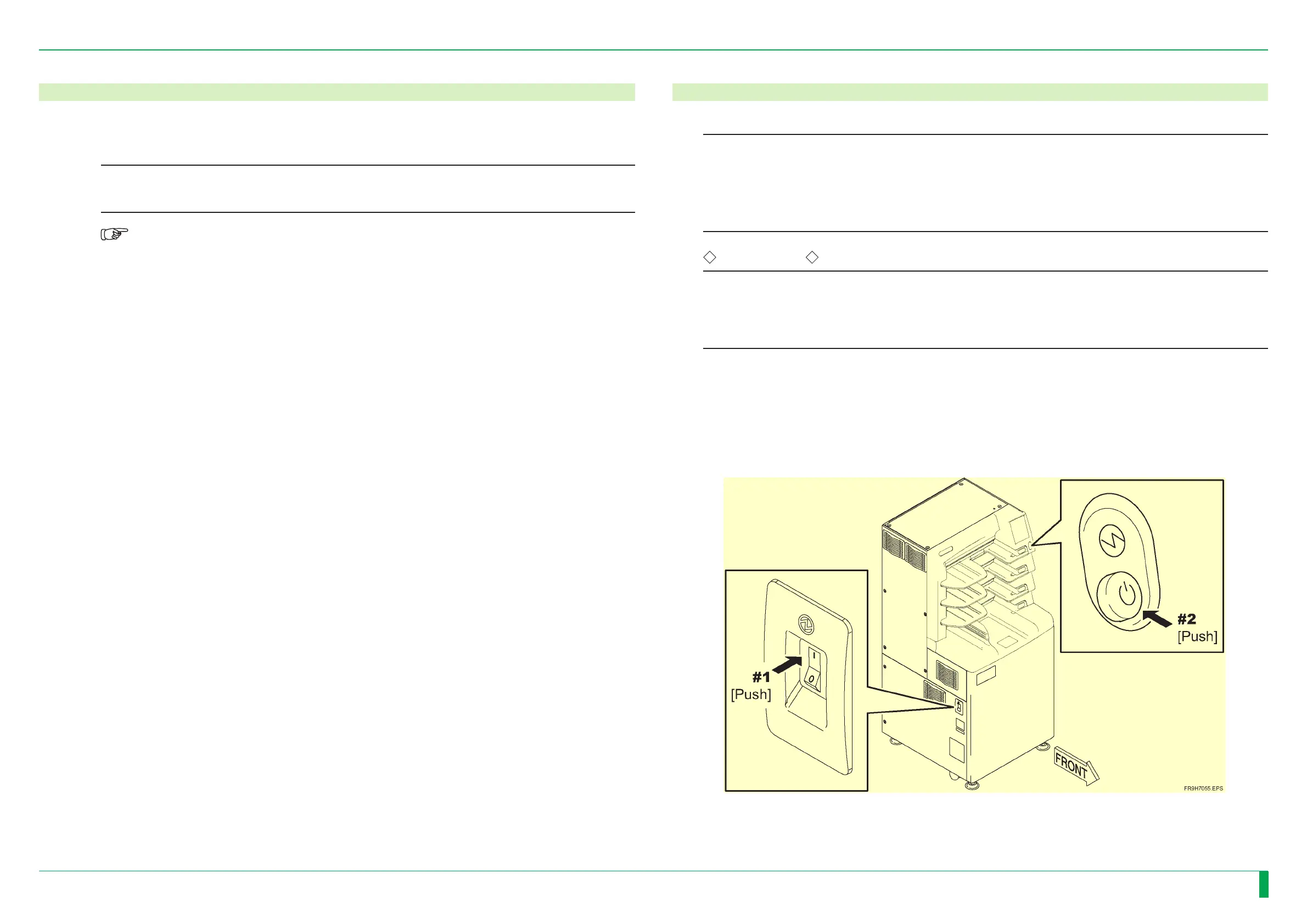
TurnONthepoweroftheCL.
2.
TurnONthepoweroftheRU.






 To Next Page