Interfaces and connectors
6 - English A26361-D1534-Z120-2-7419
Interfaces and connectors
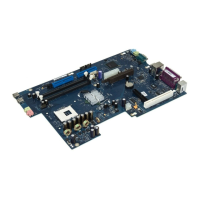
The positions of the interfaces and connectors are shown on page "Cover".
The components and connectors marked are not necessarily present on the mainboard.
External ports
The positions of the external ports are shown on page "Cover".
PS/2 keyboard port, purple PS/2 mouse port, green
Serial interface, turquoise Parallel port/Printer, burgundy
LAN
LAN connector USB - Universal Serial Bus, black
Audio output (Line out), light green Microphone jack (mono), pink
Audio input (Line in), light blue
LAN connector
This mainboard has an Intel 82562EI LAN controller. This LAN controller supports the transfer rates
of 10 Mbit/s, 100 Mbit/s and 1000 Mbit/s. The LAN controller is equipped with a 40 KB transmission
and receiving buffer (FIFO) and supports WOL function through Magic Packet.
It is also possible to boot a device without its own boot hard disk via LAN. Here InCom LAN Boot or
bootix® PXE are supported.
The LAN RJ45 connector has two LEDs (light emitting diodes).
2
1
1 = a connection exists (e.g. to a hub).
2 = Link Mode: the LAN connection is active.
WOL mode: a Magic Packet
TM
is being
received.



 To Next Page