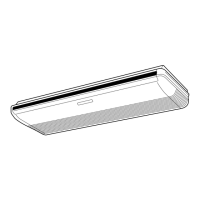
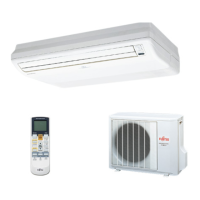
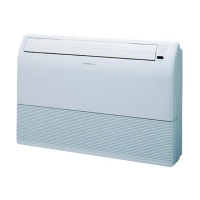
This document describes the Fujitsu Room Air Conditioner, available in Floor Console and Under Ceiling Dual Type models, with indoor units ABT24AG and ABT24RG, and outdoor units AOT24AN and AOT24RN. It serves as an operating manual, providing detailed instructions on its functions, usage, and maintenance.
Function Description
The air conditioner offers various operating modes to ensure comfort and efficiency.
Automatic Operation:
For Cooling Models, simply pressing the START/STOP button initiates automatic operation in either Cooling or Dry mode, based on the thermostat setting and the current room temperature.
For Heat & Cool Models (Reverse Cycle), the unit automatically starts in Heating, Cooling, or Monitor modes, adjusting to the thermostat setting and actual room temperature.
Sleep Timer:
In Cooling or Dry mode, activating the SLEEP timer gradually raises the thermostat setting over the operating period, then automatically turns the unit off when the set time is reached.
For Heat & Cool Models, during Heating mode, the thermostat setting is gradually lowered. In Cooling or Dry mode, it's gradually raised. The unit turns off automatically upon reaching the set time. The SLEEP timer is designed to prevent excessive warming or cooling during sleep by automatically modifying the thermostat setting. For heating, the setting is lowered by 1°C every 30 minutes, up to a total of 4°C, and maintained until the set time elapses. For cooling/dry, the setting is raised by 1°C every 60 minutes, up to a total of 2°C, and maintained until the set time elapses.
Wireless Remote Control Unit:
The unit comes with a wireless remote control for convenient operation, allowing users to adjust settings from a distance.
Omni-Directional Air Flow (Swing Operation):
This feature provides three-dimensional control over air direction. It combines UP/DOWN and RIGHT/LEFT air direction swings. The UP/DOWN flaps operate automatically according to the selected operating mode, allowing for air direction settings based on the mode.
Mildew-Resistant Filter:
The air filter is treated to resist mildew growth, promoting cleaner air and simplifying maintenance.
Usage Features
The manual provides comprehensive instructions for operating the air conditioner, from basic startup to advanced timer and airflow settings.
Turning on the Power:
Users need to connect the power supply plug to an electrical outlet or turn on the circuit breaker for direct line connections.
Remote Control Unit Setup:
The remote control requires four R03/LR03 batteries. Users must slide open the battery compartment lid, insert batteries aligning polarities correctly, and then close the lid. The current time needs to be set using the TIME ADJUST button and the SET TIME buttons. The remote control unit must be pointed at the signal receiver for correct operation, with an operating range of about 7 meters. A beeping sound confirms signal reception.
Selecting Mode Operation:
- Press the START/STOP button to turn on the unit. The OPERATION indicator lamp (red) will light.
- Press the MASTER CONTROL button to cycle through modes: AUTO, COOL, DRY, FAN, and *HEAT (for Heat & Cool models). The display will reappear after about three seconds.
Setting the Thermostat:
Use the SET TEMP. buttons (up/down arrows) to adjust the thermostat setting. The range is 18 to 30°C for AUTO, 16 to 30°C for *Heating, and 18 to 30°C for Cooling/Dry. The thermostat setting is not displayed in FAN mode.
Setting the Fan Speed:
Press the FAN CONTROL button to cycle through fan speeds: AUTO, HIGH, MED, and LOW. In AUTO mode, the fan adjusts to circulate warmed air optimally during heating, or slows down as the room temperature approaches the thermostat setting during cooling. In FAN mode, the fan turns on and off, running at low speed when on. During Monitor operation and the start of Heating mode, the fan operates at a very low setting.
Stopping Operation:
Press the START/STOP button to turn off the unit. The OPERATION indicator lamp (red) will go out.
About Mode Operation:
- AUTO (Cooling Model): Switches between Cooling and Drying modes if the room temperature is 2°C higher than the set temperature. During Drying, the FAN setting should be LOW for gentle cooling.
- *AUTO (Auto Changeover for Heat & Cool Model): Selects Heating or Cooling based on room temperature. The fan operates at very low speed for about one minute to determine conditions before selecting the mode. Once the temperature is near the thermostat setting, it enters monitor operation with low fan speed.
- Heating: Warms the room. The fan operates at very low speed for 3-5 minutes to warm up the indoor unit before full operation. Automatic Defrosting may occur if frost forms on the outdoor unit, interrupting heating and causing the OPERATION indicator lamp (red) to flash.
- Cooling: Cools the room.
- Dry: Gently cools while dehumidifying. Heating is not possible. The fan operates at low speed and may stop periodically to adjust humidity. Manual fan speed changes are not possible.
- Fan: Circulates air without heating or cooling.
Timer Operation:
The unit supports ON timer, OFF timer, and PROGRAM timer functions.
- ON/OFF Timer: Press the TIMER button to select OFF or ON timer. Use the SET TIME buttons to adjust the desired time while the display flashes.
- PROGRAM Timer: Allows integrating OFF and ON timer operations in a single 24-hour sequence. The first timer function to operate will be the one nearest the current time.
Adjusting Air Circulation:
- Vertical Air Direction: Press the AIR FLOW DIRECTION VERTICAL SET button to change the up/down airflow range. The vertical airflow direction is automatically set based on the operation type (horizontal for Cooling/Dry, downward for Heating). During AUTO mode, airflow is horizontal for the first minute.
- Horizontal Air Direction: Press the AIR FLOW DIRECTION HORIZONTAL SET button to change the right/left airflow range.
- Swing Operation: Press the AIR FLOW DIRECTION VERTICAL SWING or HORIZONTAL SWING button to enable automatic up/down or right/left air direction swing. The SWING indicator lamp (orange) will light. Pressing the button again stops the swing.
Energy Save Operation:
This feature helps reduce energy consumption.
- Press START/STOP.
- Select COOL, DRY, or *HEAT mode using MASTER CONTROL.
- Press the ENERGY SAVE button.
In *Heating mode, the thermostat setting decreases by 1°C immediately, then by another 1°C every 30 minutes, saving energy by heating at 4°C less than the set temperature.
In Cooling/Dry mode, the thermostat setting increases by 1°C immediately, then by another 1°C after one hour, saving energy by cooling/drying at 2°C more than the set temperature.
Manual Auto Operation:
If the remote control is lost or unavailable, press the MANUAL AUTO button on the main unit control panel. The unit will operate in AUTO mode with a fan speed of "AUTO" and a thermostat setting of 23°C.
Maintenance Features
Proper maintenance ensures the longevity and efficiency of the air conditioner.
Cleaning the Air Filter:
- Pull out both sides and the center of the intake grille.
- Pull the air filters upward to remove them.
- Clean the air filters by vacuuming or washing with mild detergent and warm water. Allow them to dry thoroughly in a shady place.
- Re-attach the air filters: fit them onto the inside of the intake grille, ensuring bottom edges fit into filter brackets and top edges fit under projections.
- Push in both sides and the center of the intake grille.
Accumulated dirt on the air filter reduces airflow, operating efficiency, and increases noise. Filters should be cleaned every two weeks during normal use.
General Maintenance:
- Before cleaning, turn off the unit and disconnect the power supply cord.
- Ensure the intake grille is securely installed.
- Avoid touching the heat exchanger when removing/replacing air filters to prevent injury.
- For extended periods of non-use, remove batteries from the remote control unit to prevent leakage.
- If the unit is used for long periods, internal dirt accumulation can reduce performance. Regular inspection by authorized service personnel is recommended.
- When cleaning the unit's body, do not use water hotter than 40°C, harsh abrasive cleansers, or volatile agents like benzene or thinner.
- Do not expose the unit body to liquid insecticides or hairsprays.
- If the unit will not be operated for a month or more, run it in fan mode for half a day to thoroughly dry internal parts before storage.
Troubleshooting:
The manual includes a troubleshooting section to address common issues such as the unit not operating, noise, smells, mist/steam emission, weak airflow, and water production from the outdoor unit. It advises users to check power connections, timer settings, air filter cleanliness, and thermostat settings. In case of malfunction (e.g., burning smell), users are instructed to immediately stop operation, disconnect power, and consult authorized service personnel.
Operating Tips:
- AUTO Restart: If power is interrupted, the unit will restart automatically in the previously selected mode once power is restored. If a power failure occurs during TIMER operation, the timer will reset, and the unit will begin operating under the new timer setting, with the TIMER indicator lamp flashing.
- Interference: Other electrical appliances or wireless radio transmitters may cause malfunction. In such cases, temporarily disconnect and reconnect the power supply plug, then use the remote control to resume operation.
- Temperature and Humidity Range: Provides optimal operating temperature and humidity ranges for Cooling/Dry and *Heating modes. Operating outside these ranges can trigger protection circuits or lead to issues like freezing heat exchangers and water leakage.
- Heating Performance: Operates on a heat-pump principle, which may reduce performance in low outdoor temperatures. It may take time to heat the entire room.
- Microcomputer-controlled Automatic Defrosting: Prevents frost formation on the outdoor unit in low outdoor temperature and high humidity conditions, temporarily stopping operation for 7-15 minutes while the defrosting circuit runs.
- Low Ambient Cooling: Outdoor unit fans may switch to Low Speed when outdoor temperature drops.
- Usage Restriction: Do not use the unit for purposes other than Cooling, *Heating, Dehumidifying, and air-circulation in ordinary dwellings.



 To Next Page
 General