En-7
4. INITIALIZATION (RESET)
Initialize (reset) this product in the following situations:
- Changing the access point
- Disposing of this product
- Transferring this product to a third party
1
Unregister the air conditioner from the mobile app.
For details, refer to the operation manual for AIRSTAGE Mobile.
2
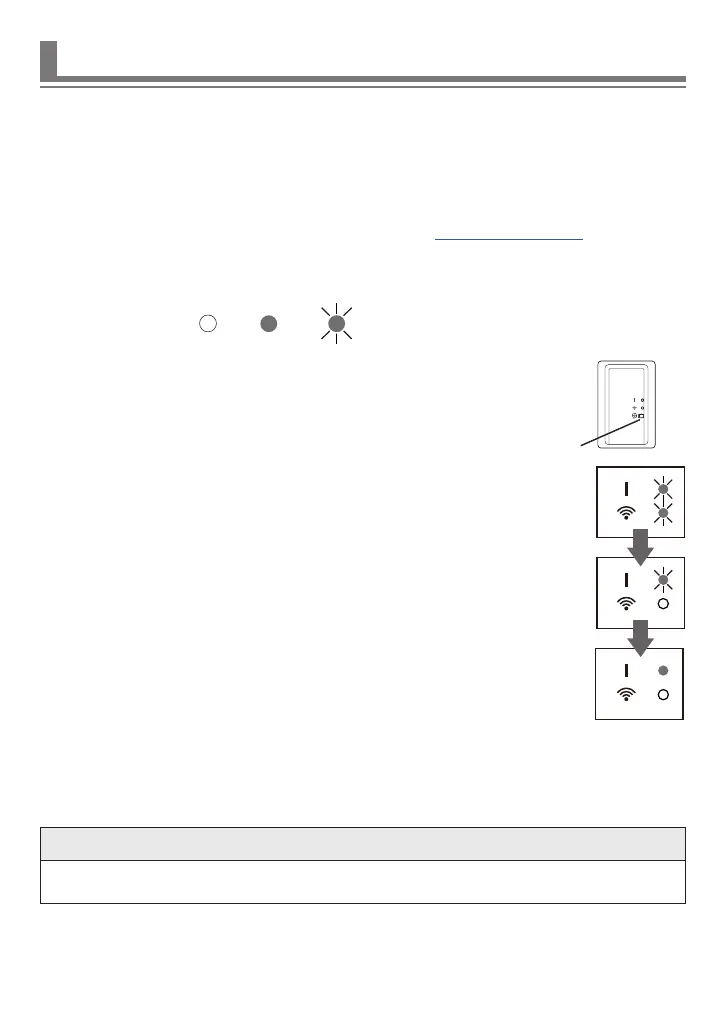
Initialize (reset) this WLAN adapter as the following procedure.
*Lighting pattern:
O
On
Blinking
(1) Press and hold the Setting button for 12 seconds.
(2) All LED lamps blink 3 times simultaneously (on/o at 0.5-second inter-
vals).
Release the Setting button during the blinking.
The initialization is complete, and LED 1 blinks. (on/o = 2 s/0.5 s)
After 10 seconds, the LED1 turns on (stop blinking).
LED1: On
LED2: O
■
To continue to use
If you or a third party wishes to continue the use of this product, connect this product to
another access point.
NOTE
• If you initialize the WLAN adapter, the information saved in the WLAN adapter is de-
leted.
Setting button



 To Next Page