Need help?
Do you have a question about the Fujitsu D3183 and is the answer not in the manual?
Details of the rear external ports for D3173 and D3183 mainboards.
Details of the front external ports for D3173 and D3183 mainboards.
Explanation of the DIP switch settings for the mainboard.
Guidelines for safe handling of mainboards, including ESD protection measures.
Overview of special features and additional information sources for the mainboard.
Description and identification of external ports like LAN, USB, HDMI, DVI-I, DisplayPort.
Instructions for updating the BIOS using the DeskFlash program in Windows.
Steps for performing a BIOS update using a bootable USB stick.
 General
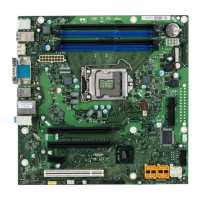
| Socket | LGA1150 |
|---|---|
| Memory Type | DDR3 |
| PCIe x16 Slots | 1 |
| PCIe x1 Slots | 2 |
| PCI Slots | 1 |
| Storage Interfaces | 6x SATA 6Gb/s |


 To Next Page