En-4
7.1. Connecting the transmission cables
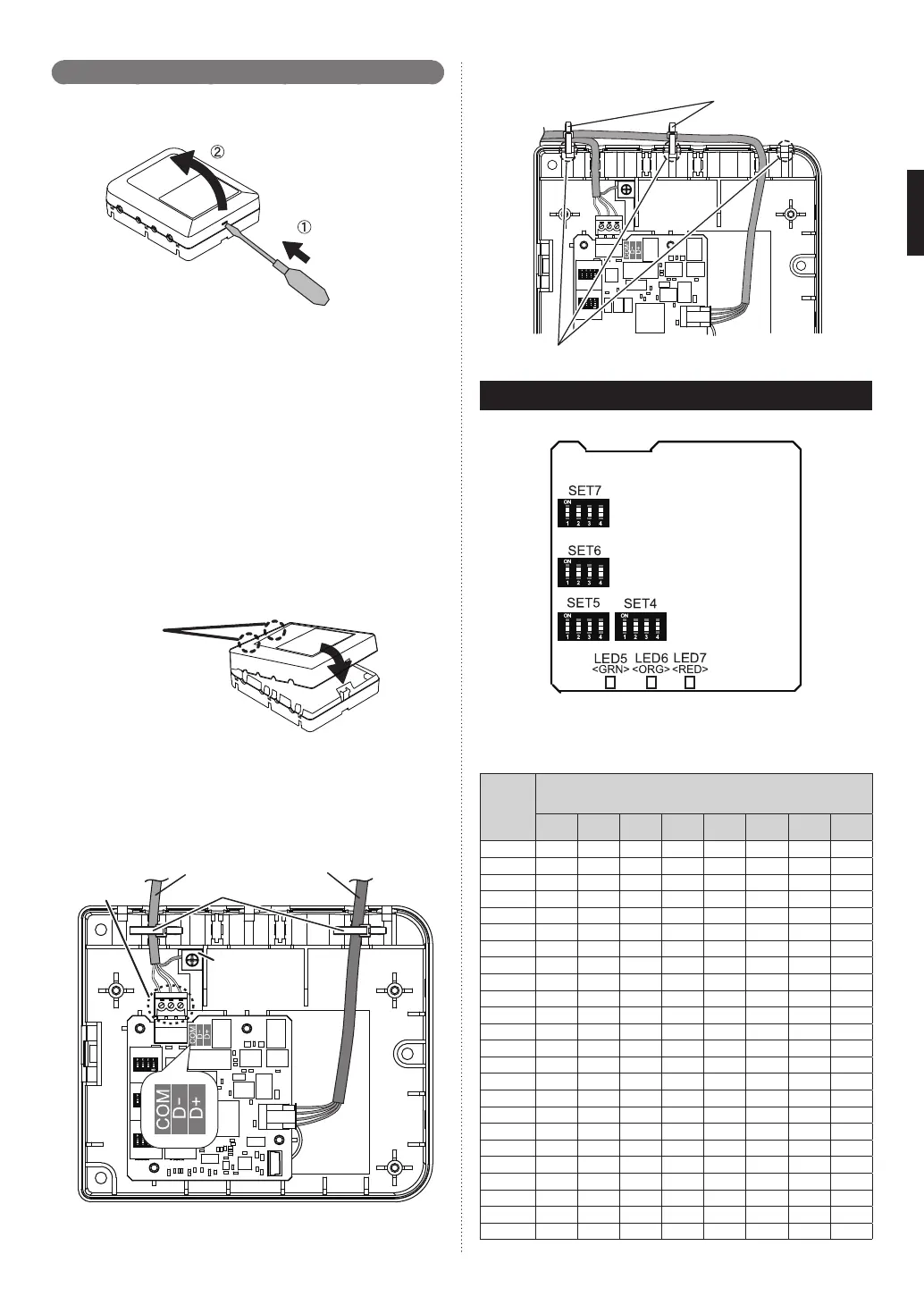
(1) Turn off the power of the connecting unit.
(2) Insert the driver, etc. into the hole (For open case) and open the top
cover.
Push
Open
(3) Connect the transmission cable to accessory MODBUS Connector to
connect to MODBUS network.
(4) Connect the MODBUS cables to RS485_A+ (D+), RS485_B- (D-), and
Common (COM) according to the polarity of the master unit.
(5) Attach the MODBUS connector to the board terminal.
(6) When using MODBUS cable with shield, earth (ground) at one end of
cable. Connect the shield to the Earth (Ground) terminal. However,
the Earth (Ground) terminal of this unit is not earthed (grounded) di-
rectly, earth (ground) at the opposite side end or earth (ground) using
separately purchased cable. Do not connect the shield to the Common
(COM).
(7) Connect the connector cable for indoor unit to the specifi ed connector
fi rmly.
(8) Securely tighten the cable tie and then confi rm that the cable will not
come out.
(9) Once the wiring of the cables has been completed, fi t the 2 claws of
top cover and close the cover.
2 claws
(10) Use the 3 screws (M4 × 16 mm) provided to mount the MODBUS
convertor to the behind ceiling, wall, fl oor or other suitable location.
* The hole for a cable can be widened as necessary. When passing the
thick cable through the hole, widen it.
Connector cable
to Indoor unitMODBUS cable
MODBUS
connector
Cable tie
Earth (Ground)
terminal
Fix the connector cable even outside the main unit as necessary. Fix the
cable with cable tie using 3 fi xing holes.
Cable tie
(Accessories)
Holes for fi xing cable tie (3 places)
8. CIRCUIT BOARD SETTING
Set MODBUS convertor DIP switch SET4, SET5, SET6, SET7.
(1) MODBUS communication setting: MODBUS slave address setting
(SET4/5)
Address can be set. (1 to 247)
MODBUS
convertor
address
DIP Switch Setting
ON:
●
/ OFF:
○
SET5-1 SET5-2 SET5-3 SET5-4 SET4-1 SET4-2 SET4-3 SET4-4
1
○
○
○
○
○
○
○
●
2 ○○○○○○●○
3 ○○○○○○●●
4 ○○○○○●○○
5 ○○○○○●○●
6 ○○○○○●●○
7 ○○○○○●●●
8 ○○○○●○○○
9 ○○○○●○○●
10 ○○○○●○●○
11 ○○○○●○●●
12 ○○○○●●○○
13 ○○○○●●○●
14 ○○○○●●●○
15 ○○○○●●●●
16 ○○○●○○○○
17 ○○○●○○○●
18 ○○○●○○●○
19 ○○○●○○●●
20 ○○○●○●○○
21 ○○○●○●○●
22 ○○○●○●●○
23 ○○○●○●●●
24 ○○○●●○○○
9374707140-03_IM.indb Sec1:49374707140-03_IM.indb Sec1:4 6/26/2019 1:57:30 PM6/26/2019 1:57:30 PM



 To Next Page