26 EN
PLAYBACK
3 Press [B (play)] to start programme playback.
• The programme playback will start.
To exit from the programme playback mode:
•Press [RETURN] in stop mode.
This function shuffles the playback order of tracks / files.
1 In stop mode, press [MODE] twice.
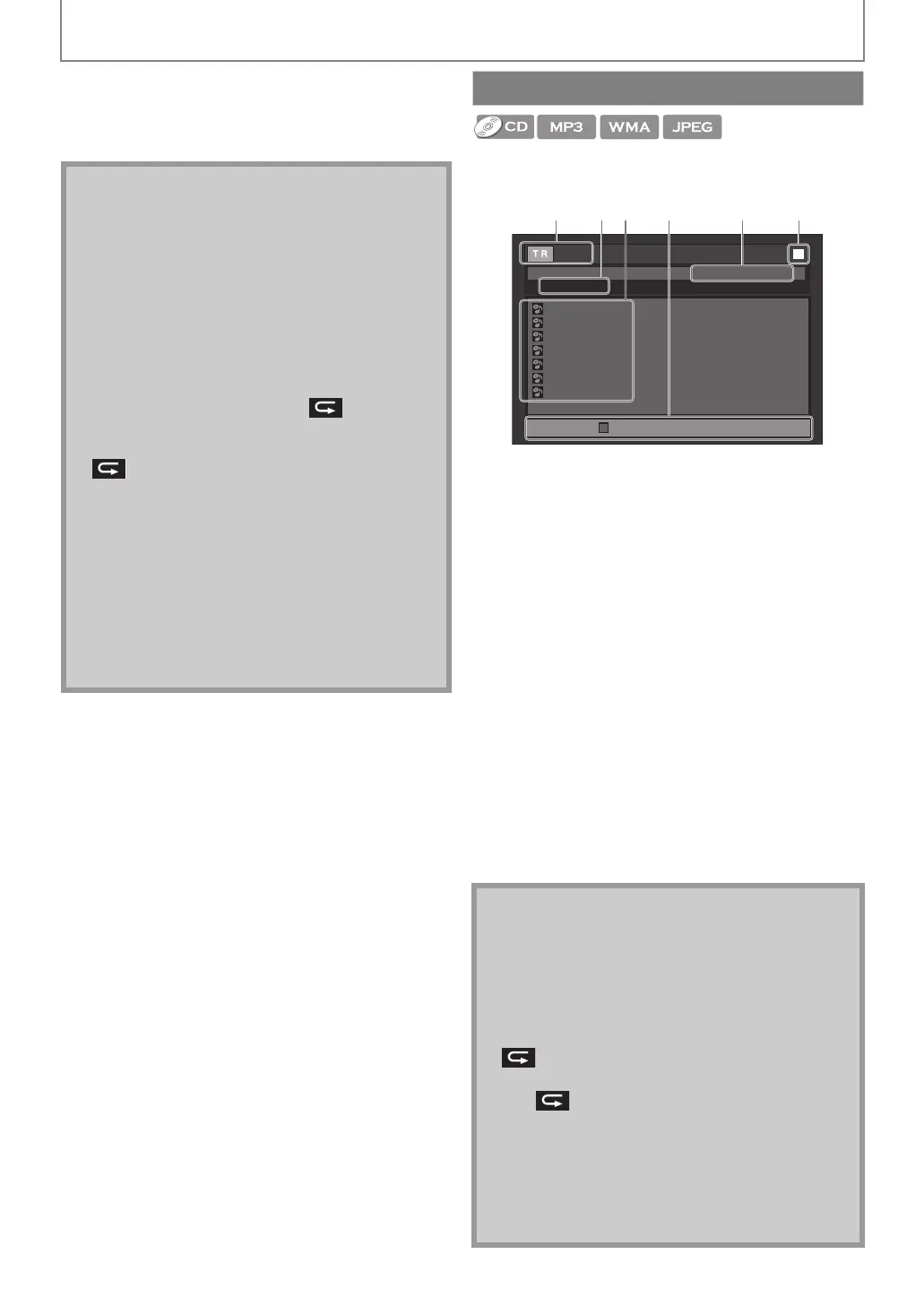
1. Audio CD
Track information
MP3 / WMA / JPEG
File information
2. Audio CD
“CD-DA” will be displayed.
MP3 / WMA / JPEG
Current disc, SD card, or folder name will be displayed.
3. Track / File list
Track / File list in the original order will be displayed.
4. Operation guide
Press [RED] to go to the previous page in the track / file
list.
Press [GREEN] to go to the next page in the track / file
list.
5. Total playback time of all tracks. (audio CD only)
6. Playback status
2 Press [B (play)] to start random playback.
To exit from the random playback mode:
•Press [MODE] in stop mode.
Note
• During programme playback, press [C (stop)] once
to set the resume point, and then press [B (play)] to
resume programme playback from where [C (stop)]
was pressed (audio CD) or from beginning of the file
where [C (stop)] was pressed (MP3 / WMA / JPEG).
• During programme playback, press [C (stop)] twice
to display the programme screen. To go back to the
normal programme playback, press [RETURN] to exit
from the programme screen, then press [B (play)].
• Up to 99 tracks / files can be entered.
• To repeat the current track / file in the programme,
press [REPEAT] repeatedly until “ Track”
appears during playback. To repeat the entire
programme, press [REPEAT] repeatedly until
“ All” appears during playback.
• Playback from a desired track / file and random
playback are not available during programme
playback.
•Press [MODE] to switch to the random playback
mode.
• The programme will be cleared when;
- the unit is turned into the standby mode.
- the media mode is switched to the other mode.
- the disc / card is removed. (as for “Disc” mode, just
opening the disc tray will clear the programme
info.)
Random Playback
Note
• During the random playback, press [C (stop)] once
to set the resume point, and then press [B (play)] to
resume random playback from where [C (stop)] was
pressed (audio CD) or from beginning of the file
where [C (stop)] was pressed (MP3 / WMA / JPEG).
• To repeat the current track / file in the random
selection, press [REPEAT] repeatedly until
“ Track” appears during playback. To repeat the
entire random selection press [REPEAT] repeatedly
until “ All” appears during playback.
• Playback from a desired track / file is not available
during random playback.
• In stop mode, press [RETURN] to switch to the
programme playback mode.
• For a disc containing mixed MP3 and Windows
Media™ Audio files, random playback of those files
will be performed.
1 / 3
1 : 13 : 29
CD_D A
1 0:36
1:14
0:45
0:50
0:53
0:20
0:54
2
3
4
5
6
7
- - / 16
1 6
4 5
Random Total
Page Down
e.g.) audio CD
E1T12ED_EN.book Page 26 Tuesday, August 3, 2010 5:13 PM


 To Next Page