5EN
INTRODUCTION
INTRODUCTION CONNECTIONS PLAYBACK FUNCTION SETUP OTHERS
• Remote Control
• Batteries (R6,1.5V × 2)
•Video cable
• FM wire antenna
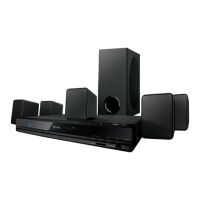
• 1 centre, 2 front, 2 rear speakers and 1 subwoofer
•Owner’s Manual
• Quick Start Guide
•CD-ROM
• Warranty card
INTRODUCTION
Safety Instructions ........................................................................2
Supplied Accessories ...................................................................5
Trademark Information...............................................................6
Symbols Used in this Manual....................................................6
Features ............................................................................................7
Front Panel.......................................................................................8
Rear Panel.........................................................................................8
Remote Control..............................................................................8
Opening Screen .............................................................................9
Front Panel Display.................................................................... 10
CONNECTIONS
Placing the Speakers ................................................................. 11
Connection to the TV................................................................ 11
Connecting Speakers and Subwoofer ................................ 13
Connecting Audio from Cable Box / Recorder /
Game Console or TV.............................................................. 13
Connecting Portable Media Player ......................................14
Connecting FM Radio Antenna............................................. 14
Network Connection with LAN .............................................14
Finding the Video Channel on Your TV.............................. 15
PLAYBACK
Information on Playback.......................................................... 16
How to Insert a Disc................................................................... 19
Selecting the Media Mode...................................................... 19
Playing Back a BD, DVD or a Disc with AVCHD Files ...... 20
Playing Back an Audio CD or a Disc with DivX® /
MP3 / Windows Media™ Audio / JPEG Files .................21
KODAK Picture CD...................................................................... 22
Reading the SD Memory Card ...............................................22
About DivX® and DivX® VOD.................................................. 23
Playing Back DivX® with DivX® External Subtitle ............ 24
Fast Forward / Fast Reverse.................................................... 24
Slow Forward Playback ............................................................ 24
Step by Step Playback .............................................................. 25
Repeat Playback.......................................................................... 25
Programme Playback................................................................ 25
Random Playback.......................................................................26
Noise Reduction.......................................................................... 27
PIP (BONUSVIEW) Setting........................................................ 27
Camera Angle .............................................................................. 27
Enjoying BD-Live Discs with Internet..................................27
Search..............................................................................................28
Switching Subtitles.....................................................................29
Switching Audio Soundtrack..................................................29
Setting the BD Audio Mode ....................................................30
Volume Control ...........................................................................30
Selecting Surround Mode........................................................31
Selecting Sound Effect Mode .................................................31
Switching Active Source Mode..............................................32
Sleep Timer....................................................................................32
Play from Portable Media Player ...........................................32
Radio Operations ........................................................................32
Enjoying Internet Radio with vTuner...................................33
FUNCTION SETUP
How to Navigate through the Setup Menus.....................36
List of Setup Menus....................................................................36
TV Aspect .......................................................................................43
Audio Output ...............................................................................43
Parental...........................................................................................45
fun-Link(HDMI CEC) ...................................................................45
Network Connection .................................................................46
Software Update .........................................................................49
Initialise...........................................................................................50
OTHERS
Troubleshooting..........................................................................51
Glossary ..........................................................................................53
Language Code List....................................................................55
Specifications ...............................................................................56
Network Service Disclaimer ....................................................57
Supplied Accessories
Contents
E1T12ED_EN.book Page 5 Tuesday, August 3, 2010 5:13 PM


 To Next Page