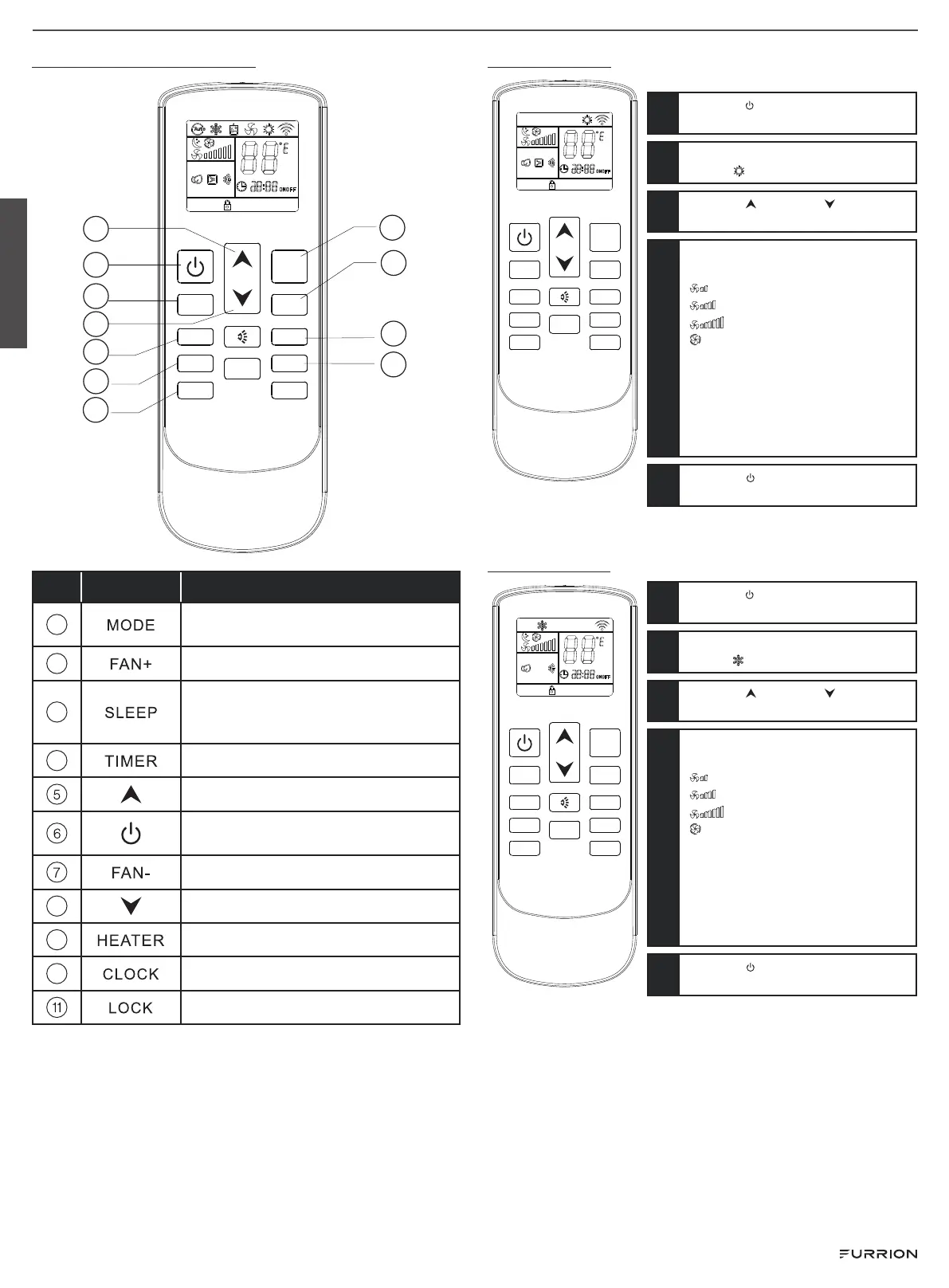
Remote control functions
7
8
5
6
9
10
11
1
2
3
4
FAN- FAN+
MODE
HEATER SLEEP
CLOCK TIMER
LOCK LIGHT
0 0
C / F
NO. BUTTON FUNCTION
1
Set the air conditioner operating
mode.
2
Increase the fan speed.
3
Enter sleep mode, and the ambient
temperature will be regulated
automatically.
4
Set or cancel the timer function.
Increase the temperature/time.
Turn on or turn off the air conditioner.
Decrease the fan speed.
8
Decrease the temperature/time.
9
Not applicable for this model.
10
Adjust the clock.
Lock the remote control set.
Heating mode
FAN- FAN+
MODE
HEATER SLEEP
CLOCK TIMER
LOCK LIGHT
0 0
C / F
1
Press the button to turn on the air
conditioner.
2
Press the MODE button to select
heating
mode.
3
Press UP or DOWN button to
set the desired temperature.
4
Press the FAN+ or FAN- button to set
the fan speed:
“
” : Low speed
“
” : Medium speed
“
” : High speed
“
” : Auto speed
NOTE: In auto setting, the speed
is chosen automatically based
on the difference between
room temperature and set
temperature(the bigger the
difference, the faster the fan will run).
5
Press the button to switch off the
air conditioner.
Cooling mode
FAN- FAN+
MODE
HEATER SLEEP
CLOCK TIMER
LOCK LIGHT
0 0
C / F
1
Press the button to turn on the air
conditioner.
2
Press the MODE button to select
cooling
mode.
3
Press UP or DOWN button to
set the desired temperature.
4
Press the FAN+ or FAN- button to set
the fan speed:
“
” : Low speed
“
” : Medium speed
“
” : High speed
“
” : Auto speed
NOTE: In auto setting, the speed
is chosen automatically based
on the difference between
room temperature and set
temperature(the bigger the
difference, the faster the fan will run).
5
Press the button to switch off the
air conditioner.
English
Rev: 12-21-23
- 3 -




 To Next Page