EasyManua.ls Logo

Furuno 1623 - User Manual

Furuno 1623
48 pages
Print Icon
To Next Page IconTo Next Page
Loading...
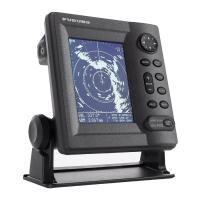
MARINE RADAR
MODEL 1623
OPERATOR'S MANUAL
www.furuno.co.jp
MODEL

Other manuals for Furuno 1623

Questions and Answers

  • J
    Jean OwenJul 25, 2025
    How to fix Furuno Marine Radar control panel when it does not light?
    • U
      usmithJul 26, 2025
      If the Furuno Marine Radar control panel doesn't light, try these steps: * Adjust the PANEL DIMMER in the User menu. * Check if the battery is discharged. * Inspect the fuse to see if it has blown.
  • Z
    Zachary ParkJul 30, 2025
    What to do if nothing appears on Furuno 1623 display?
    • N
      Nicholas MartinJul 31, 2025
      If nothing appears on the Furuno Marine Radar display (but the panel lights are on) or the display contrast is poor, try adjusting the LCD contrast.
  • Z
    zthomasAug 4, 2025
    What to do if Furuno 1623 shows “NO HEADING PULSE” or “NO BEARING PULSE”?
    • A
      Anthony FisherAug 5, 2025
      If the message “NO HEADING PULSE” or “NO BEARING PULSE” appears on your Furuno Marine Radar, check that the antenna cable is firmly connected.
  • J
    Jeanne TrujilloAug 9, 2025
    What to do if noise or targets don't appear on Furuno Marine Radar?
    • T
      Tommy SanchezAug 9, 2025
      If neither noise nor targets appear on your Furuno Marine Radar (but characters and markers do), check the signal cable for damage.
  • W
    William HodgesAug 14, 2025
    What to do if indications or markers don't appear on Furuno 1623 Marine Radar?
    • A
      amurphyAug 14, 2025
      If neither indications nor markers appear on your Furuno Marine Radar (but noise and targets do), check the signal cable for damage.
  • S
    Sherri MontoyaAug 20, 2025
    What to do if nothing happens when a key is pressed on Furuno 1623?
    • J
      jonesjacobAug 20, 2025
      If nothing happens when you press a key on the Furuno Marine Radar, the key may be faulty. Contact your dealer.

Summary

IMPORTANT NOTICES

General Safety and Handling

Essential guidelines for safe operation, manual use, copying, and product modification.

Disposal Instructions

Proper procedures for discarding the product and its batteries according to regulations.

SAFETY INSTRUCTIONS

Operator and Installer Safety Precautions

Critical safety measures for operating and installing the radar to prevent injury or damage.

FOREWORD AND PRODUCT OVERVIEW

Welcome to FURUNO MODEL 1623 Radar

Introduction to the FURUNO Model 1623 marine radar and company background.

Key Features and Capabilities

Highlights of the radar's main functions, design, and operational advantages.

SYSTEM CONFIGURATION DIAGRAM

EQUIPMENT LISTS

OPERATION FUNDAMENTALS

Control Panel and Display Layout

Overview of the radar's control buttons, functions, and display unit interface.

Understanding Radar Display Indications

Explanation of symbols, data, and readings displayed on the radar screen.

POWER ON;OFF AND TRANSMISSION MODES

Powering Up and Standby Operation

Procedures for turning the radar on, off, and switching between transmit and standby.

DISPLAY ADJUSTMENTS AND RANGE SETTINGS

Adjusting Display Contrast and Brilliance

Guide to fine-tuning display brightness and contrast for optimal viewing.

Selecting Radar Range and Receiver Sensitivity

How to choose radar range and adjust receiver gain for clear echo display.

CLUTTER SUPPRESSION TECHNIQUES

Sea Clutter Suppression

Methods for reducing unwanted sea clutter using the A/C SEA control.

RAIN CLUTTER AND RANGE MEASUREMENT

Rain Clutter Suppression

Techniques for minimizing rain, snow, or hail echoes using the A/C RAIN control.

Measuring Target Range

How to measure target distance using cursor, rings, and VRM.

BEARING MEASUREMENT AND DISPLAY SHIFTING

Measuring Target Bearing

Using the cursor and EBL to measure the bearing to targets.

Shifting Display View

Manually or automatically shifting the display origin to expand view.

ZOOM FUNCTION AND USER MENU

Using the Zoom Feature

Magnifying selected areas of the radar display for detailed observation.

User Menu Navigation and Settings

Accessing and configuring radar settings through the user menu.

ADVANCED OPERATION FEATURES

Heading Line Management

Displaying, temporarily erasing, and managing the radar's heading line.

Interference and Noise Reduction

Techniques for rejecting radar interference and suppressing display noise.

ECHO TRAIL AND ECHO STRETCH

Echo Trail and Brilliance Settings

Monitoring target movement with echo trails and adjusting their brilliance.

Echo Stretch Functionality

Enhancing target visibility on long ranges by stretching echoes.

GUARD ALARM SYSTEM

Setting Up and Using Guard Zones

Procedure for defining and activating guard zones to detect target entry/exit.

WATCHMAN AND RAIN CLUTTER CONTROL

Watchman Feature Operation

Using Watchman for periodic guard zone checks to conserve magnetron life.

Long-range Rain Clutter Suppression

Employing the FTC function to minimize spurious echoes from weather.

PROG KEY AND PLOTTER OUTPUT

PROG Key Shortcut Functionality

Utilizing the PROG key for quick access to frequently used menu items.

Outputting Target Position to Plotter

Transferring target position data to an interfaced plotter.

NAVIGATION DATA DISPLAY MANAGEMENT

Turning Navigation Data On;Off

Enabling or disabling the display of navigation data on the radar screen.

Customizing Nav Data Displays

Configuring the selection and order of navigation data items shown.

SYSTEM MENU CONFIGURATION

MAINTENANCE AND TROUBLESHOOTING

Regular Maintenance Schedule

Recommended maintenance tasks and intervals for optimal radar performance.

FUSE REPLACEMENT AND BASIC TROUBLESHOOTING

Replacing the Main Fuse

Procedure for replacing the radar's main fuse with safety precautions.

Troubleshooting Common Radar Issues

Solutions for typical problems like display errors, control malfunctions, or frozen screens.

DIAGNOSTIC TESTS

Display and Antenna Unit Diagnostics

Steps for running diagnostic tests to identify faults in the display and antenna units.

TEST PATTERNS AND COMPONENT REPLACEMENT

Test Patterns and Memory Clearing

Using test patterns for verification and clearing memory to reset settings.

Magnetron and Synchro Belt Replacement

Guidance on when and how to replace key radar components like the magnetron or belt.

INSTALLATION GUIDELINES

Antenna Unit Mounting

Considerations and steps for correctly mounting the radar antenna unit.

DISPLAY UNIT INSTALLATION

WIRING CONNECTIONS

INSTALLATION ADJUSTMENTS

Heading Alignment Procedure

Step-by-step guide to aligning the radar's heading line with the vessel's true heading.

SWEEP TIMING ADJUSTMENT

NMEA;GPS WAAS SETUP AND VOLTAGE CHECK

NMEA and GPS WAAS Configuration

Setting up NMEA ports and GPS WAAS for navigation data input.

Magnetron Heater Voltage Verification

Procedure to check and verify the magnetron heater voltage.

MARINE RADAR SPECIFICATIONS

General Specifications

Overview of radar's general characteristics, display, and range/pulse settings.

Scanner Unit Specifications

Technical details of the radar's scanner unit components.

Transceiver Module Specifications

Technical data for the transceiver module, including frequency and power.

Display Unit Specifications

Technical details of the radar's display unit, screen type, and pixels.

PACKING LIST

INTERCONNECTION DIAGRAM

DECLARATION OF CONFORMITY

Furuno 1623 Specifications

General IconGeneral
Power Output2.2 kW
Display TypeLCD
Waterproof RatingIPX6
Power Supply12-24 VDC
Display Size6 inches
Range16 nautical miles
Antenna Length15 inches

Related product manuals