25
2. SYSTEM MENU
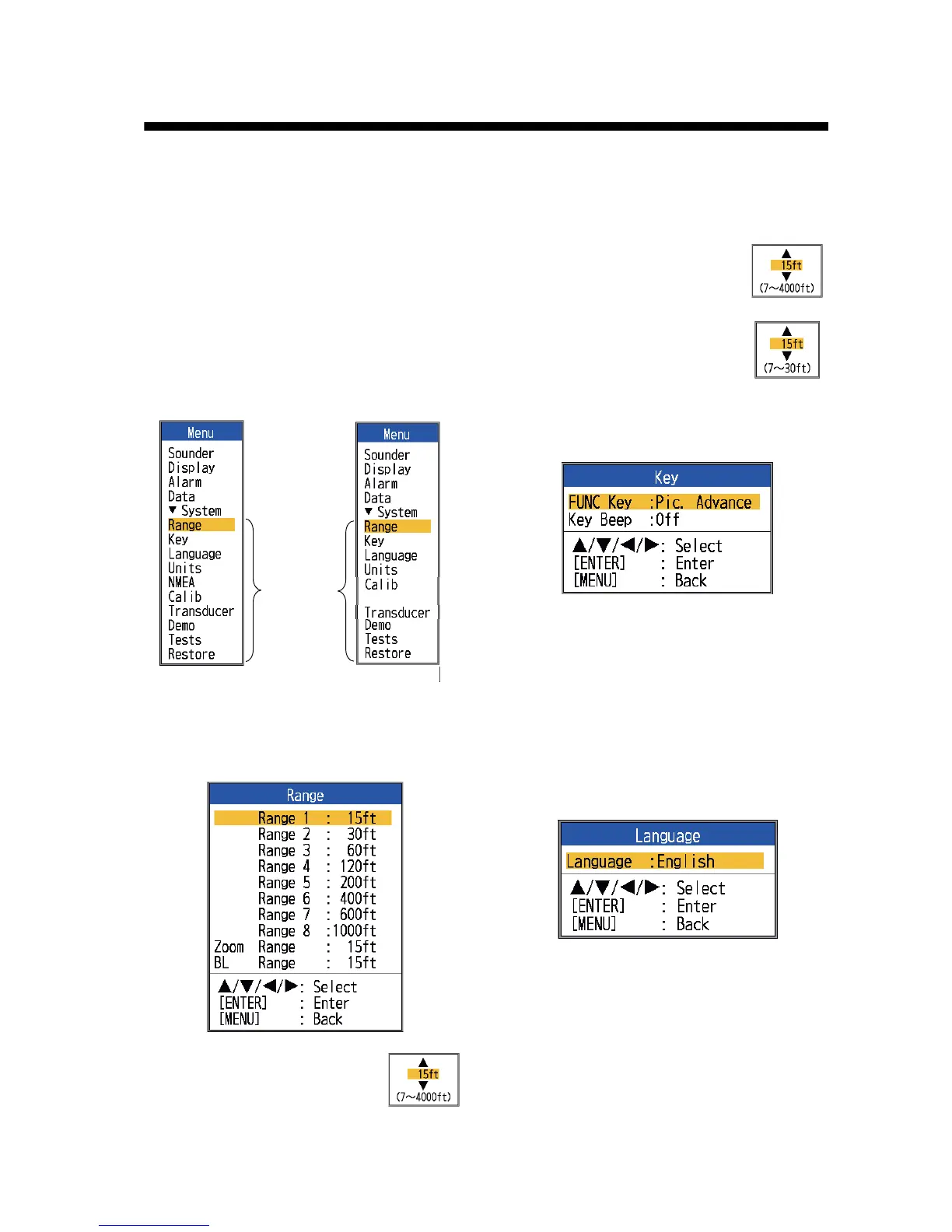
2.1 How to Display the
System Menu
The [System] menu mainly consists of items
which do not require regular adjustment.
1. Press the MENU/ESC key to open the
menu.
2. Select [System]. For [Tests], and [Re-
store], see Chapter 3. See Chapter 4 for
“NMEA”.
2.2 Range Menu
[Range 1] - [Range 8]: Set range
of each of the eight ranges
(available range: 7 to 4,000 ft).
Note that all default ranges are
restored whenever the depth unit is changed.
Therefore, change the depth unit before
changing the preset ranges.
[Zoom Range]: Select the range
to zoom in the bottom zoom and
marker zoom modes.
[B/L Range]: Select the expan-
sion width for the bottom lock
display.
2.3 Key Menu
[FUNC Key]: Select the item to program to the
FUNC key. The programming can also be
done by long-pressing the FUNC key. See
section 1.18.2.
[Key Beep]: Turn key beep on or off.
2.4 Language Menu
[Language]: The system language is avail-
able in English, and European and Asian lan-
guages. To change the language, select the
appropriate language and press the ENTER
key.
Standard spec.
Menus
shown
when
[System]
is selected.
Tankenmaru
Tankenmaru spec.



 To Next Page