EasyManua.ls Logo

Furuno FCV-1900 - User Manual

Furuno FCV-1900
85 pages
Print Icon
To Next Page IconTo Next Page
Loading...
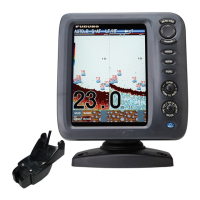
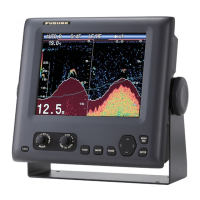
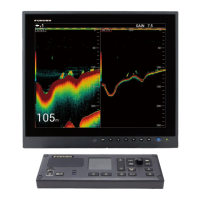
FISH FINDER
HI-RES FISH FINDER
FISH SIZE INDICATOR
FCV-1900
FCV-1900B
FCV-1900G
OPERATOR'S MANUAL
www.furuno.com
Model
(Product Name: FISH FINDER)

Table of Contents

Questions and Answers

  • R
    Ruth MitchellAug 13, 2025
    How to fix Furuno FCV-1900 Fish Finder when it cannot turn on?
    • A
      amber80Aug 13, 2025
      If your Furuno Fish Finder isn't powering on, start by inspecting the power cable for any disconnections or damage; replace if necessary. Next, check the cable connected to the control unit, ensuring it's properly connected and undamaged; reconnect or replace if needed. Also, verify the ship’s mains and check the fuse on the processor unit, replacing it if blown after identifying the cause.
  • S
    Samantha WillisAug 16, 2025
    Why is the sensitivity low on my Furuno FCV-1900?
    • A
      ashleysmithAug 16, 2025
      If the Furuno Fish Finder sensitivity is low, first, try raising the gain setting. If that doesn't help, check the transducer face for any marine life adhering to it and clean it. Also, consider if the vessel is in heavily sedimented water or if the bottom is too soft to return an echo.
  • J
    jordanandrewAug 20, 2025
    What to do if Furuno FCV-1900 has extreme interference or noise?
    • R
      Richard CurryAug 21, 2025
      If you are experiencing extreme interference or noise on your Furuno Fish Finder, try relocating the transducer, ensuring it is not too close to the engine. Also, inspect the ground wire for looseness or damage, reconnecting or replacing it as necessary. The issue might also be caused by another same-frequency echo sounder operating nearby.
  • L
    Lisa CookAug 25, 2025
    What to do if a key is not responding on Furuno Fish Finder?
    • M
      matthewcortezAug 25, 2025
      If there is no response when a key is pressed on your Furuno Fish Finder, check the cable connected to the control unit, and reconnect or replace it if necessary. If the issue persists, try rebooting the system. If you still do not get a response, the key may be damaged. Contact your dealer for instructions.
  • E
    Eric KeithAug 28, 2025
    Why no echo appears on my Furuno FCV-1900 Fish Finder, but fixed range scale appears?
    • B
      brent98Aug 28, 2025
      If your Furuno Fish Finder shows no echo but a fixed range scale, ensure that the picture advance is not stopped. Set [Pic. Advance] on the [Sounder] menu to other than [Stop]. Also, check the transducer cable for any disconnections or damage, reconnecting or replacing it as necessary.
  • S
    Sabrina EvansAug 31, 2025
    Why does my Furuno Fish Finder show echo but no zero line?
    • M
      maciaslisaAug 31, 2025
      If your Furuno Fish Finder is showing an echo but no zero line, ensure the range shift is not set to “0”. Adjust the scale to show the zero line. Also, check if the zero line rejection is turned on and turn it off on the [Calib] menu. Finally, check the setting for [Draft] on the [Calib] menu.
  • G
    George FarrellSep 4, 2025
    Why is speed and/or water temperature readout unrealistic on Furuno Fish Finder?
    • A
      Adam HayesSep 4, 2025
      If the speed and/or water temperature readout on your Furuno Fish Finder is unrealistic or not shown, check the sensor cable for disconnections or damage, and reconnect or replace it as necessary. If the problem persists, the sensor may be malfunctioning, so check the sensor.
  • L
    Leslie WeaverSep 8, 2025
    Why is position readout unrealistic or not shown on Furuno FCV-1900 Fish Finder?
    • K
      Kim PrestonSep 8, 2025
      If the position readout on your Furuno Fish Finder is unrealistic or not shown, check the cable connected to the navigation equipment for disconnections or damage, and reconnect or replace it as necessary. If the issue continues, the navigation equipment may be malfunctioning, so check the navigation equipment.

Summary

FURUNO FCV-1900 Series Operators Manual

IMPORTANT NOTICES

SAFETY INSTRUCTIONS

Understanding Safety Symbols

Explanation of WARNING and CAUTION symbols used for hazards.

Key Safety Precautions

Essential safety actions and prohibitions for operating the equipment.

Operational Cautions and Warning Labels

Cautions regarding depth data, transducer safety, and warning label information.

FOREWORD

FCV-1900 Series Features

Overview of the main features and model variations of the FCV-1900 series.

SYSTEM CONFIGURATION

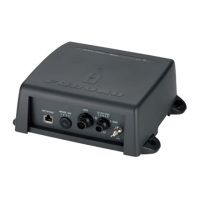
System Component Interconnection Diagram

Visual representation of how system components connect to each other.

1. OPERATION

1.1 Control Description

Detailed explanation of the control panel buttons and their functions.

1.4 Selecting Display Modes

Guide to choosing different display modes for sonar data visualization.

1.4.3 Zoom Display Modes

Overview of zoom modes like bottom lock, bottom zoom, and marker zoom.

Bottom Discrimination Display Types

Explanation of bottom hardness analysis using graphic, 4-color, and probability displays.

1.5 Adjusting the Display Range

Setting and adjusting the depth range for optimal sonar viewing.

1.7 Adjusting Signal Gain

Optimizing signal reception by adjusting the gain for clearer target echoes.

1.12 Fish Size Histogram (FCV-1900 G)

Feature for FCV-1900G to display fish size distribution as a histogram.

1.13 Setting Measuring Area for Fish Size Histogram

Defining specific areas or depth ranges for fish size analysis.

1.22 ACCU-FISH Fish Information

Feature to measure fish length and tag with symbols, providing size or depth.

1.23 Alarm Configuration

Setting up various alarms for bottom, fish, temperature, and fish size.

2. SYSTEM MENU

2.4 [TX;RX] Menu Settings

Configuring transmit power, rate, pulse, and band settings for sonar operation.

3. MAINTENANCE & TROUBLESHOOTING

3.1 Regular Maintenance

Guidelines for routine checks and cleaning of the equipment for optimal performance.

3.3 Basic Troubleshooting

Common problems and their solutions to restore normal operation.

Troubleshooting Common Issues

Addressing issues like low sensitivity, interference, no depth indication, and unrealistic readouts.

3.4 Error Icon Identification

Identifying error icons and their associated causes and remedies.

3.6 Diagnostic Test

Running built-in diagnostics to check equipment operation and status.

SPECIFICATIONS OF FISH FINDER

Furuno FCV-1900 Specifications

General IconGeneral
Display Size10.4 inches
Display TypeLCD
Resolution640 x 480 pixels
Frequency50/200 kHz
Waterproof RatingIPX6
Operating Temperature-15°C to +55°C
Power Supply12/24 V DC
Beam Angle12°/45°

Related product manuals