1. OPERATION
1-32
1.24 Sonde Mark and V-Temperature Graph
With connection of a net sonde, you can show the sonde mark and V-temperature
graph.
1.24.1 How to show the sonde mark
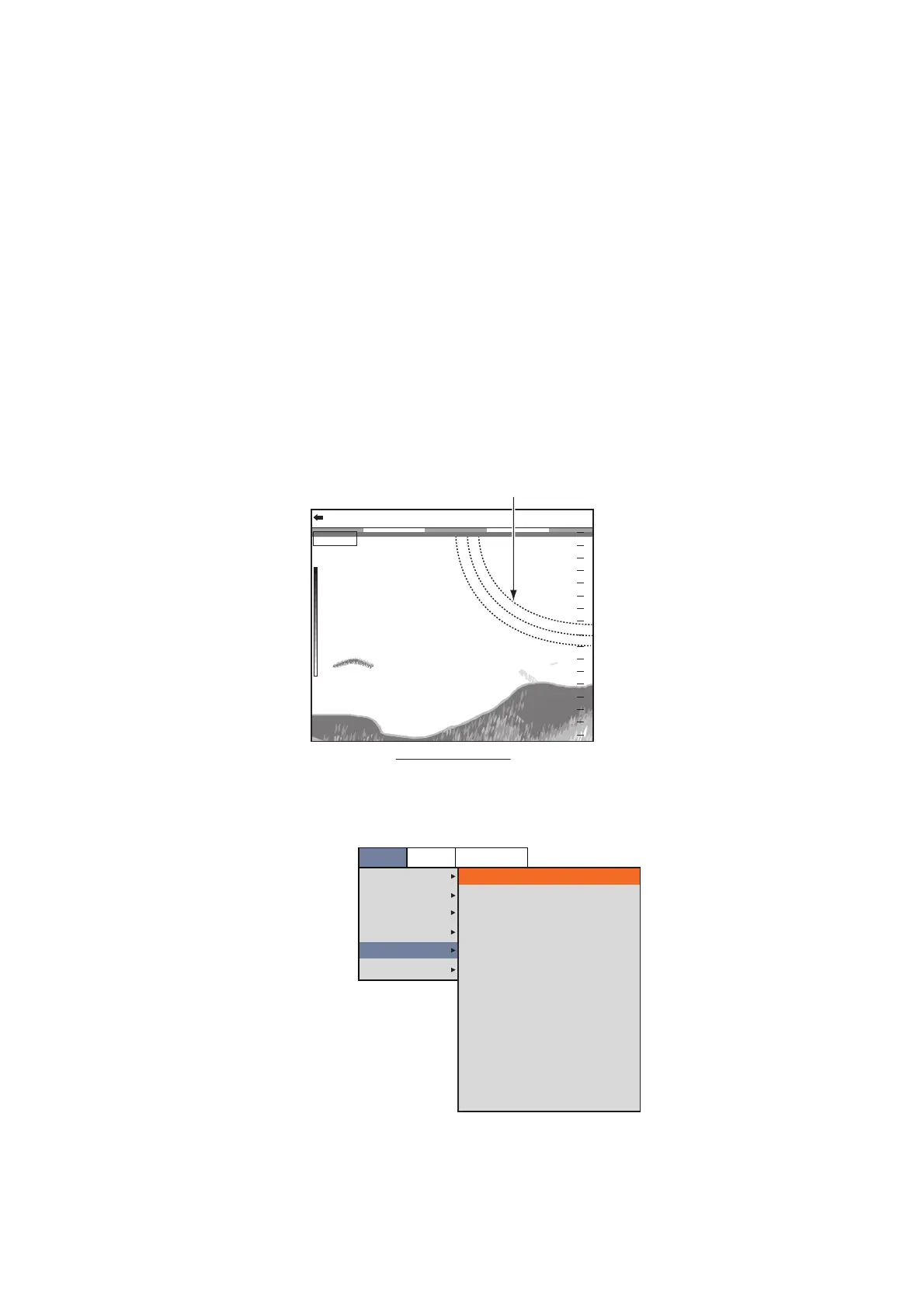
A sonde mark shows the depth of the net sonde transmitter. A maximum of three
sonde marks can be shown on the display. The color and mark width of the sonde
mark can be customized. The line type (marker pattern) of the sonde marker depends
on the input method:
• Digital input (CIF): The sonde mark is shown with the dotted line.
• Analog input: The line type depends on the setting of a net sonde.
Note: A maximum of three net sondes can be connected to the processor unit. One
net sonde can output three sonde marks. When four or more sonde mark information
is input to the processor unit, three sonde marks are shown in order of the depth.
1. Press the MENU/ESC key, then open the [Setting] tab.
2. Select [Data], then push the ENTER knob.
3. Select [Sonde Mark Display], then push the ENTER knob.
4. Select [LF] or [HF], then push the ENTER knob.
• LF: Show the sonde mark on the low frequency display.
0.0
60.2
m
20
40
60
80
0
0/99
x
1
x
1
x
1
VRM 0.0
LF: 2.0
Sonde mark
Display example
(when three sonde marks are displayed)
Setting
Sounder
Display
Measurement
Alarm
Data
System
Position
Date Time
Speed (SOG)
Speed (STW)
Temp
Temp Source
[Sonde Mark]
Sonde Mark Display
Mark Color
Width of Mark
[Sonde Graph]
Sonde Graph
Graph Reset
Off
Off
Off
Off
Off
NMEA
Off
Red
1
Off
BBDS1
Telesounder


 To Next Page