4.2 Connection
4-2
4.2 Connection
A PC is connected to a different port for program updating depending on the program to
be updated.
4.2.1 C-CPU
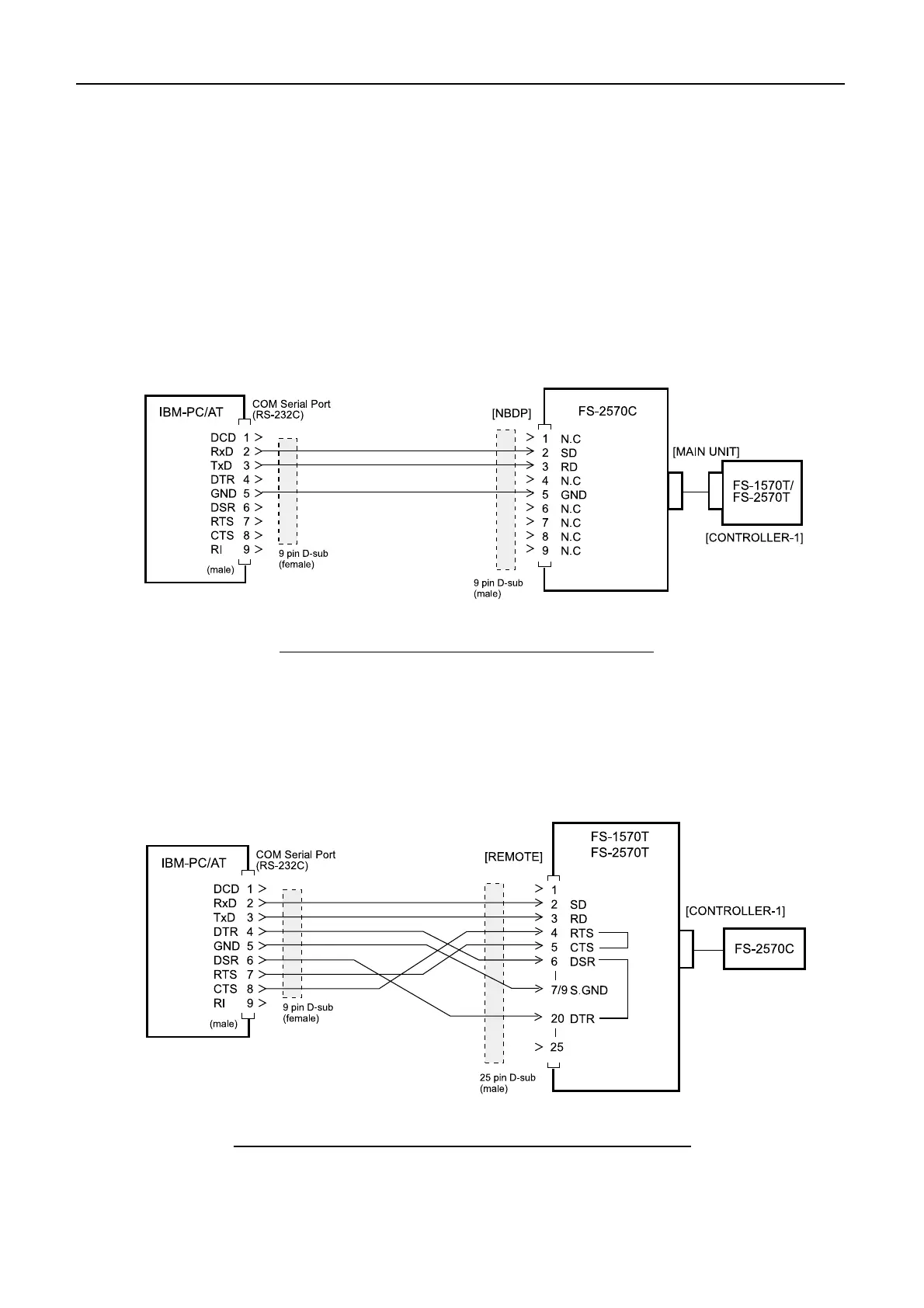
Connect the PC to “NBDP” port on FS-2570C as below. FS-2570C is connected to
“CONTROLLER-1” port on FS-1570T/2570T. To update No.2 controller FS-2570C,
change the connection for “CONTROLLER-2” port to “CONTROLLER-1” port.
Fig.4.2.1 Wiring between FS-2570C and PC
4.2.2 T-CPU, DSC MODEM and NBDP MODEM
Connect the PC to “REMOTE” port as below. FS-2570C is connected to
“CONTROLLER-1” port.
Fig. 4.2.2 Wiring between FS-1570T/FS-2570T and PC



 To Next Page
 Loading...











