1. HOW TO INSTALL THE EQUIPMENT
11
For example, in the case that the bearing displayed on a instrument connected to the unit is
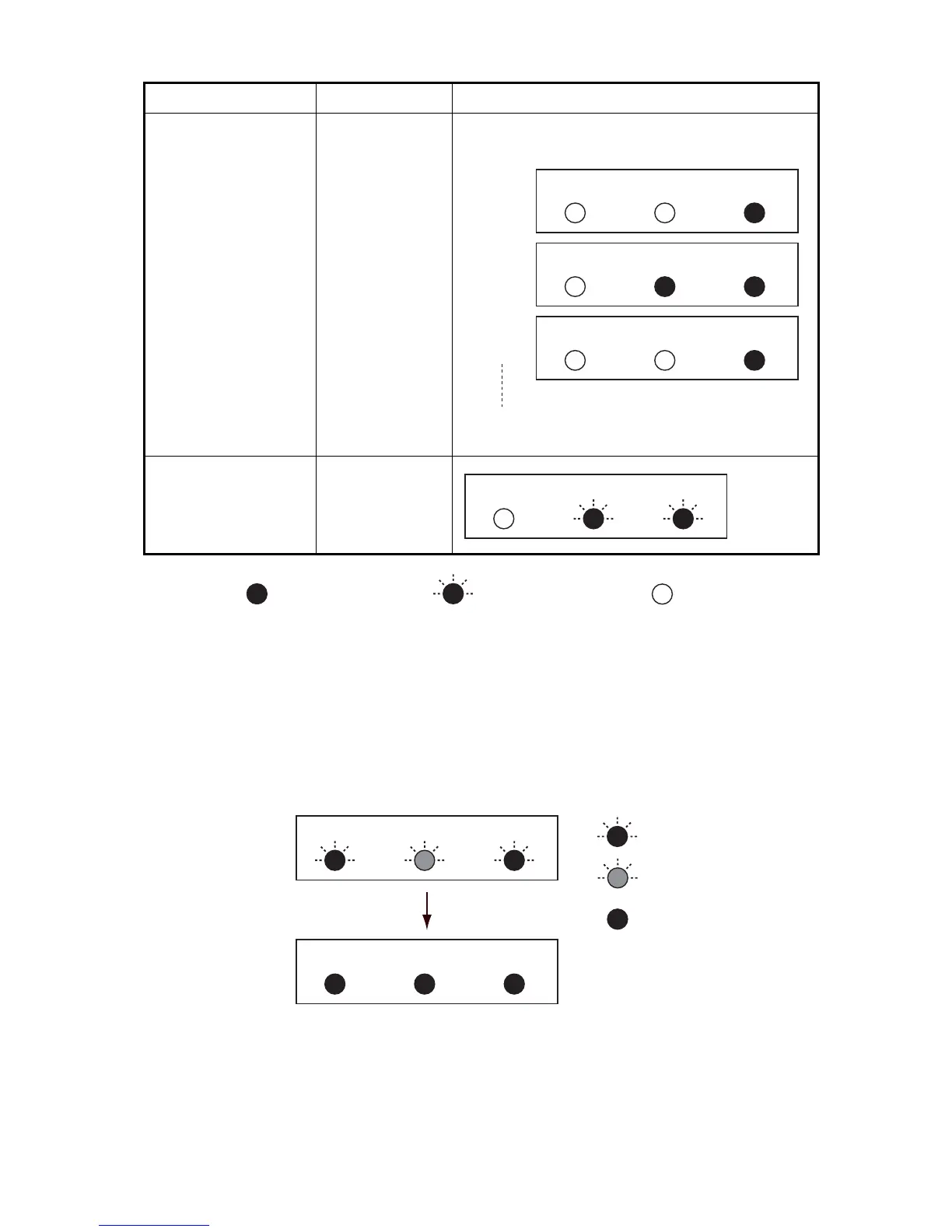
70°, and the actual bearing is 75°, there is a 5° difference. To set to +5°, press and hold the
[+] key.
3. To exit heading adjustment mode, do not press any key for five seconds. The unit automati-
cally returns to normal status.
Note: Press and hold the [+] and [-] keys for approx. one second at the lamp status after step 1 to
reset to 0.
Short press [+] key
within 5 seconds
+0.1°
(increases 0.1°
with every press)
Each time you press the [+] key, the STATUS lamp
will light on and off.
Long press [+] key
within 5 seconds
+1.0°
(increases in 1.0°
increments while
key is pressed)
Key Set interval Lamp Status
CALIB STATUS CHECK
CALIB STATUS CHECK
CALIB STATUS CHECK
1st time
2nd time
3rd time
Repeat
CALIB STATUS CHECK
: ON (green) : Flashing (green) : OFF
: Flashing (red)
: Flashing (green)
CALIB STATUS CHECK
Correction
value
resets to 0
CALIB
STATUS CHECK
Normal
condition
: ON (green)
Each lamp flashes
several times


 To Next Page