-1.6-
1.3 OPERATION ON REMOTE ALARM PANEL
No power switch is provided on the Remote alarm panel. It is turned on and off by the
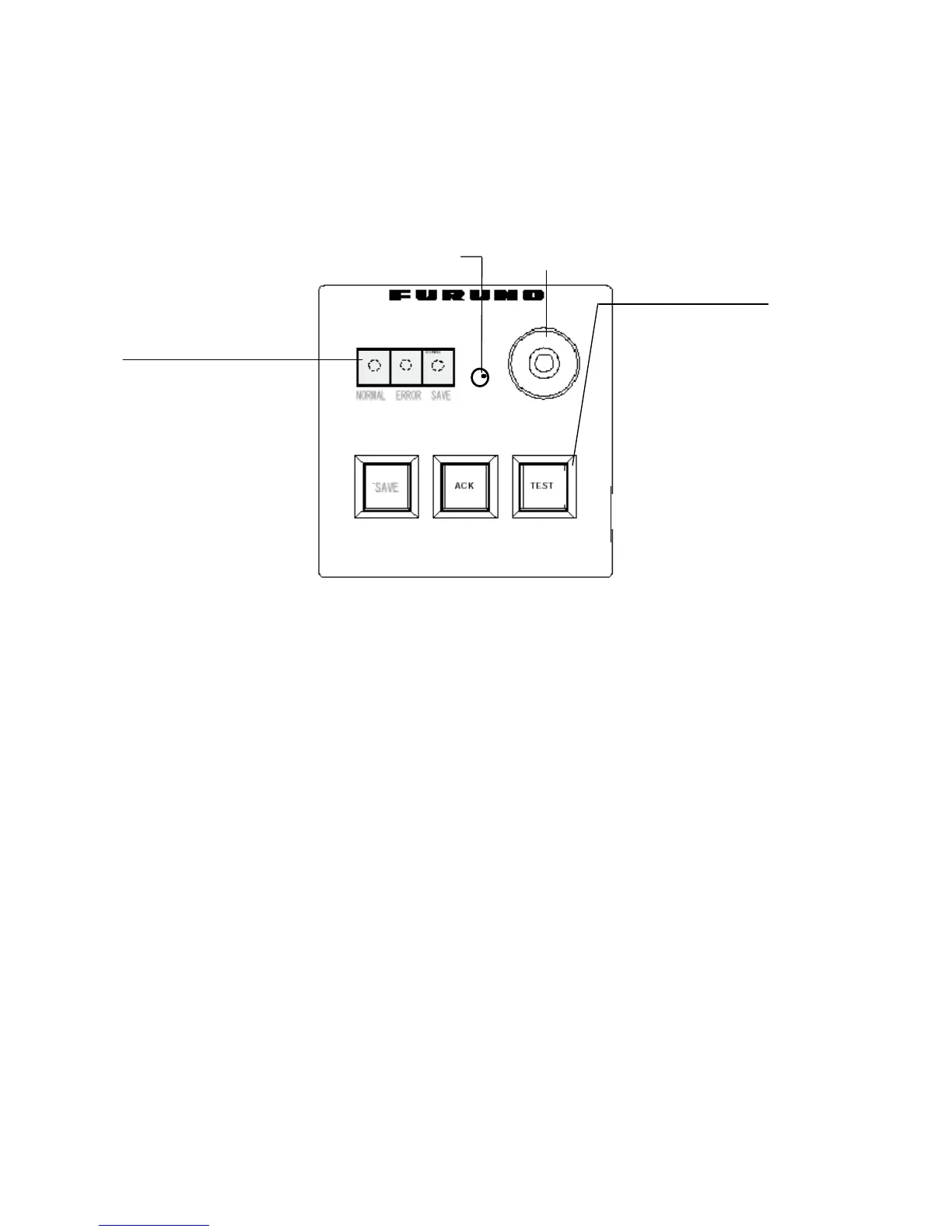
power switch on the DCU. To silence the alarm, press ACK button. When the error LED
(red) on the Remote Alarm Panel is on, identify the error by checking status LEDs on the
Power Distribution Unit in the DCU. See to Chapter 3. The buttons on the remote alarm
panel work as described in the figure below.
Remote Alarm Panel
Note: Every time the radar connected to the VDR is turned off, the alarm sounds. Press
ACK button to stop alarm sound.
*: If the HD is removed after stopping data recording onto HD, data can not be written to the
same HD. To use the same HD, consult a FURUNO serviceman.
LEDs from left
NORMAL (Green):
It is on at normal
operation.
ERROR (Red): Lights
when an error occurs.
SAVE (Yellow):
When stopping the
data recording on
to HD,
this LED starts blinking
from OFF state, then
lights steadily. If the
HD is disconnected,
this LED lights, also.
Dimmer Buzzer
Buttons from left
SAVE (w/ protective cover)*:
Stops recording onto HD
when an incident occurs.
ACK: Stops buzzer sound.
TEST: Used for test.
VDR
REMOTE ALARM PANEL VR-5016


 To Next Page