-1.8-
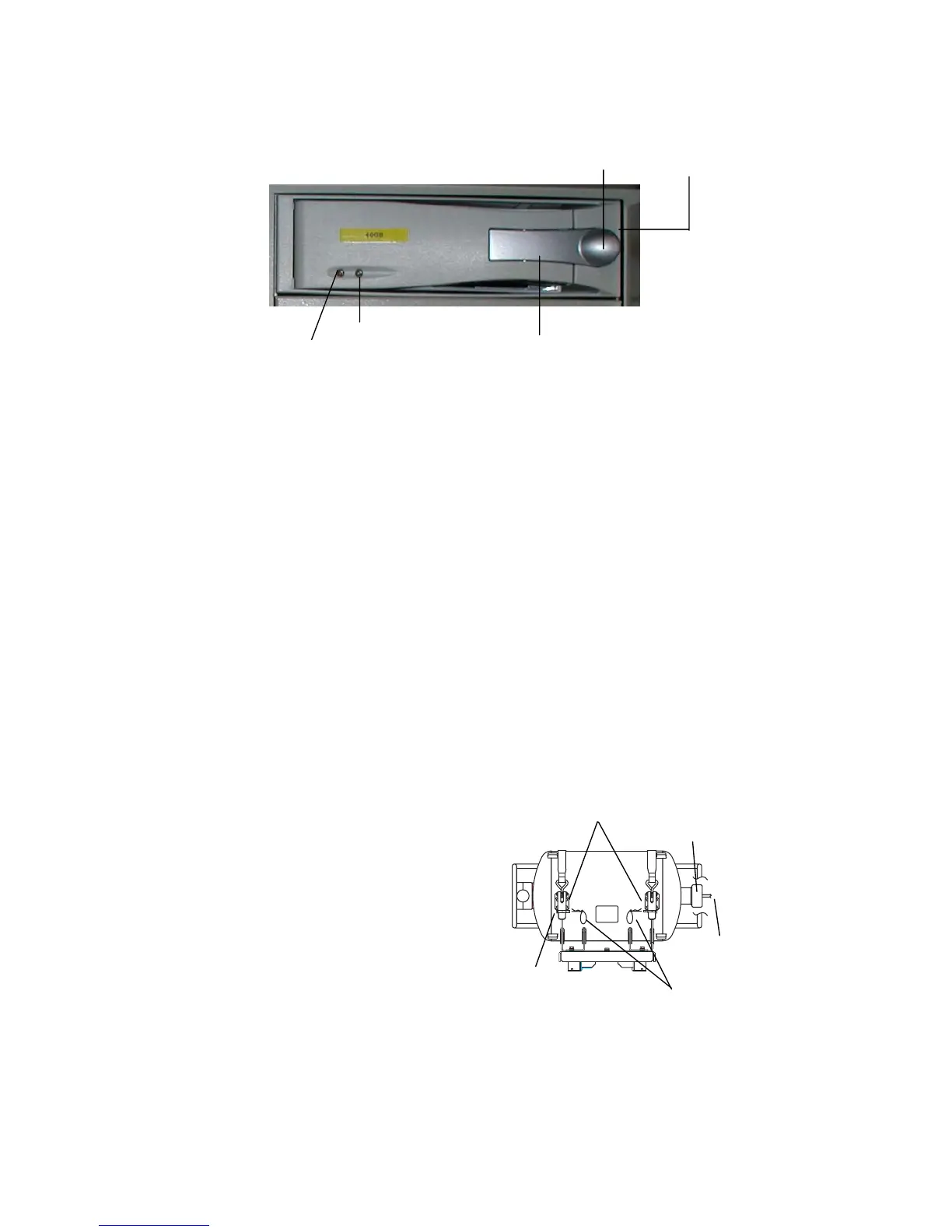
The green LED (right) on the panel is “Power” indicator and the amber one (left) is HD
access indicator.
HD access indicator
Front panel of removable hard disk
To remove the HD when an incident occurs, carry out the following procedure.
Note: Pressing the SAVE button is permitted only when an incident occurs.
1. Press SAVE button (long press) on the RAP (Remote Alarm Panel). The yellow LED
starts blinking, showing that recording is being terminated.
2. Wait until the LED comes on.
3. Pull the lever outward and then unlock the key on the HD. (Position C, downward)
4. Pull the lever to remove the HD.
1.6 HOW TO REMOVE DRU
To remove the DRU from the bracket (cradle);
1. Loosen the hand-tightened cap.
2. Pull the DRU cable straight out.
(The cable may be cut after an incident.)
3. Remove two snap pins and then
two hinge pins.
4. Lift the release levers.
2. DRU cable
1. Cap
3. Hinge pin
3. Snap pin
4. Release levers
Key lock
Cartridge frame
Lever
Power indicator



 To Next Page