67
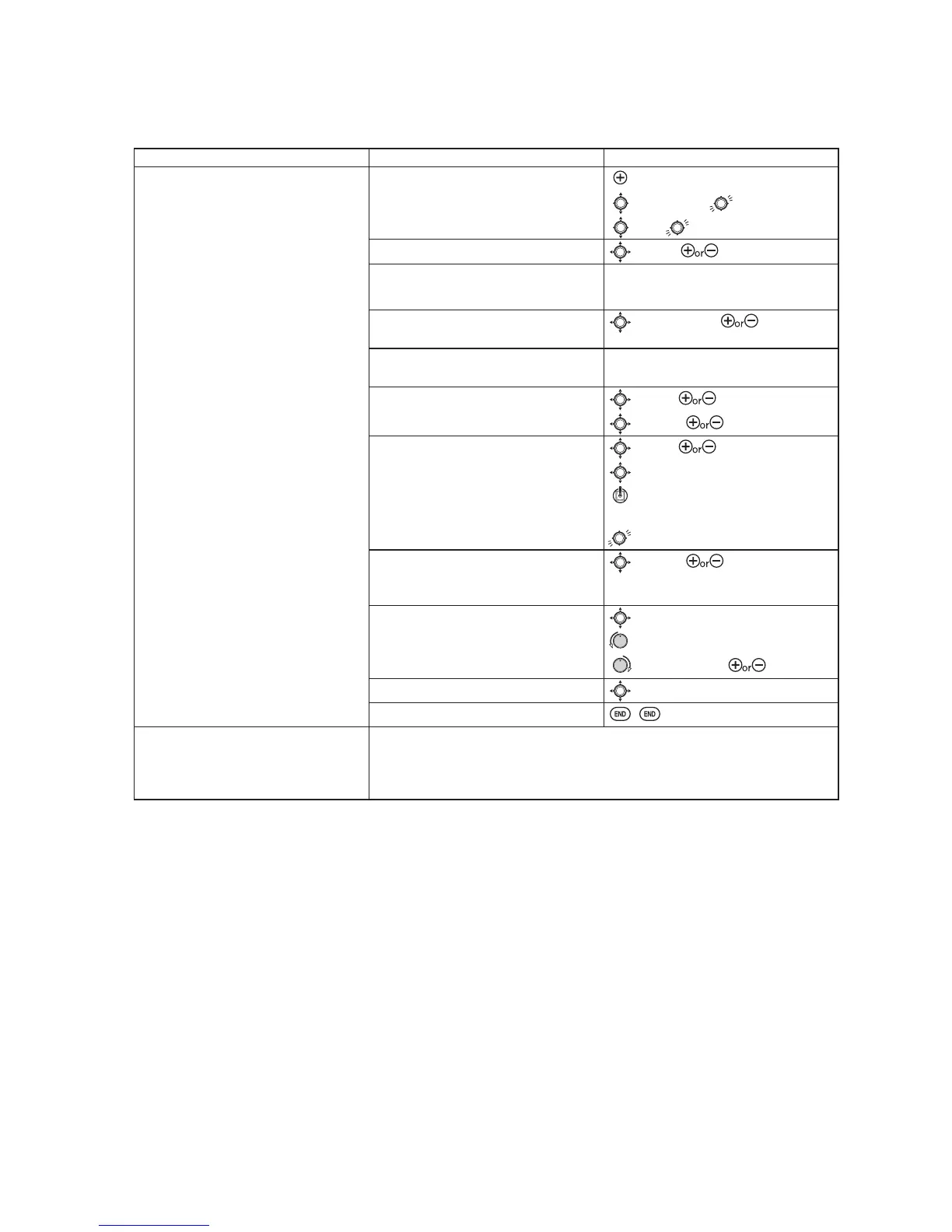
GOAL of EXAMPLE: STEPS: INPUTS:
Set up a
FLAP-ELEV
mix:
ON
when SWITCH C is in the down
position.
1RHOHYDWRUPRYHPHQWZKHQÀDSVPRYH
up (spoilers),
HOHYDWRUPRYHPHQWZKHQIODSV
move down,
)ODSKDV QRWULP OHYHU VR
TRIM
is not
DQRSWLRQ
Open an unused programmable mix.
(Ex: use
P.MIX3
VLQFHLWLVDOUHDG\VHWXS
for
FLAP-ELEVATOR
.)
for 1 second.
to
P.MIX1-6
.
to
3
Activate the function.
to
MIX
. to
ON
.
Choose master and slave channels.
(Ex: no need to change
MASTER/SLAVE
.)
already
FLP
already
ELE
2SWLRQDOVHW0DVWHUDV
OFS, DT5, DT6
or
VR
6HHDERYHIRUGHWDLOV
to
MASTER
. to desired
choice.
Set TRIM as needed.
(Ex: leave
TRIM
not available.)
Assign SWITCH and position.
(Ex: change to
C
,
DOWN
.)
to
SW
. to
C
.
to
POSI
. to
DOWN
.
Optional: set switch to
THR
to activate
PL[ZLWKTHROTTLE STICK6HH
DERYHIRUGHWDLOV
to
SW
. to
THR
.
to
POSI
.
THROTTLE STICK to desired
point.
for 1 second to set.
Optional: set switch position to
NULL
0DNHVPL[DFWLYHDWDOOWLPHV1RW
FRPSDWLEOHZLWK
THR
to
POSI
. to
NULL
.
Set rates. (Ex: Lo=
0%
+L
5%
.)
to
RATE
.
VR past center. Leave at
0%
.
VR past center. to
5%
.
Set
OFFST
, if needed. (Ex:
0
.)
to
OFFST
. Leave at
0%
.
Close menu.
Where next? Adjust servo
END POINTs
: see p. 36.
Setup dual/triple rates and exponential (
D/R
,
EXP
): see p. 39.
Set up additional programmable mixes, ex:
RUDDER
AILERON
: see p. 65.
9LHZQXPHURXVDGGLWLRQDOPL[VHWXSVZZZIXWDEDUFFRP?IDT?
2WKHU([DPSOHV
RUD-ELEV
(
ACRO
) mix: Compensate for pitching up or down when rudder is applied.
AIL-RUD
(
ACRO
): Coordinate turns by applying rudder automatically with aileron input. All model types.
ELEV-PIT
(
HELI
) mix: compensate for the loss of lift of tilting the model.



 To Next Page