51837540X18NXS_V_1_1.DOC
24/54
Blackout-socket
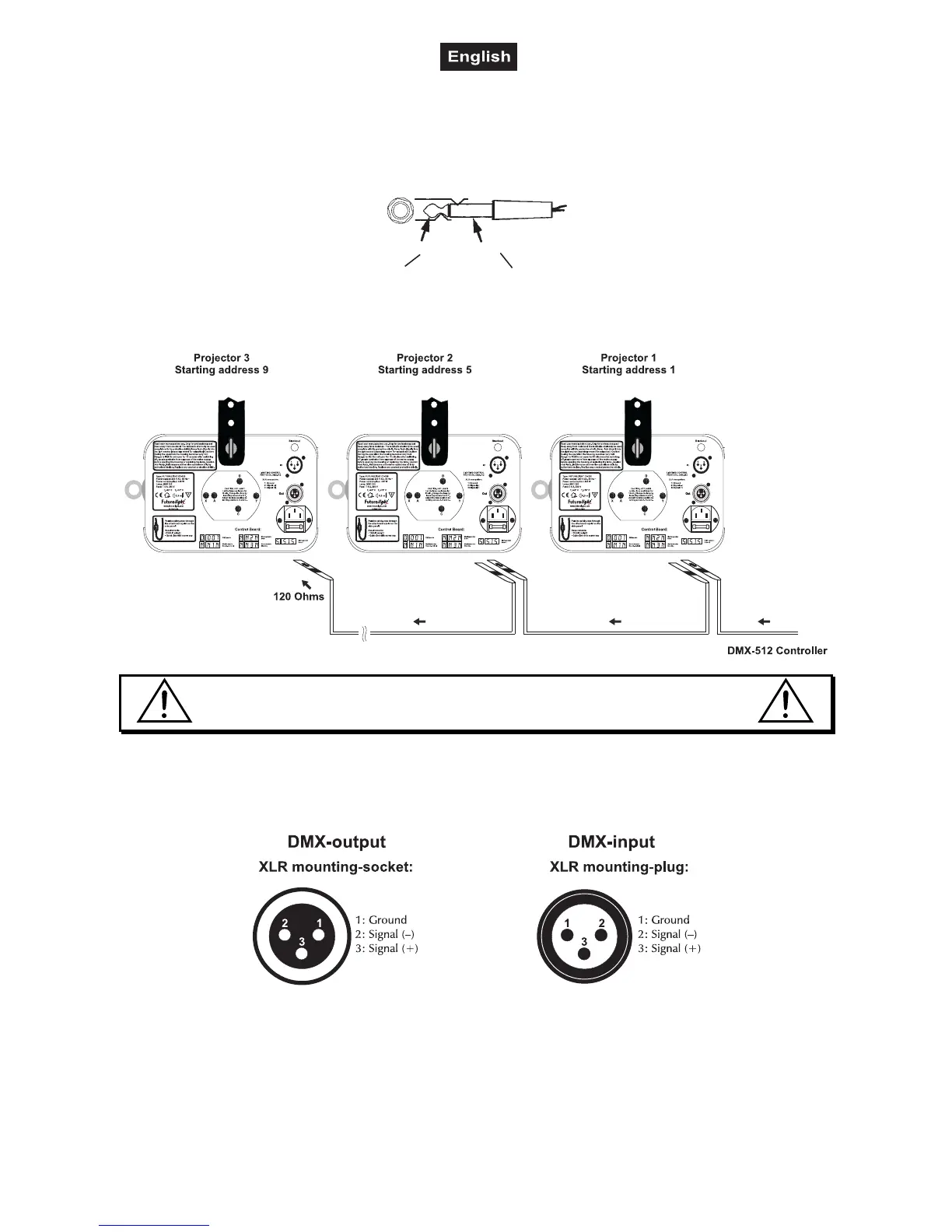
If you wish to lock the light output - e.g. via an optional footswitch (Blackout-mode), connect your footswitch
via a mono-jack plug to the Blackout-socket.
Occupation mono 1/4“ jack-plug:
Tip
In Phase (+) Ground
Sleeve
DMX-512 connection / connection between fixtures
The wires must not come into contact with each other, otherwise
the fixtures will not work at all, or will not work properly.
Only use a stereo shielded cable and 3-pin XLR-plugs and connectors in order to connect the controller with
the fixture or one fixture with another.
Occupation of the XLR-connection:
If you are using controllers with this occupation, you can connect the DMX-output of the controller directly
with the DMX-input of the first fixture in the DMX-chain. If you wish to connect DMX-controllers with other
XLR-outputs, you need to use adapter-cables.
Building a serial DMX-chain:
Connect the DMX-output of the first fixture in the DMX-chain with the DMX-input of the next fixture. Always
connect one output with the input of the next fixture until all fixtures are connected.



 To Next Page